Skip to content
View in the app

A better way to browse. Learn more.

Power Forum - Renewable Energy Discussion

A full-screen app on your home screen with push notifications, badges and more.

To install this app on iOS and iPadOS
  1. Tap the Share icon in Safari
  2. Scroll the menu and tap Add to Home Screen.
  3. Tap Add in the top-right corner.
To install this app on Android
  1. Tap the 3-dot menu (⋮) in the top-right corner of the browser.
  2. Tap Add to Home screen or Install app.
  3. Confirm by tapping Install.

Cslling

Members
  • Joined

  • Last visited

Everything posted by Cslling

  1. The information is just not very clear like on the Deye manuals. As far as I can gather is to disable "Export to Grid" and enable "Fast Zero Export"?
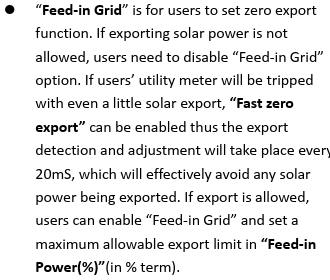
  2. I’ve been trying to look around but have not find concrete answer to my question yet. Does the LuxPower LXP12K allow you to export your extra solar power to your non-essential items without exporting to the grid?
  3. Big Thanks 👍
  4. Hi Everyone, Does anyone have the bms software for connecting with the Volta Pro stage 1 battery. Thanks.
  5. Would it be possible to share this even its abit old please.

Account

Navigation

Search

Search

Configure browser push notifications

Chrome (Android)
  1. Tap the lock icon next to the address bar.
  2. Tap Permissions → Notifications.
  3. Adjust your preference.
Chrome (Desktop)
  1. Click the padlock icon in the address bar.
  2. Select Site settings.
  3. Find Notifications and adjust your preference.