


incagarcilaso
Members
-
Joined
-
Last visited
Everything posted by incagarcilaso
-
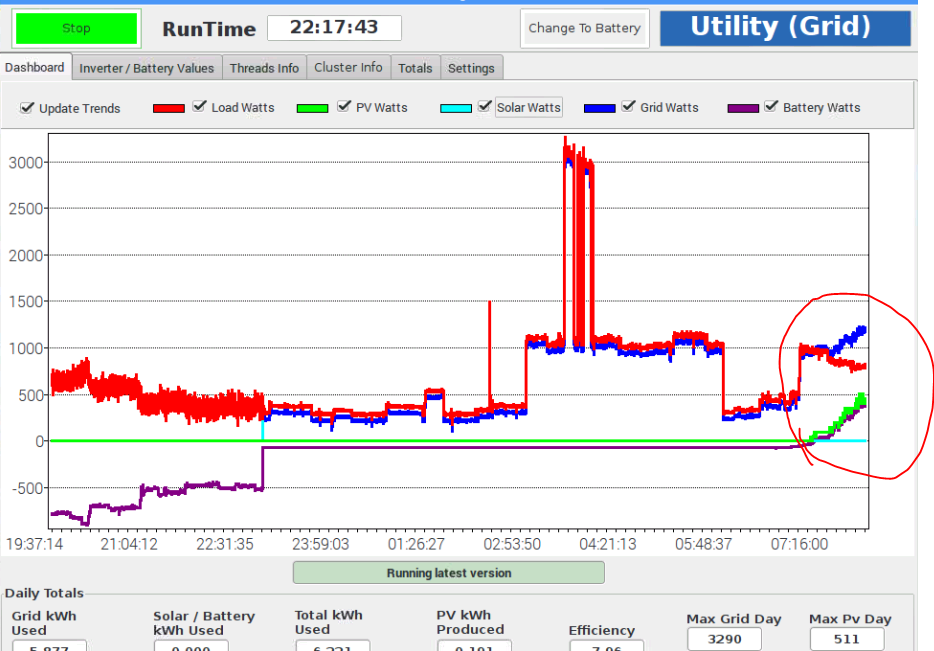
@Manie it seems there is an error in reading "Grid Watts" when the inverters are on "Utility" and solar power kicks in to charge batteries. ICC interprets it as all grid power when it is in fact a mixture of grid and solar power - grid power is supplying the load but solar power is charging the batteries. Please see screenshot that confirms this. It is the same as the screenshot that I posted yesterday in this thread, where the same thing is happening - ICC interprets solar power as grid power. In the image the "grid watts" line should not increase and separate from the "load" line but remain equal to it while the "pv watts" and "battery watts" lines rise together. I am not drawing that much grid power because the inverters are set to never charge the batteries from the grid. That extra power that is charging the batteries is coming from pv watts not the grid.
-
MQTT reads everything in its display from a pi ICC and displays it on a Windows machine but it does not synchronize the time control settings for changing between Solar/Batt and Grid. It can send a change in the time settings from MQTT to ICC but does not read the current setting in ICC on the Pi. Would it be possible to do this as it could be confusing to the end user. If they have set up a time control settings in the ICC interface but then don't see them in MQTT it may confuse, especially as it seems to be reading everything else across. The user may have forgotten the current time settings they configured or think that they haven't been configured and so it would be useful to see them updated in MQTT. It's a very small thing but may be helpful to end users.
-
Of course, yes it's to start monitoring when the app starts, not to start the app on boot.
-
OK. So when I start the Pi, ICC starts and is running by the time I log in to the GUI. So I thought that is what had been set up in the Jessie/ICC image. I wasn't aware that I had created a startup script to run ICC at start up, so I'm confused as to why it does. I would do the same as you and on the very few occasions that the Pi reboots I would just log in for a moment and launch ICC. I don't have the "Autostart" checked in the Settings either. As you say, it must be in a start up script, so I'll dig around and find out why and change it.
-
Yes, curious. OK, I'll monitor it.
-
OK. The screenshot I sent was of the LX Terminal. Not sure if it is correct but when pi starts up and ICC starts automatically I also have the LXTerminal open and running. I thought that was normal. If I close the LXTerminal window it shuts down ICC - perhaps this is not what is supposed to be happening? Screenshot shows what I have in pi GUI just after startup. It always starts the LXTerminal as well as ICC and I can't close the LXTerminal without it closing down ICC also.

-
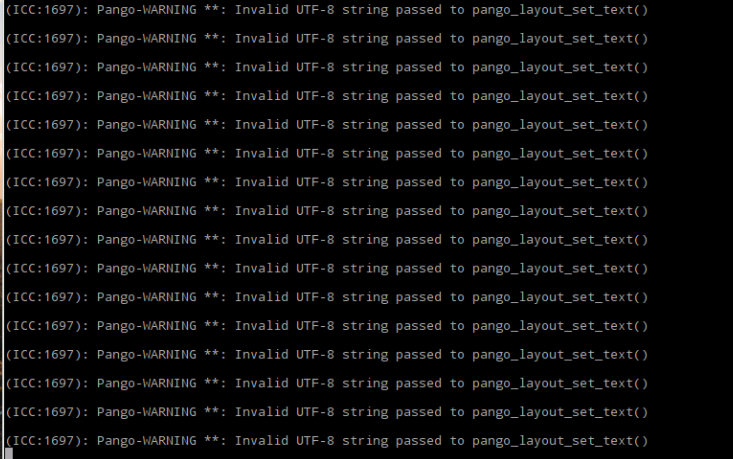
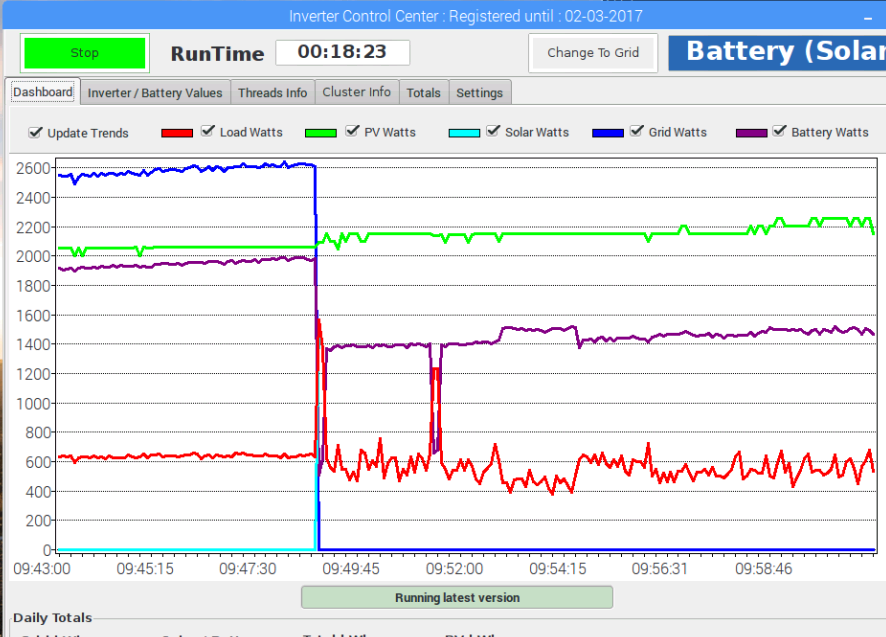
The idea that it was a DB error was just a guess from the text about UTF8 in the warning messages. ICC just seemed to stop taking correct readings, although it was still running and also it did not change from grid to battery at the time specified in the settings, so it was almost as if it was unresponsive. I had had the change to grid and solar times set and activated from around a week ago and it had been working fine applying them until this error occurred at some time last night. I just thought I'd post the info in case it was useful. I'll keep monitoring and see if it happens again. The incorrect grid reading, however, does worry me. I have the inverters set to never charge batteries from grid. The screenshot from this morning when ICC was in an unresponsive state shows as if grid was carrying load and also charging batteries when it was just supplying the load and the PV input was charging the batteries.
-
Not sure what might have caused this but I have had the ICC pi running for a few days now without problems but last night at some point overnight it stopped processing. It was set to change from grid to solar this morning but did not and it was not reading feeds although the threads seemed to be OK. I had to restart the pi to get it working again. On restart there is an error that seems to be a DB error from the message (in image). Also, it's not clear how it processes the different power outputs. I have the BMV connected as well as the inverters but it reads "grid power" total as a sum of solar generation and battery watts output to the load, which is incorrect (please see screenshot). At the time grid power was only supplying the load and not charging the batteries but it shows over 2kw from grid. What was really happening was 600W from grid and 1400W from solar charging the batteries. Maybe this has something to do with the processing error that happened at some time while it was running overnight? The sudden change you see is when I swapped from grid to solar. Maybe I am misunderstanding what the Dashboard graph is showing?
-
The way I understand ICC, I fully agree with this concept for development - I see it as totally what is needed. @Czauto is probably not the only one who has given up on getting a pi up and running, unfortunately, although he is one of the few who has mentioned it. Not a criticism at all, ICC on pi is more than great but it may not be the right system for the person who can only do "plug and play". That is actually quite convenient because as a rule of thumb users who are looking for the simplest plug and play apps are generally Windows users. The Windows ICC should do this for them.
-
Postgre works well with Tomcat as an "unattended" DB back end and could be a viable alternative, although everything for pi I see is currently on Apache. Which DB does the Windows version use? If occasional DB maintenance by users is necessary then the way to do this might be through a web-based front-end. It should be fairly simple to do (famous last words) if the tasks are few and straightforward. As far as the "locked error" from multiple sessions is concerned, I'm sure there must be a way to get round that in MySQL, MSSQL or Postgre but I'm not sure how at the moment. Choice of technology stack to use is always so difficult but I generally allow the factors "open source" and "interoperability" to sway me heavily, especially for projects of the nature of ICC.
-
It is the biggest decision to make in the initiation of the development process as it is the heart of the app and everything depends on it, everything. As you say there are so many factors. It may mean that for Pi, the answer is DB x, while the Windows ICC needs DB y. They are two different apps so I suppose that is not an issue. DB maintenance is an issue. You can of course set up automated maintenance tasks but there is only so much those can do without the intervention of a DB Admin from time to time. However, these are still arguments for using MySQL or MSSQL over Access or others, for me.
-
Yes, I'll check. It's also about the user's OS. For MQTT, for example, it'll be OK because that'll be running on Windows, I suppose. For ICC pi, the help file doesn't have to be run necessarily on the pi if it turns out it won't run in a browser in the Debian GUI (although I think it might). I'll check out all the options.Often the help file is the last thing to be done, if it gets done at all, but it is one of the most important. The developer never has time to start it and then it's a catch 22 situation - they are inundated with questions and have to repeat the same instructions over and over, and so have even less time to get the help file written. It's happened to me more than once. I'll see if I have time to do it this coming weekend. On that @Manie how do you want to deploy the help? In the past I have used WinCHM, which I find very simple and the help file it produces can be embedded in the app. You can have a "Help" link in the menu bar and it will open a user-friendly help file in a browser tab - divided into chapters and sections and fully searchable. Might be good to use this for when this project grows. Let me if there are any particular restrictions from the ICC or MQTT apps.Yes, I imagine that with the Pi ICC the easiest way to just keep an eye on an installation is with MQTT because it is so "lite" to run. Just a little .exe that runs in Window but then if you need to drill into more detail or change any settings other than the time to solar or grid then you can VNC to the pi. That was my idea. How does the license work for MQTT? Can you run it on more than one PC with a single license? That would certainly make things easier.Yes, there is plenty of real estate on that tab. That would be very useful. Is it possible to pass this info on each inverter into the MQTT dashboard image. It would be very useful to see generation by each set of panels in the cluster on that image so that the user knows that generation is working properly on each set of panels.Just to get the ball rolling, one of the things I miss on ICC pi (having used AICC for Windows) is this really useful image on the Dashboard, which gives you everything you need to know at a glance. It is so easy to see all the information you need in a moment and it is a visually pleasing image. I understand that real estate issues on the pi may have made it impossible to include this. It is for that reason that I am thinking about using MQTT with the pi ICC because it has this image that allows you to quickly check the state of all basic components in a moment.If you have a link I'll take a look.I didn't know there were plans for this. Will it be based on/developed from AICC or is it a completely new ICC for Windows based on the pi ICC? If there is both a pi and a Windows version, I think it will cover a broader base. pi is likely to be used by people who have some knowledge of Linux whereas the Windows version is likely to be used by those who like to just point and click. My thoughts at the moment on both: as an end user, pi feels less robust as a hardware platform (overheating and other issues) and I feel more confident running ICC on a Windows VM (or any conventioal PC) than on a pi box, especially in the hotter months if I am away from the installation for extended periods. This may be misguided on my part but it is the sensation I have right now. pi ICC offers the possibility of developing a "box" like the CCGX, if you build the pi with ICC preloaded and with a screen (with on-screen keyboard) - could have a lot of potential. pi energy savings for a 24/7 machine are clearly an advandate over running a PC 24/7. I like that the pi interfaces with BMV702, pvoutput, emoncms, MQTT and vnc. This makes it very versatile but I suppose the same can be done with a Windows version. Because of the difficulties that may be experienced by some end-users in adapting a pi to their installation (no one installation is the same as another) it might be worth considering making a more "plug and play" version by applying more configuration settings in the ICC/Jessie image. "Partial" cluster support should be clearly explained in the software description or it could be misleading. While pi ICC will work with inverter clusters it does not fully support them (cannot provide full information on all elements in the cluster). This is my understanding. By the way, if you'd like me to draft a help file for end-users configuring ICC and MQTT on a pi (from the perspective of an end-user), I will happily do that and you can make revisions to the final version. That way, any questions that come in and are covered in that file can simply be referred to it. With luck it would also mean that less questions would be raised.Reporting that MQTT stops working on trial after shutting down computer and then restarting. On launch of MQTT after restarting Win 7 computer MQTT displays error dialogue box "The date has been turned back" (it hasn't) and when it lauches the trial date has been changed to 30 earlier (i.e. expired on the day it was issued). Images attached.

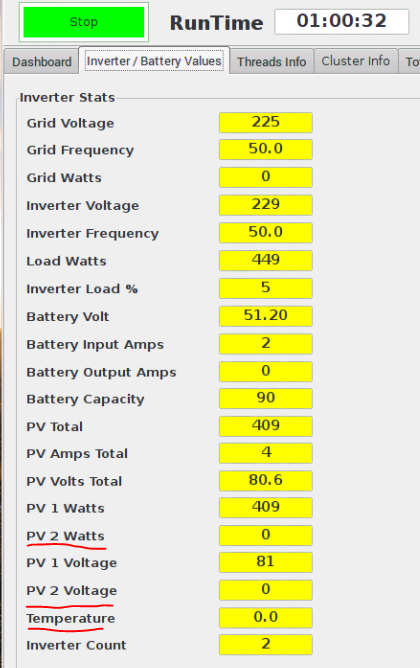
 I can understand the frustration as I have done similar projects, but you have to appreciate the work that is done by early adopters by them trialling your software and taking the time to report in with glitches from their particular setup so that these can be taken into account in further development. This can take up a lot of time on the part of people willing to trial it and invariably that input is not rewarded. At the same time, this information is invaluable to developers in factoring in conditions that they otherwise may not have imagined. When software comes with no help file or any guidance in the configuration of basic parameters for putting it into service, you have to count on some questions. A small help file with an explanation of the exact syntax required for filling out the configuration fields in ICC and MQTT would save a lot of posting both for triallers (who put in quite a lot of work by providing feedback too) and for you. Many of these configurations are not "obvious" or guessable because every system has it's idiosycracies - the only way to solve this is with a small help file that spells out the syntax. I would be willing to contribute a help file of this kind if you wish. I understand that the help offered cannot extend to operating pi - that is where the line has to be drawn. I can assure you that I fully intend to purchase the software but cannot do so until I can be perfectly sure that it is going to work with the particular hardware and software configurations that I have in my installation - hence the trial. P.S. I purchased AICC Windows early on and a week later it became free to anyone to use and development stopped on it (that is not really "fair" for the end user either). I think it is always good to try and look at these things from all angles.Hi. It wasn't the naming that confused me. I just wanted to point out that PV2 was not showing a the reading when there is input - the same as for PV1. Each inverter carries 12 panels and they usually have the same input. As you can see in the image I uploaded PV2 is not showing the output - I just wondered why.Not sure if this is a bug but I don't seem to be getting a separate reading for each of the inverter's PV inputs. Only "PV1" shows data (which is the total of both). However, the information on each inverter does show correctly separately in the "Cluster info" tab. Also "Battery Output Amps" fields don't seem to move from "0" either, when I know they are delivering power to the house. I know about the temperature probe issue for parallel inverters, which is running in another thread.
 I vote this up. Like @Don I have two Axperts and would find the temperature reading very useful, especially in the summer to step in if things start getting too hot. Maybe an e-mail alert in the future for this with a "high" and "low" temp threshold would be good.Thanks, trying now .... OK. That works - noteworthy that the trailing forward slash at the end of the address is required (not always the case).

