Riaan Eloff
Members
-
Joined
-
Last visited
-
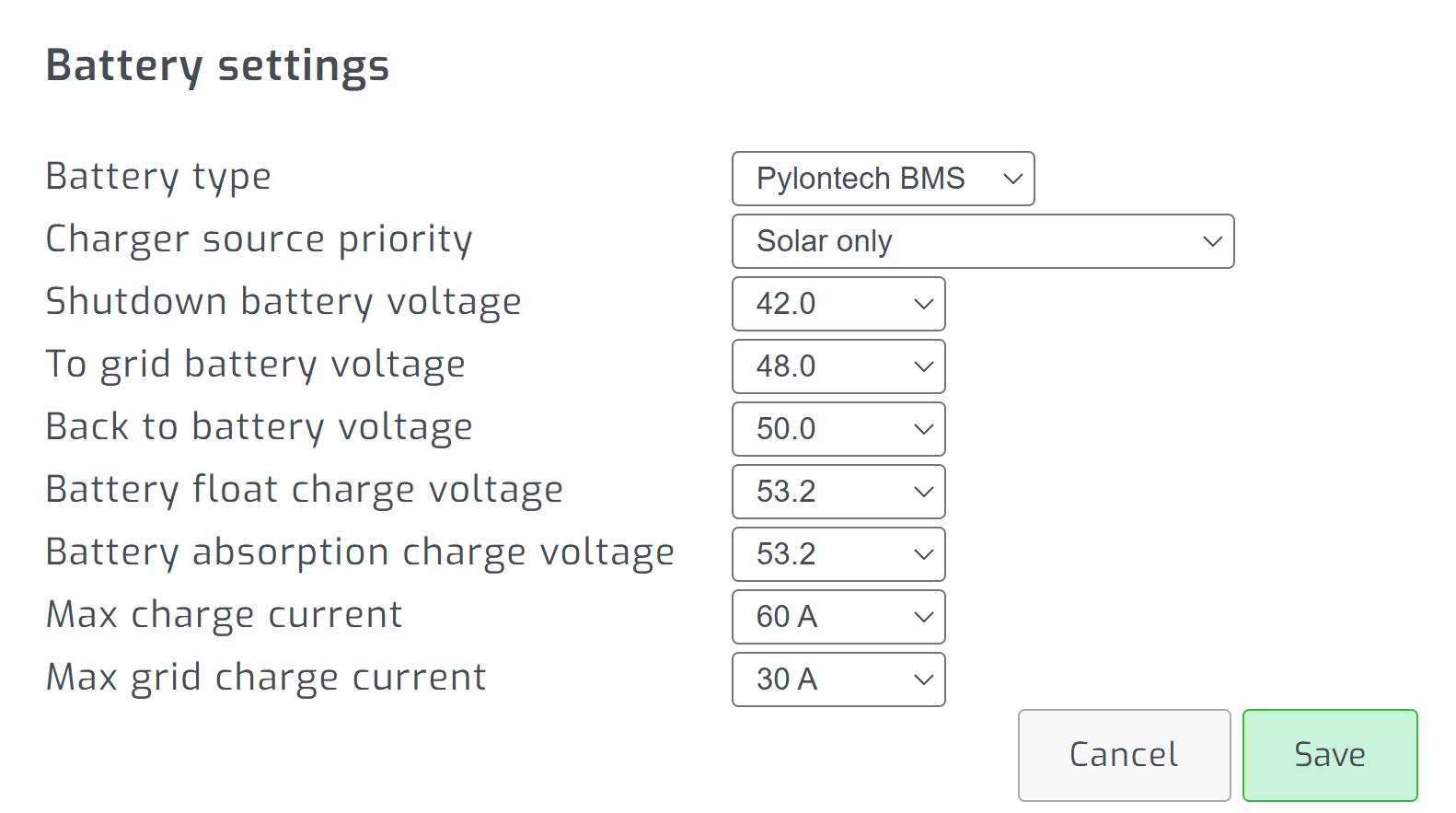
@Coulomb and all who may find this thread useful, So, when I select Pylontech BMS as my battery type - as you say - I cannot change the max charge or max float. When I change to "USER", then I can change those two. All other settings can be changed with either Pylontech BMS or USER. If you, or anyone else reading this could advise: If I switch to "USER", I understand that the Pylontech BMS will no longer be read into the software app, BUT, will the BMS on the actual unit still be functioning correctly? I did also recieve a response from Chris. He recommended that with the Axpert unit I own, I should set the max charge voltage t0 52V. That is the only info he passed on to me, though, so I've set up all others as close as I can to @Coulomb's original recommendations. I did, however, ask him the same question as I ask here in the previous paragraph. My concern is, that with the translation to Chinese, some of what I am asking may be lost, and we may miscommunicate. So, if anyone can comment on this, it would be appreciated. Thus, my system is presently running as follows: Battery type - User Charger source priority - Solar only Shutdown battery voltage - 45 V To grid battery voltage - 48 V Back to battery voltage - 50 V Battery float charge voltage - 52 V Battery absorption charge voltage - 52 V Max charge current - 60 A Max grid charge current - 30 A One other question: if the battery type is "User", will the percentages and voltages etc, that are displayed in the software still be read from the BMS, or from the batteries themselves, or at all? Thanks in advance for any input folks.
-
-
Please, no apologies. You are more help in these forums than pretty-much every customer-service-help-line has ever dreamed of being 🙂 I honestly appreciate your effort and pointers above. Also the clarifications on how you use your system and what you use. I am going to continue the conversation via email with Chris from Pylontech, and use whatever he advises alongside your original post, and consider the points you made above. If I find that I get to a dead end, I may be so forward as to bug you again 🙂 Cheers
-
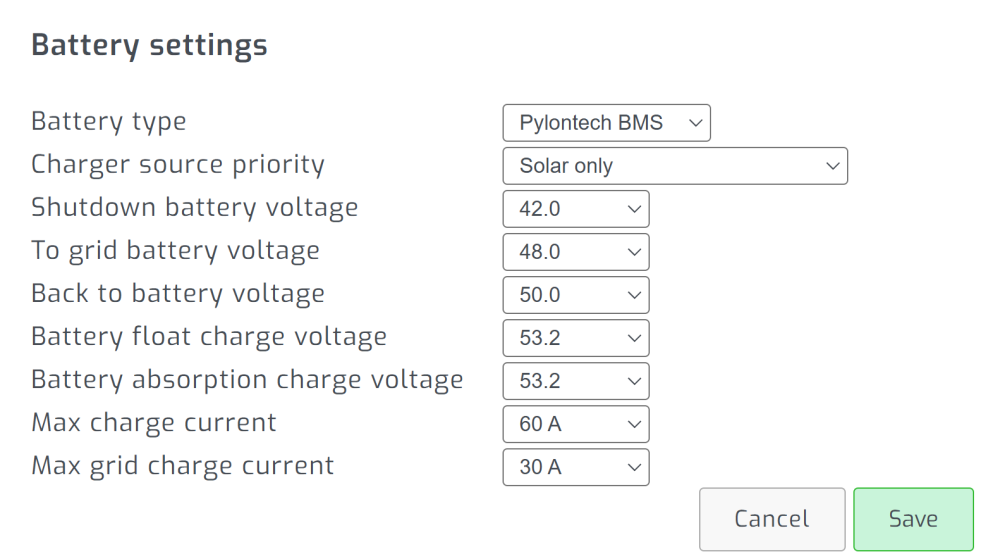
Hi @Coulomb, Thank you for these detailed instructions. After this thread, you probably know by now that my US2000 is dead, and not going to be replaced, but I have two more US 2000 and one US 3000 all connected to my two Axpert 5K inverters. I have started changing these settings as you indicate above. I do all changes from Solar Assistant, not on the physical unit itself. There do seem to be some terminology differences also. 1) I use an app called Solar Assistant, not ICC. Should I still then make program 12 46V also, or is that exclusively for ICC, and no other control apps? On SA it is called "To grid voltage". 2) I am somewhat unclear on program 02. In my instruction booklet it says I should add the solar and the grid together, and that should be my max, and in Solar Assistant I have grid set to 30A max charging, and the solar charging is set to a max60A. Now, as I understand it, These two max charge Amperage settings are what controls program 02. It seems to me that program 02 is a single setting on the inverter, but in Solar Assistant I have the two separated options. I am not clear on this at all. If you could assist, I would appreciate very much. On SA it is called "Max Charge current" (60A) and "Max grid charge current" (30A). 3) When I try to change program 26 or 27 (they are presently at 53.2V) I get the response: "Rejected" from Solar Assistant. When I go to the physical units and attempt to set it via their LCD screens, then it simply does not change. I can try to increase or decrease, it just remains at 53.5. Your help is highly appreciated. I attach a screenshot of the battery settings area, as it may help?
-
Hi @Youda Thank you very much for your response. I do appreciate. Yes, I realized this past week, that I will have to adapt my settings to @Coulomb's recommendations. I did hear back from Chris today. He did respond with a very good explanation, similar to what you said, although he did not specifically make any reference to inverters or to Axpert (I believe he may not want to have it appear as-if he's playing a "blame game", which I appreciate and respect). What you are saying, and what he emailed me most definitely point to the need for me to adapt the settings on my system.
-
Just to reply: I do not have any max charge rate setting. I do see a max charge current. Now, these may be the same thing, and I'm just too much of a noob and too uninformed to realize that 🙂 But, ya, I have a max charge current which is 60A In terms of the cells swelling, yes, that battery that caused the problem was swelling. You may already have seen the rest of this thread 🙂
-
Sorry so slow to reply. At the time, I also tested my cables, spoke to SA, and finally, I restarted SA, reset the connection settings, and made sure both cables were selected, then all worked 🙂 It did happen again once or twice, but, both times, I either just restarted SA, or I simply "disconnected" in the software, and made sure two cables were shown as connections, then they continue as per usual.
-
So the company (CNBM in Centurion) reported overcharging as the issue. The provided (after requests) a full report explaining the overcharge. I then asked them how is it possible for a unit that has a BMS to become overcharged. They did not repsond. I asked again, they just sent me the report. I asked again, then they responded with: I replied asking: They did not respond. After a day or so, I repeated my question. They CC'd me in a mail to Chris (at Pylontech China). They said: I have not heard back yet. Interesting fact, though: they are giving Chris the wrong information. I did not ask for clarity on the overcharging. I received their quote, and said that I understand that it was overcharged. I then asked HOW could it overcharge if it has a BMS. They said "it can", I finally asked: Do I understand correctly: The BMS does NOT protect the battery from overcharging. THAT was my final, unanswered question. So, Chris has the wrong info, and I'm going to have to go through the whole conversation AGAIN with him, but, anyways....that's where I'm at presently. Their CC to Chris was four days ago, so, I expect I will probably hear from him in the next few days.
-
Hi Marius, Float is 53.2V Max (back to battery) is 52V
-
Thanks for the replies folks. I actually was able to get a response from the original installer. They did offer to assist. I checked that physical battery, and there was clear signs of swelling, so my assumption is that it is a faulty batter. Date of manufacture on the battery is listed as 2020 (I think April/May), so I'm rather sure Pylontech will honour the wanrranty, let's see. The installer collected the battery from me this week Tuesday, so I await info, hopefully soon. Cheers all
-
Thanks for the replies folks. Much appreciated. I am going to get batteryview, and try that next. To answer some questions: They do get charged to 100% almost daily. Only on the days that we use heavy loads (like maybe washing day - 2x per week - washing machine and tumble drier and iron being used during the day - thus, using a lot of energy, and not filling batteries to 100%) do they NOT always go to 100%, but, at least every Saturday and Sunday, the fully charge up, and then probably more than on additional day per week. In terms of firmware: I just spoke to Sengensolar (A South African supplier of Pylontech). They say that they may need to update the firmware. They did indicate also that my unit (based off the serial number) was not purchased via them, but,. they can service it - not replace/credit, though. Now, I can understand if firmware is out of date, BUT, what concerns me is: This battery has been operating in this pack for either 1 year, or 2 years. I don't recall off the top of my head whether I installed the latest (US3000) a year ago, or two years. But, fact is, they've been together for a while. The issue "suddenly" started a few weeks ago. Thus I'm not sure I'm convinced about firmware. Lastly, can anyone assist with who would be the correct Pylontech supplier, where I could go with the battery if needed? The installer that did the system for me "disappeared" a few years later. They are still functioning, but they liquidated their company, and started operating under a new name. So now they are not at all eager to assist me.
-
Author Hey everyone. I have a US3000, and 3x US2000's. They are connected in parallel, with the comms cables connected to a Pi with Solar Assistant. Load connected to two Axpert 5kVA inverters via busbar. They usually charge to 100% by around 1pm - 2pm when I am not using anything with very heavy loads during the day (tumble drier, vacuuming the place, aircon etc.) Suddenly, a week or two ago, I noticed that they only charge to 85% even though there is still a lot of sun available, and, once they reach the 85% the incoming solar KW also drops to match the rest-of-the-house usage load. Upon investigation (in Solar Assistant, and physically checking the led's of the batteries), I discovered that one of the US2000's is only charged to 33%, while the others are at 100%. So, now I pose the question: to balance or not to balance? I have seen multiple videos indicating that you connect them in parallel, while disconnecting all other comms, and from power....and then press the start-stop button so that they balance each other. Then I have seen comments saying that is not right, and other comments confirming it is right, and other comments saying the Master takes control of all batteries always, andyou should not be concerned about balancing, and so it goes from one side to the other etc etc etc. Oh, and I have emailed Pylontech directly, last Friday. No response as yet. So, could anyone advise? How do I get that one US2000 to charge fully, like the others? Do I "balance", or not? If not, what is my next step? It's been at least a week-and-a-half and that battery continues to NOT charge up. Advice always appreciated. Cheers all
-
Some discoveries today folks. So, in terms of my previous posts, Solar Assistant support did indicate that I should "disconnect" in SA, then re-select both USB cables in the software. Then save, and then reconnect (all in software - SA). After doing this, all worked as normal again. Each inverter reading fully across the individual USB cables. In therms of the 85% charge....I have discovered the following: I have a US3000, and 3x US2000's. They are connected in serial. (Edit: oops! no, I mean, parallel) One of the US200's is only charged to 33%, while the others are at 100%. So, now I pose the question: to balance or not to balance? I have seen multiple videos indicating that you connect them in parallel, while disconnecting all other comms, and from power....and then press the start-stop button so that they balance each other. Then I have seen comments saying that is not right, and other comments confirming it is right, and other comments saying the Master takes control of all etc etc etc. So, could anyone advise? How do I get that one US2000 to charge fully, like the others?
-
Hey there folks, Just hoping there is someone who can assist, as there is still no change in my situation. As mentioned in the previous posts, I have troubleshot (is that a word?) in multiple ways, but, I still get the issue that only one of the inverters allows changing the charger source priority. The second inverter (no matter which cable I use, or which inverter is "seen" by the system as which) is always not changeable, and says "This inverter is indirectly read...." Also, something else that I've noticed since that Solar Assistant update of August: when on Solar, the batteries only charge up to 85%. They never go over that anymore (they used to charge all the way to 100% in the past). I couldn't understand why my Eskom bill has been slightly more than usual - and then when checking how they charge, and battery state of charge, I noticed that once the batteries hit 85%, the solar input drops to meet just the load, and no longer comes in at full potential. Thanks all.
-
Ok....sheezzz....just to "wierd everybody out" even a little further..... I have Home Assistant, and the Inverters are connected via MQTT. When I change inverter 1 in HA, it also changes inverter 2. BUT - this is only from HA. If I go directly to SA (Solar Assistant), the same is not true.
-
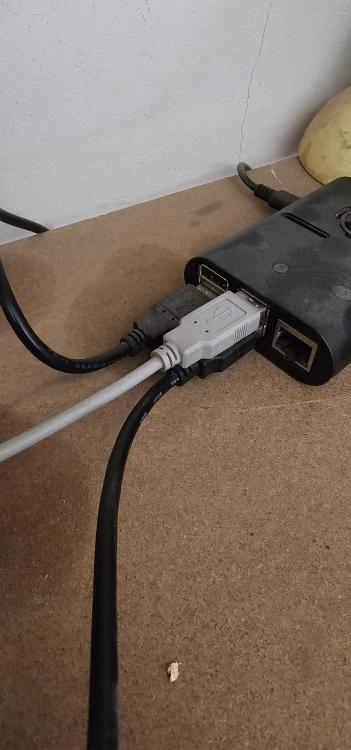
Hey there zsde, and others, Thanks for the advice thus far. Here's what I have figured: It seems the error may be either in SA (being a setting that needs to change) or on the actual inverters (again, possibly a setting which needs to change). Obviously you folks may see an error, and highlight it for me, or recommend alternative options. Here's my reasoning, and the process by which I came to this conclusion: (Please use attached image as reference). There are four USB ports on the Pi. Two are blue and two are black. Thus I assume the blue are the faster ones (I forget which version/what they are called), and the black are the older ones. For the experiment, though, this seemed to make no difference. One of the black ports (bottom left as we look at the image) is connected to the Pylontech batteries. The two blue ports (top-right and bottom-right) are connected to the two individual inverters. Let's say the grey cable is inverter X and the black cable is inverter Y. When I unplug both cables, the "STATUS" changes from connected, to "Failed to Read. Reconnecting in 20 sec". Obviously, right? Here's where it gets "wonky".... I connect the grey cable (inv X) to ANY of the three currently open ports, and connection is re-established. "Inverter 1" does what it should, and "Inverter 2", does it's thing with the message "This inverter is indirectly read via parallel connection......" and its charger source (and other settings in that block) cannot be changed - even when I change it on Inverter 1. As mentioned, only Inv 1 changes, no 2 remains locked and cannot be adapted. So, I disconnect the grey (Inv X) cable, and get the failed reading message. Now I connect the black cable (Inv Y) to ANY of the three currently open ports, and connection is re-established. EVERYTHING that I said in point 6 above, is then again exactly the same. So - Inverter 1 can be set, but Inverter 2 has restrictions. This leads me to believe that both cables are working. Please be aware.....I did not randomly connect one cable to one of the ports. I systematically connected one cable to a port, then disconnected, then same cable to next port, then disconnected, then same cable to final port. I repeated the process with the other cable. ALL CABLE and ALL PORTS "connect", but only Inverter 1 is fully "settable". Inverter 2 always has limitations. As you can deduce from my story - it appears that to the software, Inverter 1 and Inverter 2 are not always the same unit, since one cable comes from Inverter X and another cable from Inverter Y - but, no matter which of X or Y's cable is being used, the software always makes "Inverter 1" fully accessible, and "Inverter 2" restricted access. Along with this, the inverter that is currently connected (with the one-cable-experiment) is always "made" to be Inverter 1. I tested this by connecting one cable, then making changes in the software, and only the connected inverter changed. Tried systematically, again, switching between both inverters and both cables. So, with all that....please tell me someone has a suggestion as to what ails me, or additional tests I could try.