tertiuscpt
Members
-
Joined
-
Last visited
Everything posted by tertiuscpt
-
Seems like your Rx and Tx lines are either shorted somewhere or for some other reason you are reading back the exact commands being sent out. What does your setup look like, and how is your IP to serial converter configured? Should be in TCP Server mode
-
The PACE documentation requires a baud rate of 9600, as such this is hard-coded in my script. If you are using a networked serial device then you can change the baud rate on it, which the script accesses with its socket IP:Port. If you're connecting directly with serial then its not currently an optional setting. Your photo is an exact layout of the PACE BMS.
-
Should be the RS232 port, if there's no reply whatsoever then it's likely not a PACE BMS, or maybe the baudate is different 🤷♂️
-
The script is reading the warnings as ASCII data, not expecting the hex 0xD character representing a carriage-return. There's small variances between some BMS' causing this, I've compensated once before for it. Please drop a full debug log at Github in the Issues for me to look at.
-
Linked below. Another user on github shared it: https://github.com/Tertiush/bmspace/files/10372932/72651.11625-PACE-RS232commuciation-protocal.PACE-RS232-TY16S.-20180705.pdf
-
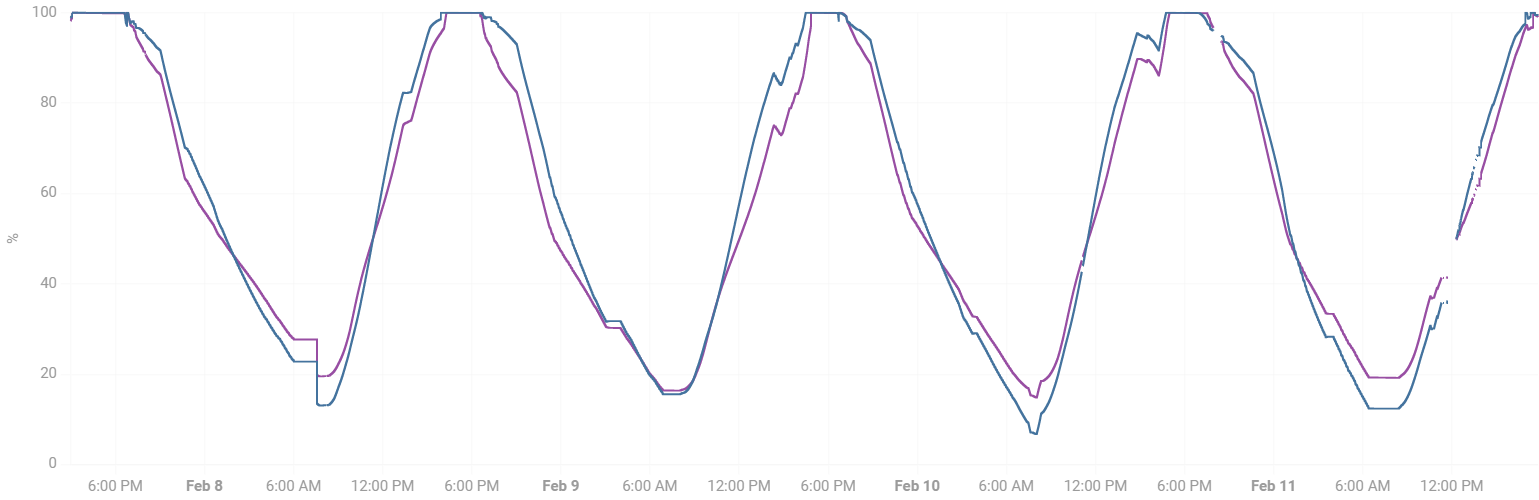
I don't see how 50% can be counted as one cycle. In any definition a cycle is 0-100%, in fact that is what Hubble says in their brochures, I quote: "Cycle Life @ 1C: +/- 3000 Cycles @ 100% DOD, Above 6000 cycles @ 50% DOD" If the pack runs into issues few years from now what will Hubble then say? "Sir you are at 3000 cycles and your warranty is no more......." If they base their argument on that measurement then the way its calculated is dishonest. I have about 4 packs of which 3 is doing this, some like the one in question increasing sometimes 3 cycles in one day, with a single charge/discharge. Micro-cycles in this regard are minimal. One pack tracks one per day, which I feel is correct. Even their "Cycle Life and DOD" graphs depict the 3000 cycles at 100% DOD to get to 80% remaining capacity. This implies a full discharge & charge = 1 cycle. These batteries are expensive and I think we need to have this conversions to secure our investment and avoid surprises later on.
-
Hi, check your charge voltage settings and make sure you are not overcharging the battery, i.e. have a float / boost voltage level that is too high. Perhaps even confirm with a multimeter directly on the poles. It sounds like your battery is at a very high state of charge and may be trying to warn / disconnect.
-
Has anyone noticed their BMS counting more than one cycle per day, most times in quick succession, even though the charging & discharging has been largely continues (minimal micro-cycles)? I have two Hubble AM2's and a friend another one. Two of these three batteries do this most days. The graphs below is for two batteries in parallel. The master mostly counts 1 cycles per day, yet the slave 2 (and less often 1 or even 3!) cycles per day. I'm baffled and can only assume they aren't configured correctly. I've reached out to Hubble and am waiting their response. Curious to know if this is a somewhat isolated case(s)....?
.thumb.png.0feb73a789249d7d2fab267895b63899.png)
-
Also consider the continuous AC passthrough rating... This is what the inverter will allow through during on-grid scenarios. For the 5kW I think its 32A, which equates to 7.360kW. For the 8kW I think its at 45A, so 10kW+
-
The faceplate of that BMS looks a lot like the PACE type (same as Hubble uses). If so, here's another option to retrieve data form the BMS and push it to an MQTT broker:
-
Quick update, I've rewritten most of this script using the official PACE RS232 Protocol definition. The script now supports multiple packs! I've only implemented informational messages / retrieving data, no commands. Use at own risk! Many new fields are now retrieved such as warnings, balancing data, status indications, etc.
-
(Updated info further down in the post) I create a very simple Python script to interrogate the Pace BMS as used in some popular lithium battery brands. I've also packed this as a Home Assistant add-on, but can just as well be used as either a standalone script / within a docker container. It reports the voltage of cells, temperatures, the pack's current, voltage, SOC, SOH, and a few other metrics. Use at own risk. Either a serial link to the RS232 port or via IP (using some port server over TCP) will work. Repository: https://github.com/Tertiush/bmspace The script serves by needs atm, so any further developments can be done by the community. UPDATE: I've rewritten most of this script using the official PACE RS232 Protocol definition. The script now supports multiple packs! I've only implemented informational messages / retrieving data, no commands. Use at own risk! Many new fields are now retrieved such as warnings, balancing data, status indications, etc.

-
Do you still have the PDF referred to? The normal manual doesn't give the RS485 port's pinout, hoping its in there....
-
Should I use the RS485 port for the upgrade? Damm, just checked the manual and yes I should use the RS485 and not 232 port 😑 Thanks for pointing that out!
-
I'm having an SOC issue with my AM2, Hubble advised to upgrade the firmware but after an hour trying I couldnt get it going. They just sent an upgrade app and the bin file (no other instructions). I've tried different baudrates, addresses, pinout, RS232 and TTL levels, all to no avail. Any tips on how to get it going pls. Hubble's support channels aren't the quickest out there. Thanks! (I'm using a Moxa Uport 1100 USB Serial dongle)
-
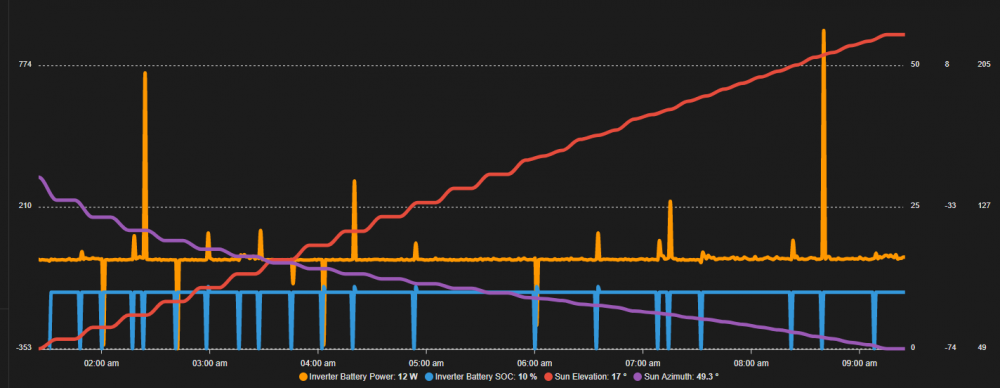
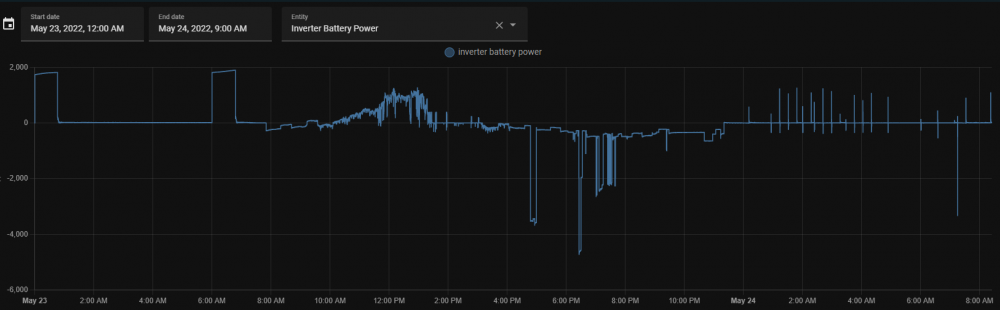
I have two identical installations with Hubble AM2 batteries connected via CAN to Sunsynk 8kw inverters. Both installations have a weird issue where they discharge to their 10% setpoint and then at random drop to 0%. At this point the inverter starts charging the battery (presumably because it thinks it's now really at 0%). The battery then jumps back to 10% and sometimes charges to 11% before the inverter stops and discharges the battery back to the 10% setpoint. This issue is only observed when at the lower SOC setpoint is reached (I've played with different values, same result). There's clearly some issue causing the BMS to drop the SOC (perhaps a comms error, but nothing in the Sunsynk logs). Has anyone seen this before? I've since updated the Sunsynk to its latest firmware (M6.0.1.4 / S1.7.2.4 / CE.4.2.4), with no change. Hubble ahs also provided a firmware upgrade but I cannot get their upgrade app to communicate via RS232 to the AM2. Tried many baud rates, addresses, swopping of Rx Tx, RS232 and TTL levels, etc. Awaiting their help. Below's a few screenshots, if it looks familiar to anyone. Ps. I do not have a RIOT/Cloudlink installed. Tertius.
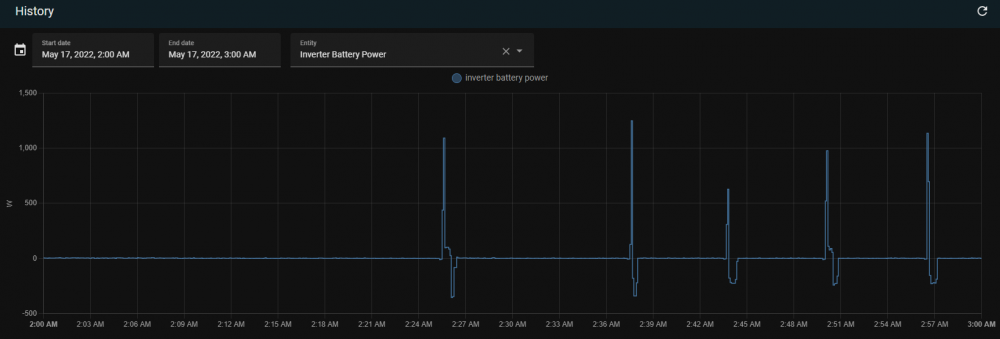
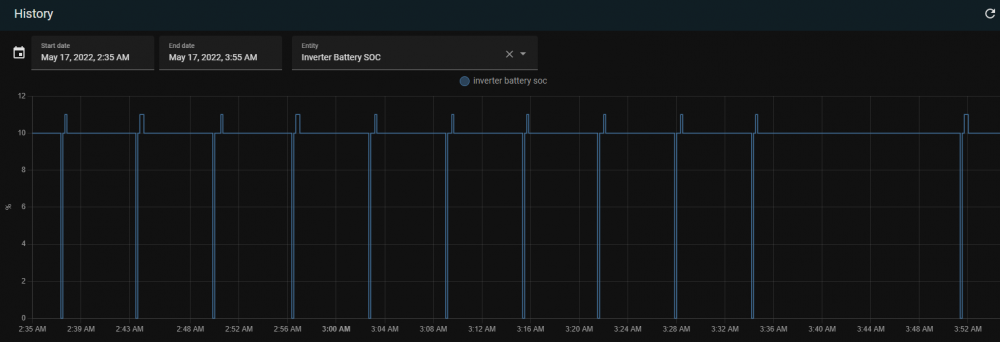
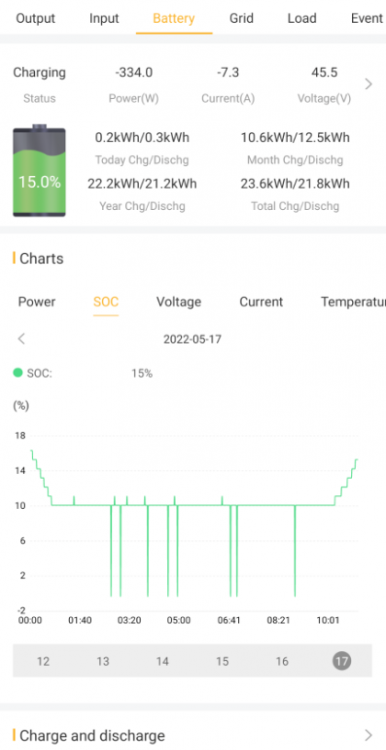

.png.7298810d202e64bbe0fbaf3900dab7fc.png)