


oguzatagan
Members
-
Joined
-
Last visited
-
-
Yes, I finally finished the installation. This is feedback. Neutral phase earth from left to right. So the labels on the motherboard are wrong for my device. Everything works fine. The black fuse on the motherboard must be on the phase path. As far as I researched, there are 2 types of cards. (My device black fuse is rightside.) First black fuse is on the right side, the second is near the middle. Friends who will take references, please attention to this.
-
Can you share your device's panel photos?
-
Unfortunately, your device's card is not the same as mine. Your black fuse is on the Live line. I shared the pictures above.
-
Deye has no support and distributor in my country. So I don't have a second chance and I can't case.
-
Another Device at the top. This picture belongs to my device. Everything is in place on the device above. Green connector L, N line up. Wires L, N. Green connector L, N on My device but wires N, L On top device black fuse is on L line but on My device it is on Neutral line. Please review the Pictures.

-
It would be very nice if the friends who have the type device in the picture I added show where they put the phase and neutral.
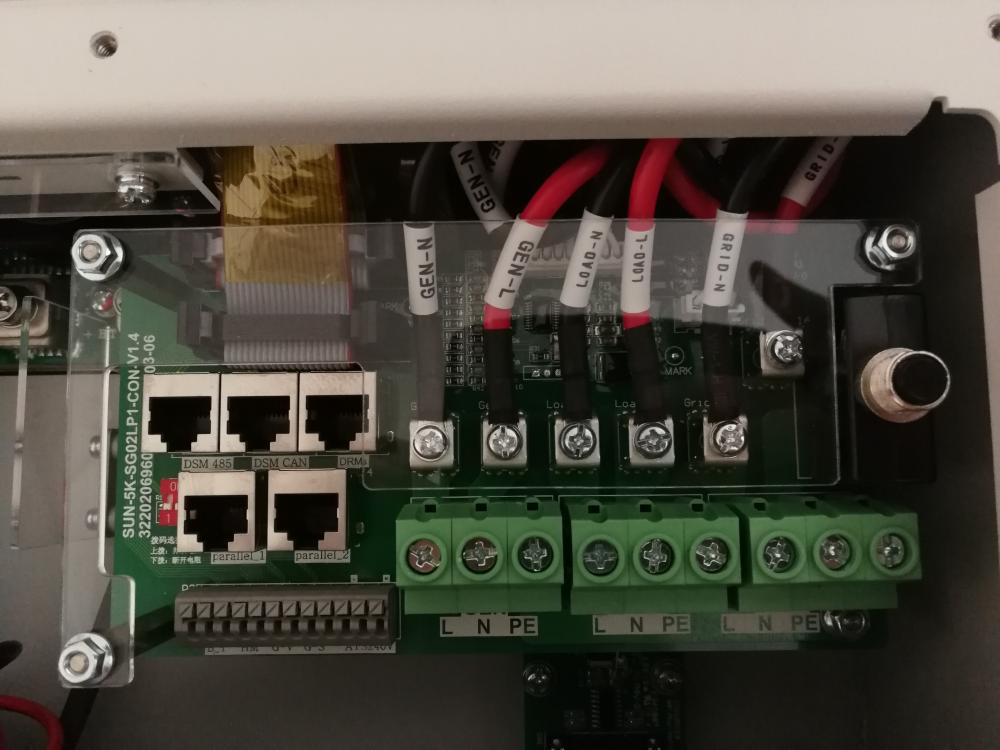 There are 2 versions of this device. Therefore, there are 2 user manuals. That's why I want to benefit from experience.İ know but this inverter have 2 different bottom board. First my device. My device bottom board fuse is right side. Fuse on neutral line. Green connector label reverse incoming cable and inverter inside board label. Second device bottom board fuse is on Live line on board middle. İs anybody send photo their device cabling. İ send email deye. Deye say first follow green connector. But second say follow cable marks. İ m confused. Deye has no support in my country.Does anyone use this device? İ want connect system to grid but im scared so im waitingPlease add me your WhatsApp group. İ need technical supportThanks for your attention. There is a 2 version of the board in the youtube as far as i can see. First board fuse bottom right side on neutral way. Second is fuse bottom middle on L way. Normally fuse shouldnt be neutral way. İ dont understanding. Have you a this device?
 Hello everyone. İ bought deye sun-6k-sg01lp1-eu hybrid inverter but there is a label problem in the inverter. The board label inside the inverter is labeled grid L which has the Red cable coming from it also labeled grid L which then connects to the Grey contact (under the Grey contact it also is labeled grid L) which comes to the Black fuse. From the fuse it comes to the neutral grid at the bottom of the bottom board. You can see from the picture i have attached and have circled. Which one is the correct label, is it the grid L labeled cable or is it the neutral at the green connector at the bottom of the board? The bottom board name is SUN-5K-SG02LP1-CON. v1. 4 İ think this device same sunsynk 5.5kw


