Ravenshield
Members
-
Joined
-
Last visited
-
I managed to be at the inverter this afternoon when it happened and took a video of the event. Error code is indeed F08. And i am starting to see a pattern of when it occurred, it seems to me that i drain some of the battery during loadshedding off course, then when eskom comes back on and battery starts charging, and as soon as the battery hits full charge it happens! According to the app "Main CPU Firmware Version 00072.00 and Secondary CPU Firmware Version 00036.03"
-
I just checked in history and mine does not seem to have any gaps that i can spot.
-
Thanx for the reply, im new to this inverter, how can i record the fault code?
-
-
-
-
@Steve87 i know you installed a fair amount of these Kodak's maybe you have encountered this problem before. Or maybe the techs at @SEGEN SOLAR will know?
-
Hi guys, i have a Kodak OGS5.6, brand new install, system only has inverter and 1 hubble am2 battery and no panels so far. Also have a problem that sounds like yours of it cutting power to loads for a few seconds and my automatic change over swapping over to eskom and then swapping back to inverter like 3 sec later. Im not sure where to get the error code, but this is the screenshot i took on the Watchpower App (not sure why it shows the error a couple of times as all the time stamps are the same)

-
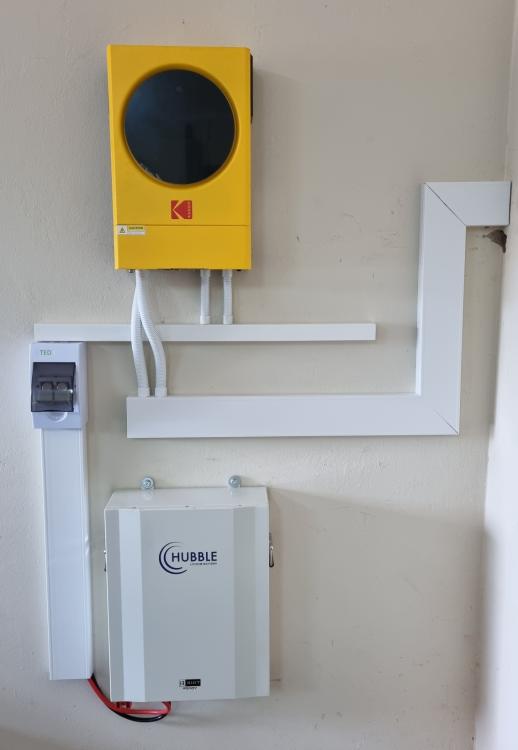
Its been a while, but i finally did this install. Not exactly as i planned, ended up starting with a Inverter and Battery, but here it is...
-
I posted on the forum a while back to get advice and changed my initial plans a bit and started off with Inverter and battery in stead of Inverter and panels, i will now add panels as funds come in. Here is the install so far.

-
I also had this problem, at the wifi configuration it kept saying the phone is not on the same wifi as the inverter although it was, went into the app and allowed all permissions and it worked immediately after that.
-
Your install looks awesome!! What panels and config did you use on this setup?
-
Yes that is def in the safe zone once you calculate everything. It just feels so low because when you initially check specs on inverter you see that 6000W max pv input and now that you calculate everything you end up on a max input of 4320W .
-
-
Haha i see you answering the questions now even before i get to ask them! My next question was what the components are i need tot make the install safe legal and neat, as i need to make a list of those!
-
Thanx, i will recalculate using that and see if their method agrees with what @Steve87suggests
-
Aah ok thats something i did not spot there! Ok so 8 panels one string no problems. Wil it be fine if i start the string off with 4 panels and then add another 4 once budget allows? If i understand correctly if i do that the string voltage will be lower meaning the inverter will only start producing later in the morning abd and stop earlier in the afternoon, but that's just something I'll have to make peace with for the start. Other than that any problems with that config?
-
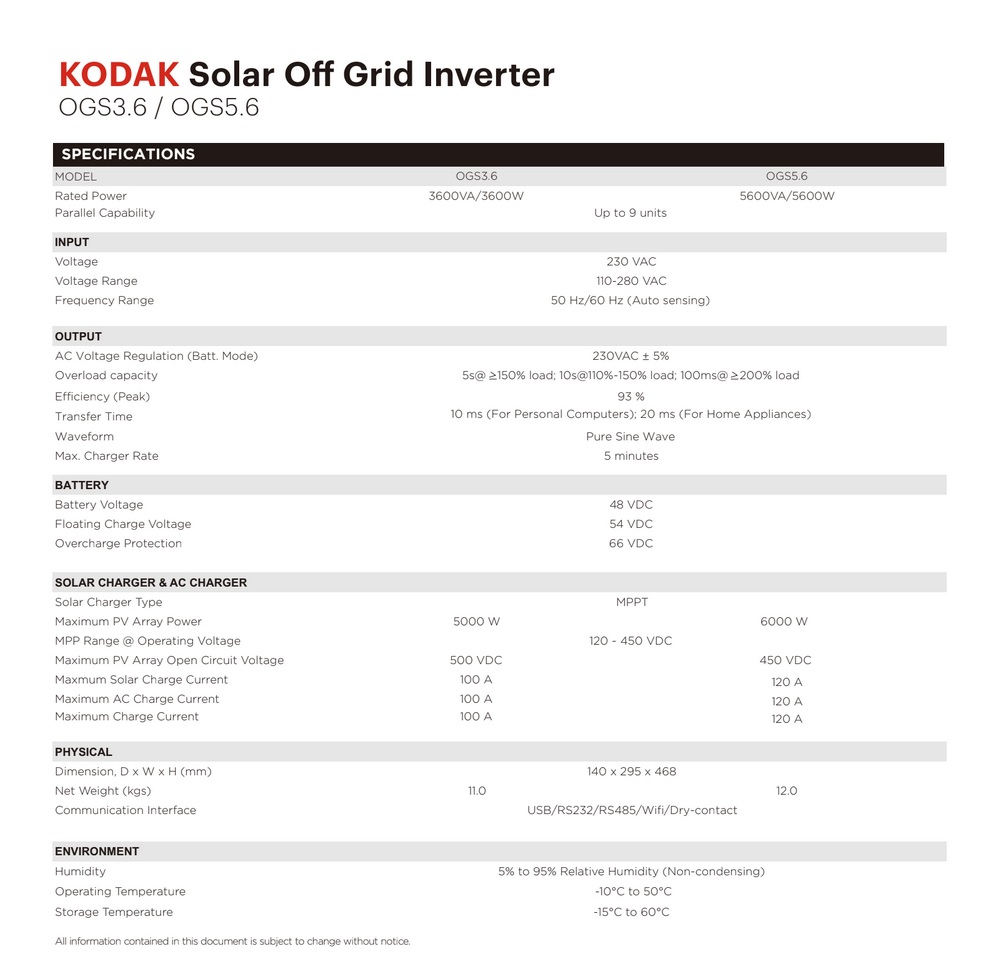
Ok so far it seems like i will go with the Kodak OGS5.6 Inverter and the JA Solar 540w Panel. I played around a bit and worked out the PV array according to a method i found on solaradvice.co.za (https://solaradvice.co.za/how-to-size-a-pv-array/) Answer i get is 10 panels in one string, thats it... I will post screenshots of my calculation as well as inverter and panel specs. Does my calculation look correct and real world actionable? Also, if that is correct, will it be fine to start off the array with 5 panels and then later add another 5? Or should it be different?


-
Yes you are 100% correct, but those days, cloudy with a chance of loadshedding will at least be way less than the days i currently have no power to work with, which is every day! I def do intend on adding a battery, those are just damn expensive!