ZCS
Members
-
Joined
-
Last visited
Everything posted by ZCS
-
So i am very new to all this so please forgive my ignorance... what does the software do? What is the benefit? Why would installers not provide this and is it not something clthat can just be downloaded?
-
Ah my bad. Misunderstood. No, no additional software provided to me...
-
Yes BMS included. Communicates perfectly with my SS 5kw.
-
Lol lets hope so. I was very concerned but decided to go with the advice of my installer. Hopefully some good reviews come out of this which could help future first time solar peeps make an informed decision.
-
I have the 5kwh version of this currently and so far very happy. Its only been a few weeks since my install so granted not enough time to properly review. What concerned me prior to accepting my quote is that these Greenrich batteries are not spoken about much on any of the forums...
-
Welcome to the forum. I am sure you will learn a lot about your system from this community as I sure have. Congrats on your install and to kicking(partially at least) Eishkom to the curb.
-
This is the part i am unsure of....
-
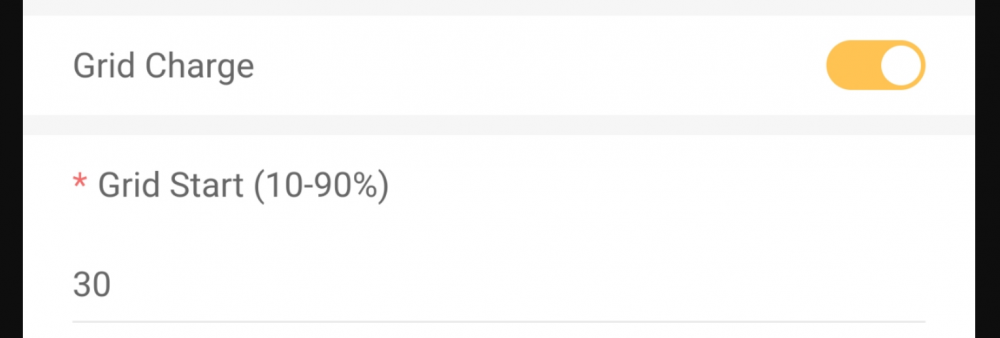
I did attach some screenshots (from the app) above for the battery setting screen and the system setting(work mode) screen. Not at home to take pics directly off the inverter screen. Hopefully you will be able to access the screenshots above on this thread. For your feedback as always.
-
thanks @Leshen. thats what i thought which means my settings from that perspective are correct. are you able to confirm the battery settings grid charge setting with corresponding value below it?
-
maybe one of the many experts on here could help me understand what the grid charge and grid charge number is under battery settings...
-
the way i undersood it was that limit to load would limit the power to the essentials only? maybe someone else could clarify? i have zero export only ticked and thought this just limits the feedback into the grid.
-
I'm hesitant to untick this setting under the battery settings without understanding what it is and how it works as it was set by the installer( I assume for a reason...). it only really charges from grid in the morning when my SOC is idling at 10% (runs down over night until 10% per TOU setting). My 8am TOU SOC is set at 15% and the grid then kicks in at 8am and raises the SOC from 10 to 15.
-
i have zero export ticked. i dont limit to load as i have my geyser connected to non essential which i switch on via timer at midday to heat via pv.
-
grid charge is ticked under the battery setting screen and a value of 30 below that (not sure what this is for? what happens if i untick?). grid charge is not ticked for any of the time slots under the TOU work mode setting screen. i noticed it only charges a little bit from grid in the morning while my battery is floating at 10% (SOC selected on workmode 1 screen for the morning time slot).
-
Another question for our resident pros... i do not have grid charge ticked on the work mode screen but for some reason it seems like my battery gets a shot from the grid up to the stated SOC for that time slot. is this normal? i noticed that on the battery settings screen, grid charge has been ticked, could this be the reason? should this be unticked? another question.. what is the BMS Err Stop tick box and protocol for? should this be enabled? Thanks in advance guys.Thanks @LeshenHi There, another question from my side. is it necessary to have a grid trickle feed of 20w? i have a smart meter with one of those landis & Gyr key pads but i am not on pre paid. if i change this to 0watts will it cause any issues with the meter?Hi @EHvdMerwe, I am pretty new to all this and only have my system installed for a few days now but ill add my 5 cents anyway and hope it adds some benefit. The main power hog for me was my 4kw geyser element. i added a timer to my geyser and schedule it to come on and heat up at midday while the pv is at its peak. this is has so far been the biggest saving for me as my geyser uses on average around 9kwh during the 2 hours it takes to heat up during the day. the water stays hot enough so that when i switch it on again in the evening, it only takes around 20 minutes to heat back up to max temp. I suggest playing around a bit with the time of use settings and ensure that your load is set to priority. my battery drains over night(also a 5kwh li ion battery) and then charges up during the day while also supplementing my load during middle of the day when i have the geyser running (it charges back to full by the afternoon again). so far this is the way i have found to maximize my solar/battery use and minimize my eskom draw. with this setup, the last few days 90% of daily eskom draw has been from my morning geyser heating. keep in mind, that your pv will only generate what is required at any point, so if you battery is full and your load is low, you could be wasting precious power during the day that could otherwise be utilized/stored. hope this helps.Finally installed. 2 days running so far and its been great. just a question to any pros out there... is it correct for the battery to be discharging a very small draw even when grid is connected and time of use limit has been reached and battery should supply anything more? i assume this is the power being used by the actual inverter? if so, is it possible to change this so that eskom supplies that small power usually between 20w and 50w... Another question. my geyser is connected to the non essential side (so ive been told) but still uses battery when it comes on during the day even when grid is available? havent had loadshedding yet so not sure if it will also draw power from the bat when grid is not available? is this correct or is my geyser not connected correctly to the non essential side?so just an update for anyone browsing. day 3 of having solar installed. my geyser and pool pumps are on cbi astute timers and the geyser is scheduled to come on during mid day and 2pm. this is enough time to heat it up fully through the available pv. pool pump runs either side of the geyser slot. so far( only 2 days with great weather) the geyser stays hot enough for our evening showers and doesnt need reheating. the only geyser use through eskom is at 330am to warm up for our morning showers. geyser is connected to non essential load on inverter. seems to be working well so far..Hi @JohnDoe. Did you ever get this resolved? I have just had a system installed and notice there is a constant draw of around 20w odd coming off the battery. Interested to understand if this is normal or something which needs to be attended to...sorry for the noob question but is the aux side the same as the 'non essential'? my plan is to have my oven, geyser and pool pump connected to the non essential side in order to not use battery when loadshedding. everything else to be connected to essential backup side of the inverter.food for thought. thanks guys.