Cheburashka
Members
-
Joined
-
Last visited
-
Sorry for the late response, I don't get any email notifications and just now checked up on the post. I bought this on Aliexpress after I found it on the Must Solar website. I tried contacting them to buy it directly, but they have never responded to any of my queries (really poor company). So I just picked it up on Aliexpress and hooked it up. It uses some wonky Chinese site and to be honest the information is really basic. It shows your power generation for the day, week, month, year and that's about it. They also have some wonky software that you can use and connect your PC directly, but that's not great either. I think I paid about 80 USD for it. With all the trouble it has caused with those beeps it wasn't really worth it haha
-
 jumper reacted to a post in a topic:
Need help getting rid of loud BEEP noise in MUST SOLAR INVERTER PV18-5048 VHM
jumper reacted to a post in a topic:
Need help getting rid of loud BEEP noise in MUST SOLAR INVERTER PV18-5048 VHM
-
@Scorp007 @jumper I think the mystery has been solved. I am using an external device (see photo) that sends the data to a website where I can see power generated. It's pretty basic, but it's something at least. I have it on my WiFi guest network and recently switched from VPN on my devices to VPN on the router. I think this blocked the guest network access for some reason and the inverter was probably beeping because the device couldn't transmit data. Since I added an exception that told my router not to use VPN for this device the beeping has stopped. I realize now I should have added this information, but forgot. Now I'm not a 100% sure of course but so far so good. Wanted to thank you both for the help and let you know the (possible) problem/solution.

-
Been a few busy days, but spent some time tinkering around and unfortunately without much luck. I tried a few things: 1. Set the first setting to Utility first, this didn't help. Beeps during the whole day including in the evening when it's pitch dark outside. 2. Had another go at the alarm settings, nothing changed. 3. Changed setting 1 back to SUB and also beeps during the evening when pitch dark outside and solar doesn't even show up in the display. 4. Changed the setting for background light to be always ON, this works. Confirming that saving settings should work, although this doesn't prove that changing all settings work. I guess the beeps are not related to load since it happened on both SUB and UTL and even in the evening when pitch dark outside. Load is never near 100%, no error codes are shown when the beeps go off. Not sure what else to try.
-
With the solar first setting you mean setting number one? It's currently set to SUB which means solar first, utility second and then battery. So perhaps every time solar is not up to the task it will give this beep? The sad thing is that all the settings for 1 either have solar as first or it's just utility and only solar / battery if utility is out. That would mean all the solar energy would be wasted because we don't give anything back to the grid. Now with 4 panels that's not the end of the world, but it would be suboptimal if the only solution to these beeps is to always run on utility except for an outage. And yes the inverter is always running. That's the only way to seamlessly switch in case of a utility outage, right? (I'm not that technical to be honest, at least not when it comes to electricity).
-
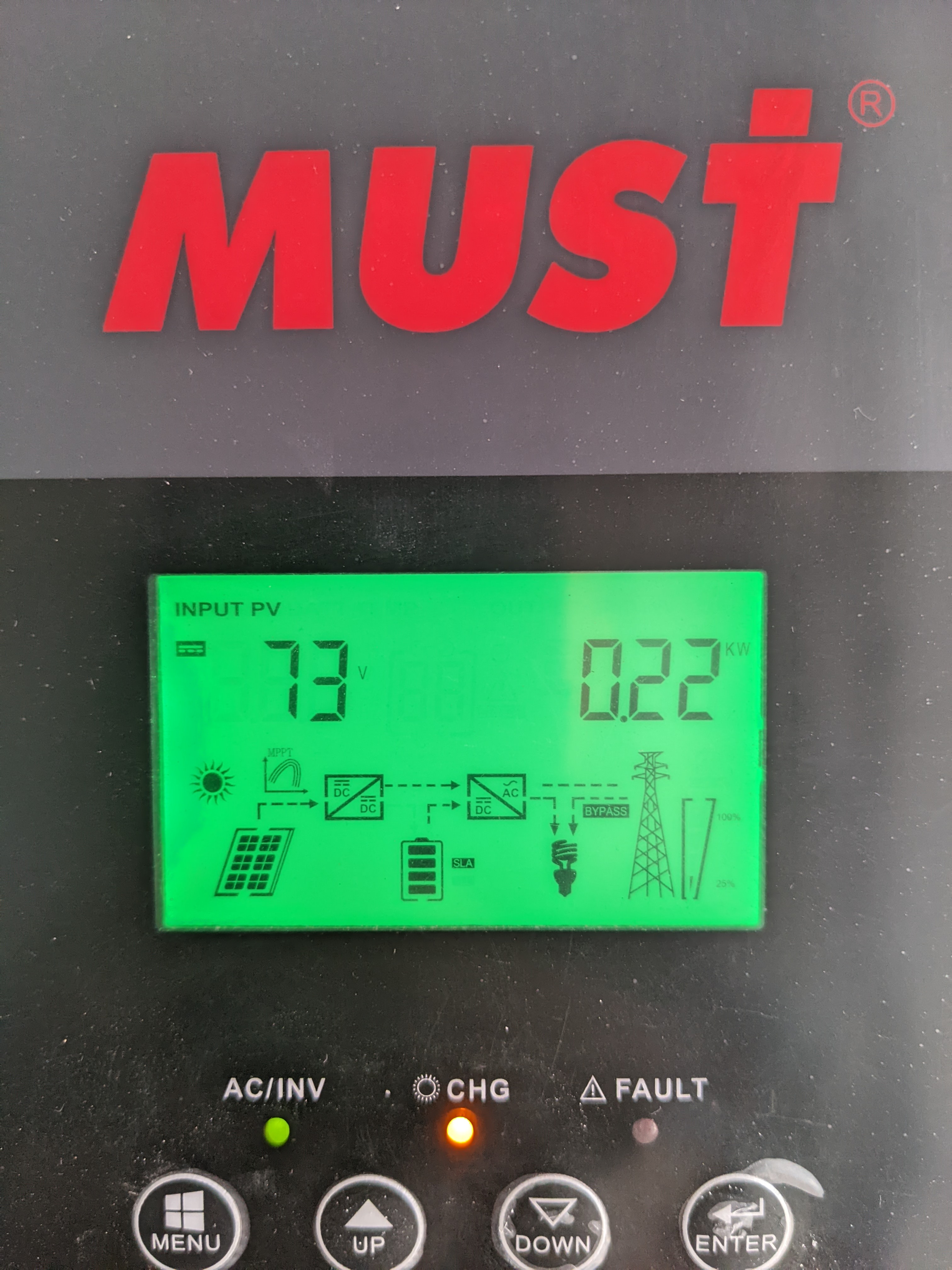
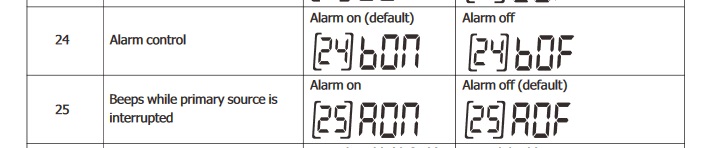
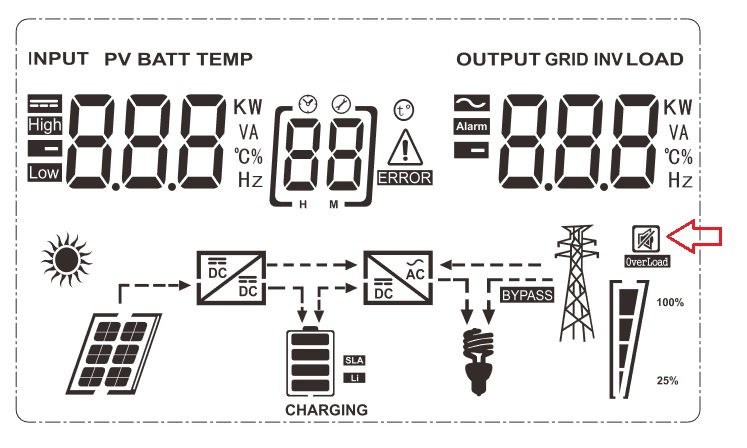
Here's a picture of my display. Not too much to see here I guess? In the manual it shows there should be a speaker icon on the display if alarms are muted, but I don't see it. In the manual I can find two settings related to alarm and I set them both to off. No other information in the manual about how to mute these alarms. I think the alarms are given when perhaps there's no power generated by the panels or when power is being generated again. This based on the fact that beeps always seem to happen around sunup / sundown, but they do happen during the day as well. Since our house was constructed without these panels / inverter in mind unfortunately the inverter is places in a spot where the beeps are a real annoyance.

-
Hello everyone, We moved to a house over a year ago and had some frequent electricity outages (not major ones, but just for a few hours). We decided to get some batteries and figured we may as well put up a few solar panels while we're at it. We contacted a company that took care of it for us. We now have 4 batteries with a total capacity of 5KW, 4 solar panels (not much I know) and a Must Solar Inverter: PV18-5048 VHM. Now we had some problems with the power and since the company that installed it was not helpful another company helped us out with that. Power wise things are working well now. Panels are working, battery is working when the power goes out. The only problem is that the inverter let's out a loud BEEP like 30 times a day. I have the feeling that it has something to do with there being sun on the panels or not, but that's just a guess. I have looked in the manual and turned off the two settings that are related to an alarm, but that doesn't do anything. I see in the manual there's an icon that should be on the display when all alarms are off, but it isn't showing. Of course there's nothing in the manual about how to achieve this. I have sent questions to Must Solar (Chinese company) a few times, but they simply don't respond to anything. Apologies if this forum is not the right place for a question like this, but I'm pretty desperate here 😩 Thanks in advance for any response.
-
Hello everyone, I'm sorry for jumping in to this thread, but I am pretty desperate to get this question answered. We moved to a house over a year ago and had some frequent electricity outages (not major ones, but just for a few hours). We decided to get some batteries and figured we may as well put up a few solar panels while we're at it. We contacted a company that took care of it for us. We now have 4 batteries with a total capacity of 5KW, 4 solar panels (not much I know) and a Must Solar Inverter: PV18-5048 VHM. Now we had some problems with the power and since the company that installed it was not helpful another company helped us out with that. Power wise things are working well now. Panels are working, battery is working when the power goes out. The only problem is that the inverter let's out a loud BEEP like 30 times a day. I have the feeling that it has something to do with there being sun on the panels or not, but that's just a guess. I have looked in the manual and turned off the two settings that are related to an alarm, but that doesn't do anything. I see in the manual there's an icon that should be on the display when all alarms are off, but it isn't showing. Of course there's nothing in the manual about how to achieve this. I have sent questions to Must Solar (Chinese company) a few times, but they simply don't respond to anything. I did a google search and somehow found this topic where I read some of you have a Must Solar inverter as well. So I'm posting this hoping that anyone knows how to get rid of these anoyingly loud beeps. Again apologies for just posting in this thread, but it's like a last straw for me to grab onto.