jumper
Members
-
Joined
-
Last visited
-
-
-
-
-
-
I recently bought some of these as we live mostly off rain water from the roof, they work well. I only use half of the recommended dosage. https://www.takealot.com/water-purification-tablets/PLID94752400
-
This is probably your best (cheapest) bet to try first, I have regular dab pumps and they whine too. The next would be a pressure tank to reduce the amount of times the pump turns on as mentioned above. Another thing you can try if you have a ball valve / tap on the output of the pump, ...try closing it a little to choke the pump and reduce cavitation. Sometimes the pump will sound like it's got little stones inside, choking it adds back-pressure and it will run a lot quieter by reducing the cavitation bubbles in the water and at the same time it will make the pump last longer.
-
That doesn't look serious, it is just an alarm that the PV has been disconnected, but it is late in the afternoon so it will be because the sun is setting. My inverter beeps a couple of times in the evening too when PV gets too low. No need to reset the alarm, it will probably reset at sunrise, it shouldn't affect the inverter at all.
-
The screenshot is just the seplos software with a RS485-USB cable. The settings for equalization are given above, but you might have different numbering on your inverter depending on firmware. 33- een (enables equalization) 34- 57V (eq voltage) It will overshoot slightly at some stage and hit 57.6V and trigger 100% 35- 120 (eq time) It will try and stay at eq voltage for this 2hrs 36- 240 (eq timeout) It will run the eq program for 4hrs 37- 5d (eq interval) It will run the eq program every 5 days
-
Unfortunately I'm not familiar with the growatt inverter and I run my battery in use mode, so I can't help much at all. FYI solar assistant is a South African company and they do ship internationally, so it doesn't matter where you are, it seems to be the only solution if you need accurate SOC on the inverter.
-
Hi @Tiaan Vermeulen, sorry for the late reply, been inactive on the forum. Here are the settings I use with my battery: 1-SBU 2- I don't have setting 2 3-UPS 5-USE 11- 2A (I have no grid connection) 12- 46V 13- 48V 16- SLB UDC 26- 56.5V 27- 55V 29- 44V 32- 240 33- een 34- 57V 35- 120 36- 240 37- 5d It's important to activate the balancing to make sure the battery reaches 100%SOC once a week at least to make sure you don't get SOC drift. These settings have been keeping my battery running perfectly for the last 2 years+. It still balances perfectly with 100%SOH and reaches 100% SOC. Hope that helps.

-
-
I'm not totally sure about the 4.8kWh batteries, but the newer 5.1kWh will charge to the pack overvoltage setting (57.8V) if you have comms to the inverter, thus causing overvoltage errors on every charge which is 'normal'. What were you charging to? I'm not sure about the short circuit events though. Try to get the logs from your other battery to see how they compare.
-
It could be a few things... check your baud rate, try switching the A and B wires around, otherwise it could be windows drivers.
-
It looks like it is an error with the date formatting the software is struggling with, it might be the order of the date, try changing it to day/month/year instead. You might also need to change your number formatting to a . for decimals and a , for thousands seperator.
-
Are your batteries charging to 100%? If so then it is probably your cutoff voltage that needs to be dropped. What is it set to?
-
 jumper reacted to a post in a topic:
Atess HPS100 + ATS150 + 2 x 40/32HV FreedomWon Lithium batteries + 96 x 545W Canadian Solar panels
jumper reacted to a post in a topic:
Atess HPS100 + ATS150 + 2 x 40/32HV FreedomWon Lithium batteries + 96 x 545W Canadian Solar panels
-
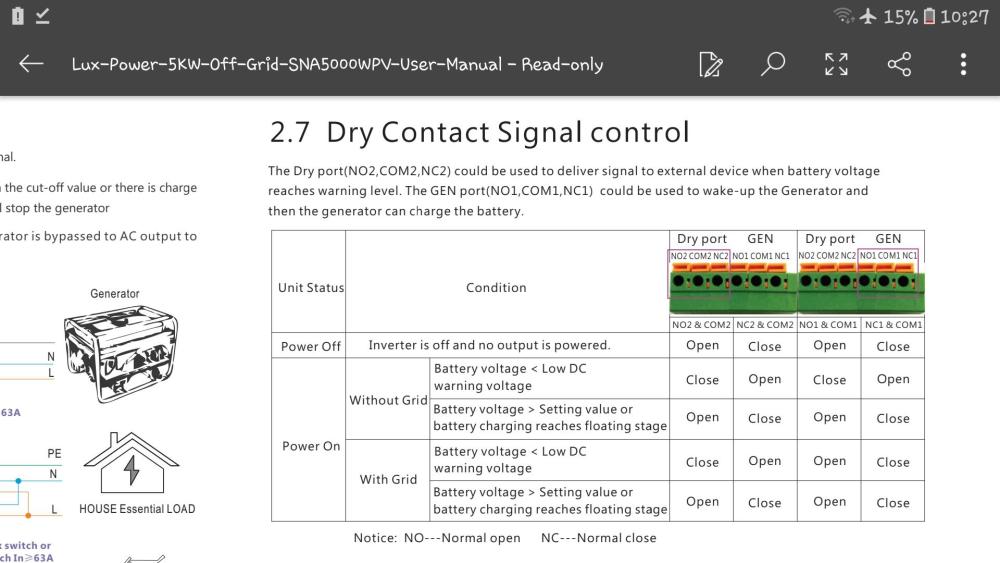
Unfortunately the dry contacts are triggered by the battery level, not only whether grid is present or not, so I don't think you can use them as you want to.
-
Dip switch changes need a restart of the battery to take effect, it is best to do it with the batteries switched off so they don't cause any conflicts while they are running. You can do it before you set them up, no need to start them up and switch them off again first. I reckon your dips are correct though because in your first post all 8 batteries are shown and a US3000C is the master shown at address 1 which I guess is the bottom battery from the temps.
-
Yeah they are always updating the firmware to take care of issues and support new hardware, there may have been quite a big BMS change when the pins were updated. There is a ton of info on Youda's lab topic on pylontech batteries.
-
-
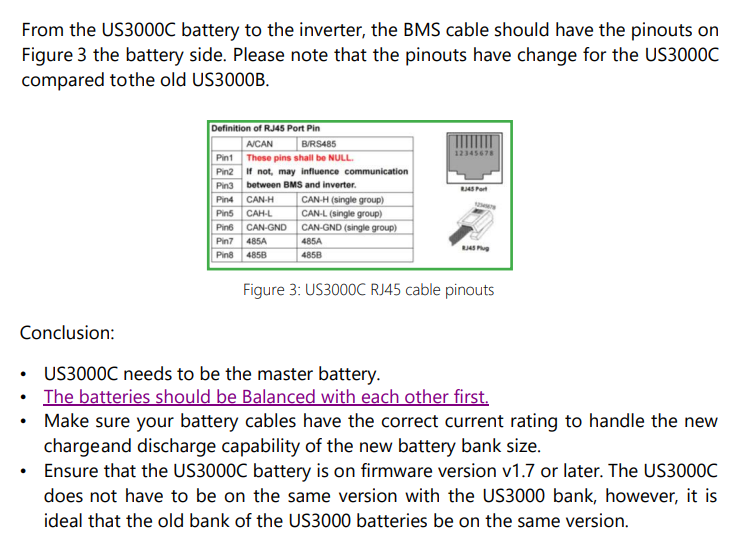
Were all batteries at 100% SOC when firs connected up? Did you update the BMS to inverter cable as it changed? Are the US3000C on firmware version 1.7 or above? This is from Segen Solar: Source: https://portal.segensolar.de/reseller/docs/US3000C and US3000 Mixture Installation.pdf You could let them charge until the US3000 have reached 100% and then disconnect them and charge the US3000C to 100% and then reconnect them all to see if that balances them again.
-
-
This should be setting 12 - Back to Utility, you need to increase the voltage set there. Setting 13 (Back to Battery) controls when it will switch back again after charging.