jumper
Members
-
Joined
-
Last visited
Everything posted by jumper
-
I recently bought some of these as we live mostly off rain water from the roof, they work well. I only use half of the recommended dosage. https://www.takealot.com/water-purification-tablets/PLID94752400
-
This is probably your best (cheapest) bet to try first, I have regular dab pumps and they whine too. The next would be a pressure tank to reduce the amount of times the pump turns on as mentioned above. Another thing you can try if you have a ball valve / tap on the output of the pump, ...try closing it a little to choke the pump and reduce cavitation. Sometimes the pump will sound like it's got little stones inside, choking it adds back-pressure and it will run a lot quieter by reducing the cavitation bubbles in the water and at the same time it will make the pump last longer.
-
That doesn't look serious, it is just an alarm that the PV has been disconnected, but it is late in the afternoon so it will be because the sun is setting. My inverter beeps a couple of times in the evening too when PV gets too low. No need to reset the alarm, it will probably reset at sunrise, it shouldn't affect the inverter at all.
-
The screenshot is just the seplos software with a RS485-USB cable. The settings for equalization are given above, but you might have different numbering on your inverter depending on firmware. 33- een (enables equalization) 34- 57V (eq voltage) It will overshoot slightly at some stage and hit 57.6V and trigger 100% 35- 120 (eq time) It will try and stay at eq voltage for this 2hrs 36- 240 (eq timeout) It will run the eq program for 4hrs 37- 5d (eq interval) It will run the eq program every 5 days
-
Unfortunately I'm not familiar with the growatt inverter and I run my battery in use mode, so I can't help much at all. FYI solar assistant is a South African company and they do ship internationally, so it doesn't matter where you are, it seems to be the only solution if you need accurate SOC on the inverter.
-
Hi @Tiaan Vermeulen, sorry for the late reply, been inactive on the forum. Here are the settings I use with my battery: 1-SBU 2- I don't have setting 2 3-UPS 5-USE 11- 2A (I have no grid connection) 12- 46V 13- 48V 16- SLB UDC 26- 56.5V 27- 55V 29- 44V 32- 240 33- een 34- 57V 35- 120 36- 240 37- 5d It's important to activate the balancing to make sure the battery reaches 100%SOC once a week at least to make sure you don't get SOC drift. These settings have been keeping my battery running perfectly for the last 2 years+. It still balances perfectly with 100%SOH and reaches 100% SOC. Hope that helps.

-
I'm not totally sure about the 4.8kWh batteries, but the newer 5.1kWh will charge to the pack overvoltage setting (57.8V) if you have comms to the inverter, thus causing overvoltage errors on every charge which is 'normal'. What were you charging to? I'm not sure about the short circuit events though. Try to get the logs from your other battery to see how they compare.
-
It could be a few things... check your baud rate, try switching the A and B wires around, otherwise it could be windows drivers.
-
It looks like it is an error with the date formatting the software is struggling with, it might be the order of the date, try changing it to day/month/year instead. You might also need to change your number formatting to a . for decimals and a , for thousands seperator.
-
Are your batteries charging to 100%? If so then it is probably your cutoff voltage that needs to be dropped. What is it set to?
-
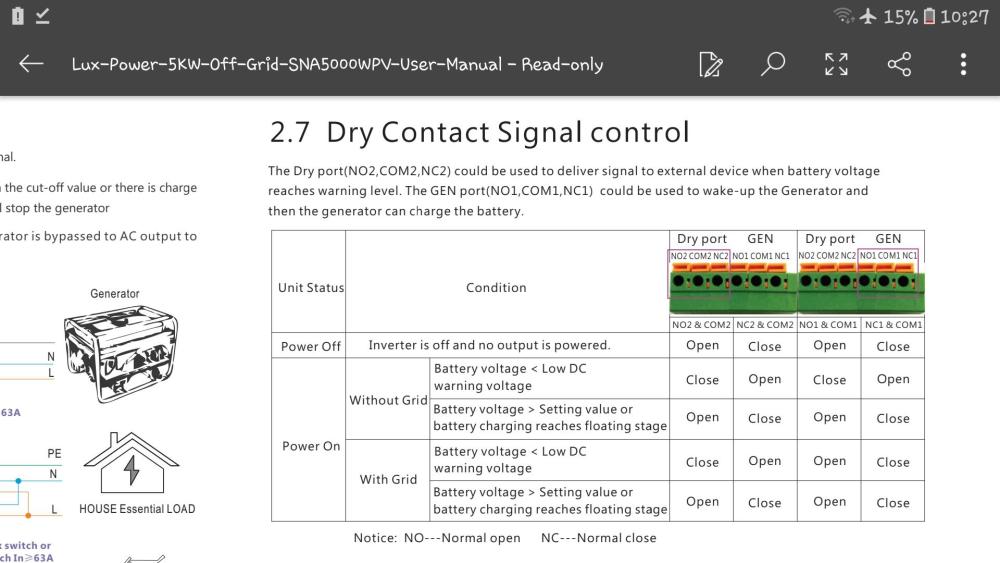
Unfortunately the dry contacts are triggered by the battery level, not only whether grid is present or not, so I don't think you can use them as you want to.
-
Dip switch changes need a restart of the battery to take effect, it is best to do it with the batteries switched off so they don't cause any conflicts while they are running. You can do it before you set them up, no need to start them up and switch them off again first. I reckon your dips are correct though because in your first post all 8 batteries are shown and a US3000C is the master shown at address 1 which I guess is the bottom battery from the temps.
-
Yeah they are always updating the firmware to take care of issues and support new hardware, there may have been quite a big BMS change when the pins were updated. There is a ton of info on Youda's lab topic on pylontech batteries.
-
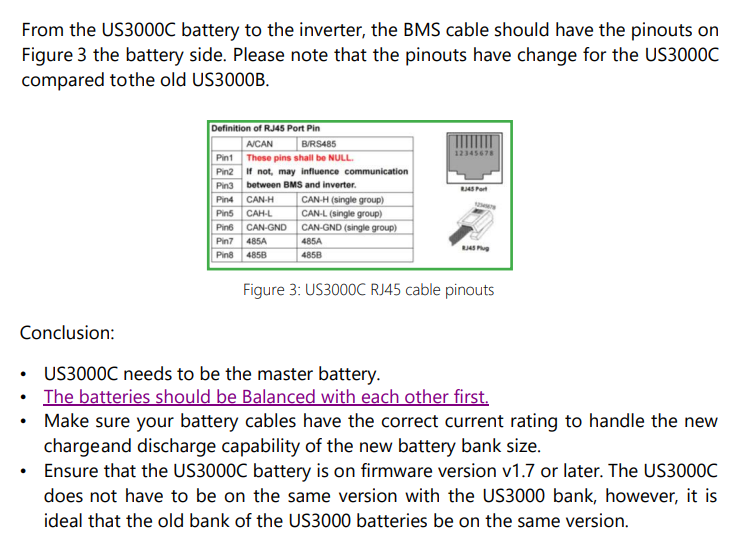
Were all batteries at 100% SOC when firs connected up? Did you update the BMS to inverter cable as it changed? Are the US3000C on firmware version 1.7 or above? This is from Segen Solar: Source: https://portal.segensolar.de/reseller/docs/US3000C and US3000 Mixture Installation.pdf You could let them charge until the US3000 have reached 100% and then disconnect them and charge the US3000C to 100% and then reconnect them all to see if that balances them again.
-
This should be setting 12 - Back to Utility, you need to increase the voltage set there. Setting 13 (Back to Battery) controls when it will switch back again after charging.
-
I think you will have more luck with this as I have only seen pbmstools work with rs232, I've not seen it run over rs485.
-
FYI I had a lot of trouble with drivers on one of these adapters because the site I bought it from said it was a CH340 chip, but it turned out to be FTDI. I finally sorted it by uninstalling the adapter in device manager and manually deleting all related driver files (write them down before uninstalling the adapter). I then restarted the PC, plugged the adapter in and windows installed the correct drivers. I have managed to connect to the seplos bms in my battery with the seplos software, with the same pinouts as you and the adapter works perfectly, but I am not able to connect with PBMSTools, so you may need to find out exactly what bms you have and if there is a specific software for it.
-
I like the water analogy... the inverter will increase the voltage across the DC bus, raising it higher than the battery voltage which causes the electrons to flow 'downhill' to the battery. Voltage can be seen as pressure and higher voltage means higher pressure (uphill) and electrons will always flow from higher pressure to lower pressure, just like water. Inversely, when there is a load on the inverter the voltage of the DC bus will drop lower than the battery, figuratively placing it downhill so the electrons will flow from the battery to the inverter. Current can then be seen as the rate of flow of the water (electrons), the higher the pressure difference the higher the flow rate (current). This obviously gets a bit more complicated when doing blending with grid, battery and PV, but the principle is the same, it is all managed by voltage differences.... at least that's my layman's understanding of how inverters work.
-
The best way I've found to set my gas geysers is to turn on the tap with least pressure and then use the water flow knob on the geyser and turn it down slowly until the geyser ignites, then leave it and use the flame knob to set the temp of the water. Also check your filter in your kitchen tap if it has one. That could be why it used to work but doesn't anymore. The geyser might also have a little filter sieve that needs to be cleaned.
-
This caught my eye the other day while shopping. It's not for extinguishing lithium fires, but does extinguish electrical fires, which could help prevent an electrical fire reaching the batteries causing a more serious disaster: https://www.takealot.com/afo-fire-extinguishing-ball-fire-suppression-device-2-pack/PLID92543174
-
@Coulomb is correct, error 61 is BMS comms error and you will only get it if you are on PYL, Lib or Lic settings, you won't get it when set to USE battery type and set the voltages. That way you can at least know if it is the BMS comms causing the issue or not. It might be that the new comms board doesn't give error 61 because it connects to the BMS, but there might be an error in the protocol implementation when the battery reaches 100% causing your issue.
-
There definitely seems to be something strange going on with the BMS comms... the inverter is trying to push charge into the batteries even though they are both at 100% SOC. If comms was working, one would expect the inverter to go to float and not keep trying to charge. Have you tried removing the comms cables and running the batteries in USEr mode on the inverter? If that alleviates the problem then you know it is definitely a communication issue.
-
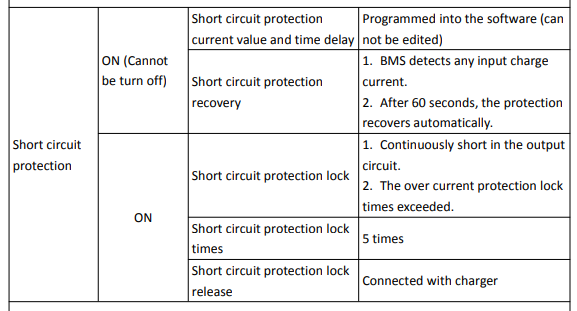
I guess Short Circuit Protection (different to over current protection) has been activated on the BMS. Normally this should reset itself after about 1min or if charge current is detected, unless there is a permanent short circuit in the battery circuit (either the BMS or across the inverter battery terminals)... maybe the precharge circuit has been damaged if your BMS has one. Looking at my BMS manual (not Hoselect, but they are all quite similar) the SCP can also be activated if Over Current Protection has been triggered too many times. Do you have an OCP count? Here's an excerpt from my manual in case it helps: It seems the only way to deactivate it would be to reconnect it to a charger, but as you say it goes into protection as soon as you close the breaker. You may be able to get it started by precharging the circuit before closing the breaker, but I hesitate to give specifics because I'm not a sparky and I don't have personal experience with this. There are quite a few topics where people had to precharge before connecting a battery, otherwise maybe someone else with more experience can chime in. You may need to first check that there is no short across the battery terminals of the inverter, but be very careful, make sure everything is disconnected and turned off for quite a while before touching anything as the inverter will hold charge in its internals which can be very dangerous, get a professional to check it out if you don't have experience. That's all the ideas I have.
-
Totally agree, that's kinda what I meant by "load test them properly", but thanks for clarifying 😀👍
-
Error code 4 is Battery Voltage Too Low. As a few have mentioned above, it is likely the batteries. The voltage might look fine when disconnected, but as soon as the inverter switches on and draws power the voltage is probably collapsing. It looks like you have 8 batteries in the bank? If only 1 is bad it will pull the whole bank down under load. If you can load test the batteries properly and find the 4 best ones you could possibly get the inverter to run and then limit your load until you can get new batteries. At least that way you can test if the inverter works before taking it off the wall.