


DuncThePunk
Members
-
Joined
-
Last visited
Everything posted by DuncThePunk
-
Thanks so much for this! This seems like the best option for me. I have found someone who may be able to repair it, but I need to ship it to JHB and even then, 50/50 at best. 3 of these are probably the best option. Thanks again for posting this!
-
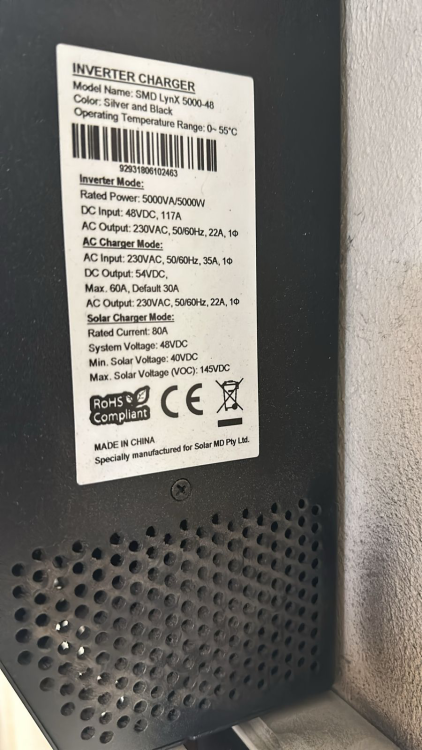
Thanks so much for this detailed response! I really appreciate it. Here is the info I have from the side of the unit. You are correct that the 3 phases don't share any loads or anything. I use Solar Assistant to change the mode from SBU to UTI when required based on the battery level which are shared between all 3. All I need is to make sure that they behave together and switch to SBU / UTI when needed and charge the batteries correctly. I don't have the firmware version on hand at the moment. I'll check it when I get home. Yeah, I have seen that PWM vs MPPT issue. This one looks like more of what I need. If the firmware versions are different, but they are running independently, should this (and I obviously am just looking for some advice and won't hold any grudges if it is not 100% correct) work? https://www.makro.co.za/hardware-auto/electrical/inverters-solar-panels/inverters/5kva-hybrid-inverter-80a-mppt-built-in-parallel/p/ffbb4015-28e0-4e63-85e8-35c1ab828e76?gad_source=1&gbraid=0AAAAADiAUi0CqCBb-aNP_e-2pMIDC2jq8&gclid=CjwKCAjwxNW2BhAkEiwA24Cm9Njv9qhMIe5-MpmZuJc-arYskLeOYmnt4kZMPrrRWI8vTOgsQvR6ChoCVksQAvD_BwE
-
Hi, Yesterday one of my Axpert SMD Lynx-48 inverters died. Beeped with error 53 for a while, then went off completely. Also a strong smell of fried electronics. Ouch. I have 3 of these running together, one per phase. The one that died was the master, but also connected to the biggest solar array and the highest loaded phase. It definitely was the one that worked the hardest. It was installed in 2018. I need advice as to what to do to get it replaced. This looks very similar, but it obviously needs to run in an array with the other two, and I'm not sure this one will. https://www.takealot.com/mecer-axpert-v-5kw-pure-sine-wave-inverter-with-2400w-pwm-sol-i-/PLID92853226?gclsrc=aw.ds&gad_source=1&gclid=CjwKCAjw59q2BhBOEiwAKc0ijbfugMjmGHmXrSJVbmYKce5UKOqHYFHHykxTSnv3YWaJdZin9mtbuBoCVpUQAvD_BwE&gclsrc=aw.ds I've called a few companies, but they all don't seem clear about what to do, and I'm worried they're going to tell me I need to replace all 3. I'm very not keen for that. Is this a simple rip and replace job I can do myself, or is that a dumb thing to do? They are pretty old and are likely running on much older firmware, so I don't know if this is an issue to run them together or if I may need to replace all 3. Any advice would be greatly appreciated.
-
I'm running 3x SolarMD SS4037 batteries running with 3x Axpert Inverters. Agree that the logger is not great, and the Axpert AI thing sucks. I posted this onto MyBB forum yesterday with an update on my setup. After waiting for years for SolarMD to enable "Load Shedding Prep" via MQTT so I can automate it, and not have wait up until after power comes back on at midnight to manually start the batteries charging again for the next 4am load shedding sesh, I took matters into my own hands. I set up Solar Assistant on an old Pi 3, disconnected the inverters from the SolarMD logger (serial) and connected them to Solar Assistant via USB. I then integrated Solar Assistant into HA and everything is perfection. It took a bit of tweaking to get it all right. The SolarMD batteries use a CAN bus to communicate which wouldn't work with Solar Assistant. So I left the SolarMD batteries connected to the SolarMD logger which sends data into HA via MQTT and just connected the inverters to Solar Assistant. It's critical to get your float and absorption charge voltages right so it doesn't over charge the batteries (the values in the SolarMD manuasl are not correct!), but it's been working for a week now (through a pretty heinous load shedding patch) flawlessly. I have an automaton that switches to utility charging 45 mins before load shedding starts (as provided by the awesome COCT Load Shedding Integration) and then switches to SBU 1 minute before load shedding starts to prevent the quick drop in voltage when a dirty switchover happens if the grid suddenly disappears. This sometimes makes my HT Receiver drop which kills whatever I'm watching which is irritating (first world problem for sure!) but I thought if I could automated that problem away, then why not! I can also control when the inverters switch to SBU now much more efficiently that using the SolarMD "AI" thing which seems pretty random sometime and is terribly inefficient. I can now switch to SBU based on many different sensors via HA (and back to grid when needed). SolarMD used to switch off Utility to SBU around 70-75% SOC which meant that my batteries were full around 11am and I wasted all the lovely sun that I wasn't actually using for the rest of the day. I used to manually turn off Eskom at the meter during summer because I'm a maximiser and inefficiency like that drives me up the wall. All fixed now! Very stoked with Solar Assistant. It is a R900 additional purchase (plus a Pi if you don't have one) but to me, this is what Home Automation is all about. Making the stupid annoying stuff just go away. Well worth it! I am waiting on a fix from Solar Assistant to allow me to change the Grid Charge Current via HA. It gives an error at the moment, but I see the next beta already has some fixes for MQTT control so I hope this is sorted soon. Not being able to do this means I have to set it at max for a quick charge when needed for Load Shedding, but the inverters are powered only by battery so they consume around 120W all night and can run the batteries too low if I don't do quick small top up charge cycles. Being able to Adjust the Grid Charge would mean I can set it to 2A and use Utility and Solar at night so it would charge very slowly at night and compensate for this 120W inverter usage, but the taps could be opened up by HA when load shedding is coming so it can charge enough to get the through.
-
Since I got the City of Cape Town Load Shedding Schedules into Home Assistant (https://github.com/tinuva/ha-coct-loadshedding for anyone interested), being able to automatically start Load Shedding Prep via MQTT or any kind of API would be a MAJOR win. Literally the only issue I have left is when Load Shedding comes on at 5am and the batteries don't have much charge left. I either have to wake up at 4am to start load shedding prep (and it has happened that the internet was down once and I couldn't via the MyPower24 site coz the Logger wasn't connected, or the house goes dark which is a major pain in the @$%. Anyone at or with contacts at SolarMD, PLEASE add this!!! PLEASE!!!
-
Hi, If this helps anyone, feel free to use it to get SolarMD MQTT sensors into Home Assistant. I just enabled the MQTT function on the logger and told it to send data to my MQTT broker on HA. I then used MQTT explorer to go into the broker and see what data I was getting from the logger. With that, I created these sensors in HA: #SolarMD Inverter - platform: mqtt name: "SolarMD Battery Bank Capacity" state_topic: "solarmd/energy/outputEnergy/bank1" unit_of_measurement: "%" value_template: "{{ value_json.capacityP | round(0) }}" - platform: mqtt name: "SolarMD Inverter Grid Power" state_topic: "solarmd/power/outputPower/grid" unit_of_measurement: "W" value_template: "{{ value_json.powerW | round(0) }}" - platform: mqtt name: "SolarMD Inverter Load Power" state_topic: "solarmd/power/outputPower/load" unit_of_measurement: "W" value_template: "{{ value_json.powerW | round(0) }}" - platform: mqtt name: "SolarMD Inverter Solar Power" state_topic: "solarmd/power/outputPower/pv" unit_of_measurement: "W" value_template: "{{ value_json.powerW | round(0) }}" - platform: mqtt name: "Battery Raw Power Out" state_topic: "solarmd/power/outputPower/bank1-dischargingPower" unit_of_measurement: "W" value_template: "{{ value_json.powerW | round(0) }}" - platform: mqtt name: "Battery Raw Power In" state_topic: "solarmd/energy/outputEnergy/bank1" unit_of_measurement: "W" value_template: "{{ value_json.powerW | round(0) }}" - platform: mqtt name: "Grid Available" state_topic: "solarmd/power/outputPower/grid" value_template: "{{ value_json.available }}" - platform: mqtt name: "Solar Available" state_topic: "solarmd/power/outputPower/pv" value_template: "{{ value_json.available }}" - platform: template sensors: solarmd_inverter_battery_power_out: friendly_name: SolarMD Inverter Battery Power Out unit_of_measurement: "W" value_template: >- {% set solarmd_inverter_battery_power_out = ((states('sensor.battery_raw_power_out'))) | int %} {{ ([0, solarmd_inverter_battery_power_out,]|sort)[1] }} - platform: template sensors: solarmd_inverter_battery_power_in: friendly_name: SolarMD Inverter Battery Power In unit_of_measurement: "W" value_template: >- {% set solarmd_inverter_battery_power_in = ((states('sensor.battery_raw_power_in'))) | int %} {{ ([0, solarmd_inverter_battery_power_in,]|sort)[1] }} I also created these template sensors to clean up the data a bit so I could make better gauges and use it better in the HA energy dashboard: - platform: template sensors: battery_raw_power_in_kw: value_template: "{{ states('sensor.battery_raw_power_in')|float(0) / 1000 | round(1) }}" unit_of_measurement: 'kW' friendly_name: Battery Raw Power In KW I have noticed that the grid power used reported by the logger is about 10-12% lower than my meter is reporting, but it's ok and helps me keep an eye on energy usage. I also have several automations that only trigger then I'm making enough solar to cover it (like pool pump, geyser in summer) etc. Super cool! Let me know if you need more help.


