waynehooper
Members
-
Joined
-
Last visited
-
Currently
Viewing Topic: Looking for a silent/quiet 8kW hybrid inverter
Everything posted by waynehooper
-
I am reading the battery via the inverter, and that is working perfectly.
-
Can this battery be connected directly to Solar Assistant, or should I just read the battery data via the inverter connection to Solar Assistant?
-
On hold pending sale
-
Files sent
-
Hi Greg No problem, will send in the morning, when I get into the office. Regards Wayne
-
Thank you, will have a look
-
Thank you, will probably go with the Kynee - spoke to Steve from Powerforum and he had very positive things to say about it. Surprisingly, the 8 panels charge my 3 Pylontech UP5000's (for sale in the Classified section) perfectly. In winter I cannot put much excess to the geyser, but in summer the batteries are fully charged by 12pm and the excess goes to my geyser.
-
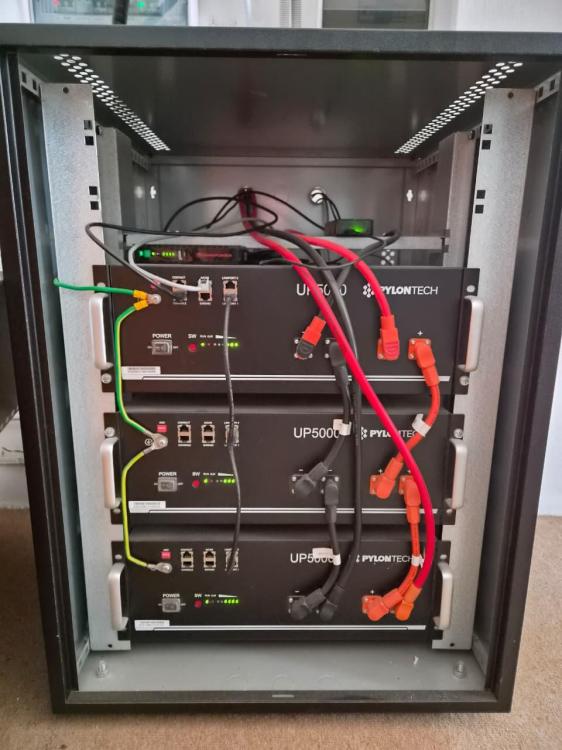
Item: 3 x Pylontech UP5000 LiFePO4 (4.8kWh, 48V) - all upgraded to 1C firmware Age: 2 x 3 years - 1 x just under 2 years Price: R7500 Each - If you take all 3, I will throw in the battery cabinet for free Payment Method Accepted: Cleared EFT Warranty: Should still have, comes with 5 years. It was registered for the 10 year warranty but I'm unsure if that is transferable. Packaging: 2 original boxes. I can package at buyers expense if it needs to be shipped. Hence prefer collection Condition: Excellent working condition — SOH all 97%, Cycles - 321, 385, 389 I can provide SOH reports. Location: East London Reason: Upgrading to a larger capacity battery Shipping: Preferably not — but can discuss at buyer’s risk and cost Collection: Yes, collection preferred
-
Hi All I am looking for some advice - hope someone can assist. I have a 8KW Sunsynk and I am looking to replace my old batteries with a 16Kw single battery. I have 8 solar panels and my max battery discharge on the Sunsynk is set to 100A Have seen the HinaEss PowerGem Max 16kWh and the Knyee KNY-ES-LV-16 16.08 kWh - which one would work better with the Sunsynk and Solar Assistant. Thanks Wayne
-
I hope you can assist me with some advice. What 5Kwh battery would you recommend to use on the Axpert 5.6kw that talk to the BMS and not have to use the USER setting? I have looked at the Pylontech UP5000, what are your thoughts as there is a pylon setting on the Axpert 5.6?
-
Have a look at links below, in the USER settings you need to set the bulk, absorption and cut off voltages to the specifications for the Battery https://www.solar-europe.co.za/product/dyness-battery-lithium-ion-4-8kwh-48v-100ah-dyn-b48100/
-
They pushed the 95% firmware to my battery (Inverter is Mecer SOL-I-AX-5M4 Axpert MKS IV 5600va) and since then I have been having issues with the inverter restarting when the battery reaches 100%. You can hear the audible clicks from the BMS and after that the inverter shuts down and restarts. Happened twice this morning within a few minutes. Last night I got a F60 error on the inverter (with red ring) and battery showed error state as well. I have messaged CFE and they are looking into it!
-
I dropped the charge rate to 20A and CFE updated the firmware on the battery. Since then it has been stable. However the CFE batteries discharge down to 90% and then recharge back up to 100% constantly. They updated the firmware to limit the discharge to 95%, but since then I have been having constant problems with the battery and inverter restarting. I even had a F60 error on the inverter and battery gave an error as well. They are investigating, so hopefully will have a solution soon.
-
I have the same problem. The server seems to go down every few weeks, last time it lost all the past history in the graphs!
-
I have been at the inverter when it gets the F08, and you can hear the loud click on the battery when the BMS disconnects, and right away the inverter ring turns red and the F08 pops up on the inverter. What you says makes total sense, unfortunately, the Axpert firmware is not setup properly yet to handle the larger lithium batteries, and it is something they are going to have to address going forward. 20A on one 5.2kwh battery is fine, but when you have multiple batteries it will take too long to re-charge.
-
I received advice from @Devanté to change the charge current to 20A. I have been using a 30A setting when getting the F08 error. I changed to LIB and 20A and so far no F08 error (2 charge cycles so far)
-
Looks like the 20A setting is working. I changed to the LIB setting on my Axpert 5.6kva and set the charge rate to 20A. Has been two charge cycles and no F08 errors yet!
-
Thank you for the advice, I will give 20a a try. The Hubble voltages are a bit higher than the CFE ones, so will try it with the Cfe recommended settings. Our stage 6 was 9 hrs today and the shortest time between 2 3hr loadsheddings was 1 hr. Had to do 40a for the hr to get the battery up enough to keep us going for the next 3 hr session . On Wednesday we have 4 3hr sessions, not looking forward to that .
-
I am doing a manual workaround for stage 6. Using the SolarPower/WatchPower app to temporarily increase charge amps to 40a, and the bulk charging voltage to 56v. To avoid the F08 error I watch the battery % charge and when it gets over 95% I change the charge voltage back to 54v.
-
I have a Mecer SOL-I-AX-5M4 Axpert MKS IV 5600va that I am using with a CFE-5100s 5.12kwh battery (firmware has been updated). I have been using the USER setting with the recommended battery settings as the LIB setting forces bulk and float charge voltages to 56v and this results in a F08 error on the inverter when the battery is full. The inverter then drops power and restarts. My problem is that the USER setting does not show the correct battery voltage so charging tapers off, ie. when the battery is at 82% it is only charging at 2.35A. This is fine in stage 3 and 4 as over time it the battery will get to 99%. However under stage 6 the battery is at 82% and we have 3hrs load shedding in East London. Is there a updated firmware for this inverter (Watchpower app shows Main CPU 00052.00 and secondary CPU 00030.07) that allows you to change the bulk and float voltages in the LIB setting?