rkistner
Members
-
Joined
-
Last visited
Everything posted by rkistner
-
For the WiFi route, you have some options: 1. Use the "Sonoff LoadShedder" (https://www.sonoffafrica.co.za/product/loadshedder/), along with a Sonoff relay. This way everything can be controlled using the Sonoff software - no complex integrations required. Unfortunately you don't get the standard 3-prong ZA plugs with Sonoff, but you may be able to fit a Sonoff MiniR3 16A behind the outlet. Also keep in mind that this will depend on WiFi + internet working, although Sonoff iHost may solve that when released. 2. Use HomeAssistant, along with any relay that integrates with it (personally I still prefer Sonoff, and have had issues with Tuya-based ones). You may be able to integrate directly with your inverter, avoiding the need for the "LoadShedder". Depending on the inverter + integration, there may be a delay in detecting loadshedding (e.g. the most common Deye/Sunsynk integration just checks once every minute). This can also work fully on your local WiFi, without an internet connection. But if you're not doing any other home automation, this will be a lot of work and learning to configure just for this one thing.
-
I have a Revov R100 battery. Specs says it's "designed" for 7000 cycles, with a warranty of 10 years or 3500 cycles at 100% DOD. 50% discharge counts as 0.5 cycles. So with this, and considering I only have a single 5.1kWh battery, I'm going to cycle it as much as I can (down to 20% during the night, and 5% during load shedding). And if I do shorten the battery life a little because of this... by the time I'm over 3500 cycles, batteries may be a lot cheaper than they are now.
-
So the cycle count is actually displayed on the battery's LCD - got the info from Revov's technical support: Analogue information -> Cell Capacity -> CC (cycle count). And it's nice to see it matches up nicely with the total battery discharge stats - in my case around 210-220kWh total discharge resulting in 43 cycles, for a 5kWh battery.
-
Only saw this now: Looks like that should work with the cable from SolarAssistant. Not sure about the Pylon one though, that may use a different protocol.
-
I have a Revov R100, which has a design lifespan of 7000 cycles, and warranty for 3500. Is there a way to view this cycle count? I can't find it on the battery's menu or my Deye inverter. It sounds like partial cycles are measured according to the capacity used, e.g. using 20% would count as 0.2 cycles. But I'd like to confirm this, so it would be useful to see the actual number of cycles. It looks like solar assistant might be able to get this info, but I don't want to spend over R3k just for those stats (Solarman + Home Assistant already works well for me).
-
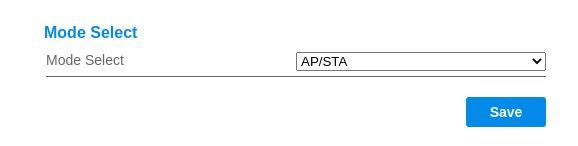
Changing to AP/STA worked for me to disable the AP (Deye inverter with Solarman logger).
-
Disclaimer: Not an electrician and can't tell whether this is fine legally. Are each of the plugs and cables rated for 16A, and do you have circuit breakers of 20A (or less) in the main db for each of the sockets? If the cables or plugs are rated for 10A, then you'd need smaller circuit breakers. You'd also need the same protection from the inverter side - depending on the inverter it may already have built-in over-current protection (must also be 20A max). That's the minimum you need for it to be safe, i.e. not melt the cables or catch fire when you overload the circuits, but not sure if it's sufficient or legal. In terms of what's advisable - it would be much better to use direct wiring, without sockets/plugs/extension cords between the db's. You can use a changeover switch to switch between using mains or the UPS to supply the mini dbs.
-
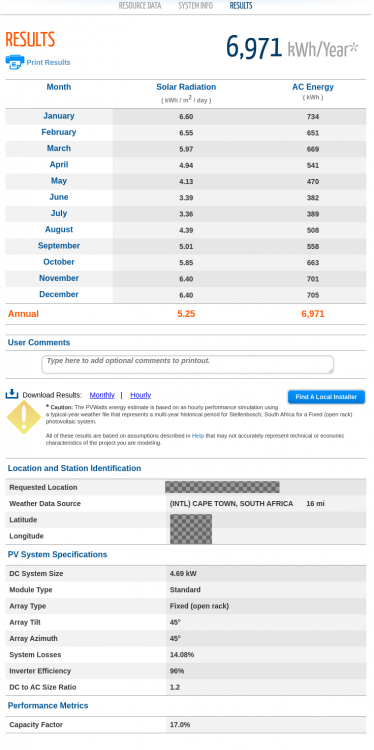
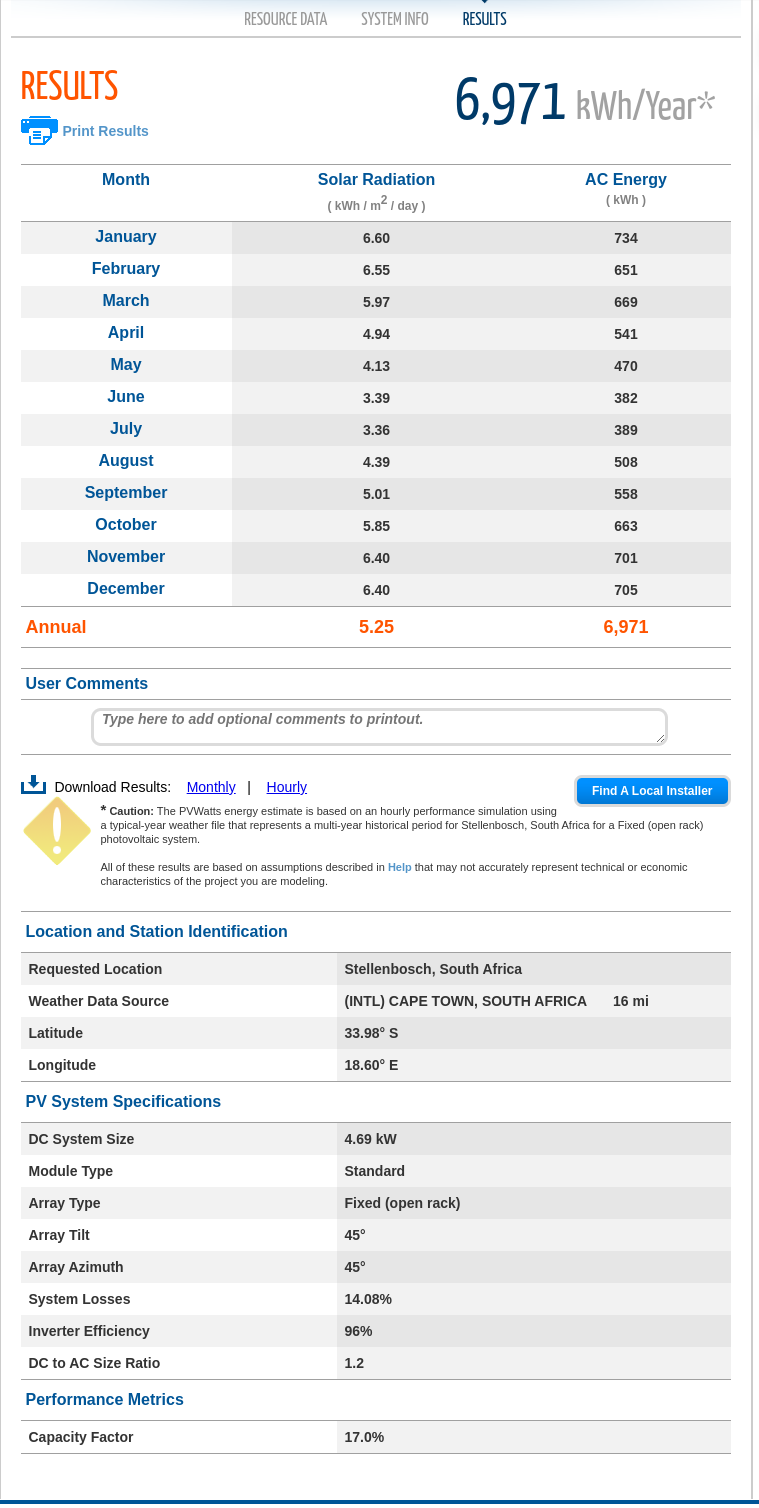
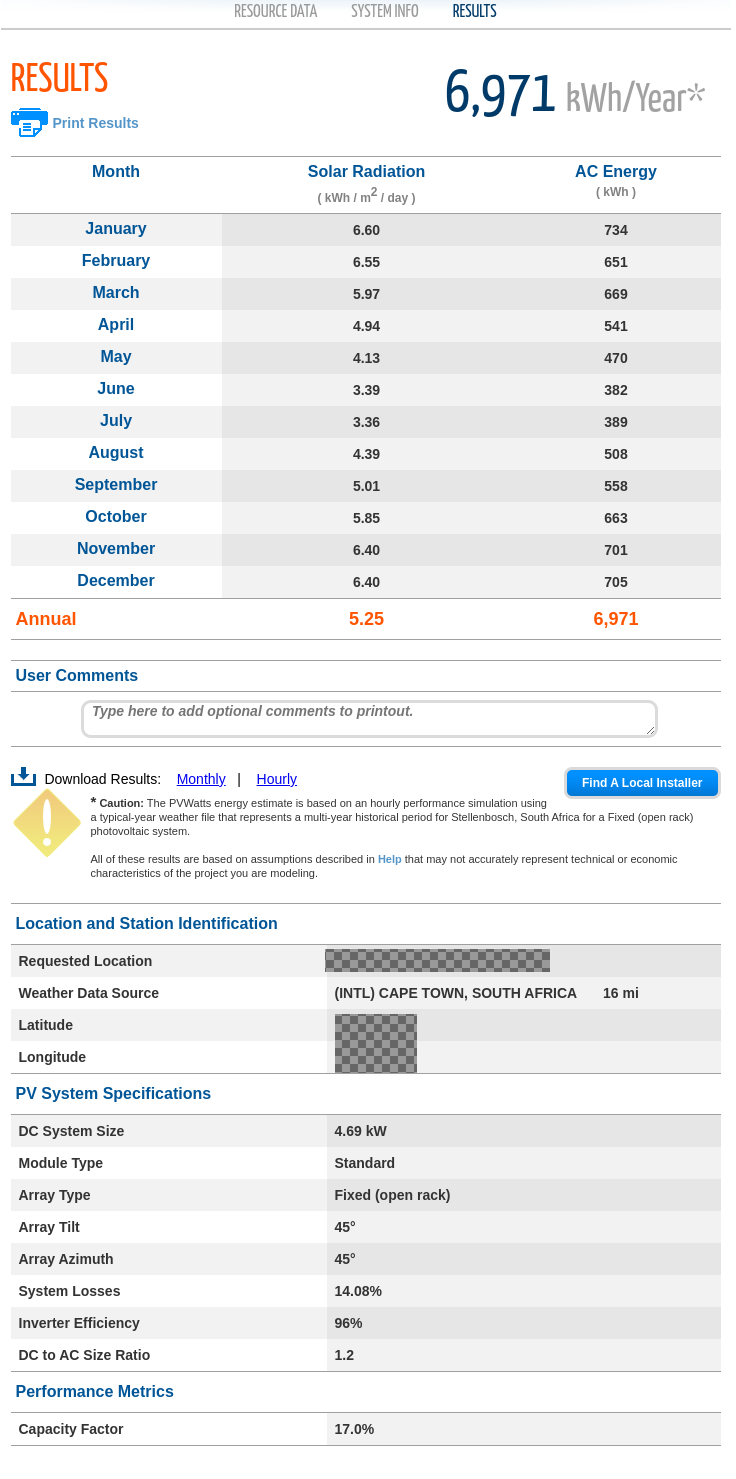
I came across simulation software from the US NREL, and just want to share for anyone else looking for something like this. This is useful to estimate how much power could be generated throughout the year, and what the effect is from different placement of the panels - for example comparing a roof facing NE vs N, or using different tilt angles. 1. A simple online calculator: https://pvwatts.nrel.gov/pvwatts.php This supports basic calculations of monthly generated energy, based on historical weather data for the location, position of solar panels, solar array size. Hourly data can be exported. 2. For more advanced simulations, they provide desktop software: https://sam.nrel.gov/download It's a bit of a pain to figure out initially (weather data has to be downloaded separately), but it has full support for simulating based on historical weather data for the location, position of solar panels, solar array size, inverter and MPTT parameters, shade based on 3D models, and a lot more that I haven't explored. There are lots of options for simulations - I picked "Photovoltaic => Detailed PV Model -> No Financial Model". (Times are in UTC in these graphs)