


Ed Zozulya
Members
-
Joined
-
Last visited
Everything posted by Ed Zozulya
-
I came across information somewhere that Deye is working on reducing the inverter's own consumption when the load is powered only by the grid. That is, UPS mode. Has anyone noticed this in the new firmware?
-
Perhaps - by increasing the load - to move to the low-voltage, high-current segment of the Voltage / Power graph
-
I can't anymore. The shadow was eliminated - cut the trees.
-
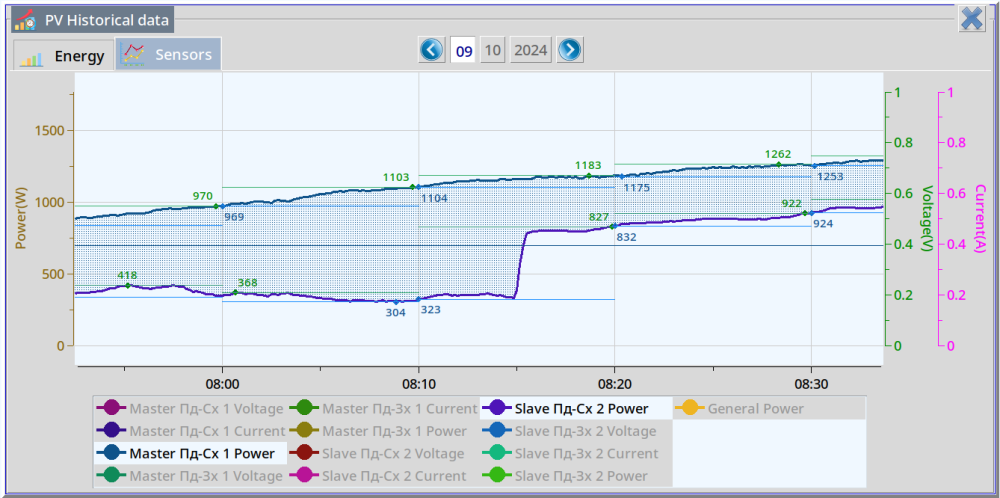
The difference in the generation of a partially shaded string when using the "MPPT Multi-Point Scanning" option. Until ~08:15 - the option is disabled After ~08:15 - the option is enabled The string "Slave Пд-Сх 2" have a two panels of six partially shaded. The string "Master Пд-Сх 1" - not shaded. The schedule is based on monitoring data dSolar http://doro.poltava.ua/dsolar with a one seconds interval.
-
Remote update
-
SUN-6K-SG03LP1-EU Firmware updated today. HMI: 0000-C36E Main: 0-4386-1515
-
Friends! About a year ago, I sent suggestions to the Deye development team for firmware modifications that would greatly improve the performance of hybrid inverters, which are useful and important. But, unfortunately, these proposals were not accepted. I ask the community to join the discussion of the proposed functionality, share the post, support it with a like. That is, let the Deye development team understand that this functionality is important for all of us. Thank you! Join the discussion! Deep Sleep Mode.pdf
-
I updated the firmware three weeks ago (Deye SUN-6K-SG03LP1). The situation with the speed of finding a new mppt point, in my opinion, is not good. Search by the Deye Inverter for the second mppt point with partial shading of one panel of a string of six panels: 14:06 - the first attempt 14:09 - second attempt 14:12 - the third attempt 14:14 - the fourth attempt

-
I checked. This option does not work for me. I highlight a checker. I save the settings. I am looking at the settings - the option is self-turned off (is not stored).
-
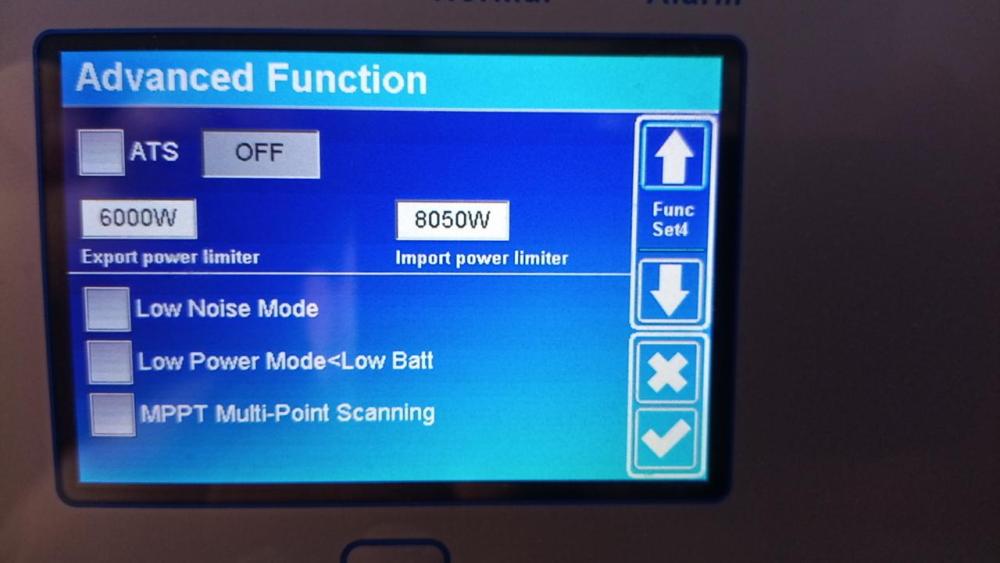
SUN-6K-SG03LP1-EU HMI: 0000-C369 MAIN: 0-4385-1515 New options in configure menu:
-
top left see picture on chapter "Equipment" to this link http://doro.poltava.ua/dsolar/index.html
-
SUN-6K-SG03LP1-EU ------------------------------ HMI: 0000-C366 Main: 0-4384-1515 firmware upgraded 23.09.2023 PS: Maybe a bag
-
Hello! Anyone using "low power mode"? It doesn't work for me. I have a parallel system of two SUN-6K-SG03LP1-EU inverters. Low Bat set as 51.2 Volt. Time Of Use Voltage set as 51.1 Volt. Checker for "Low Power Mode<Low Batt" set is on. Grid is connected. PV is disconnected. The battery voltage reaches 51.1 volts. But the inverters do not switch to the low power mode. Anyone have any ideas?
-
Battery Charge and Battery Discharge measured via Victron SmartShunt generation PV and Load measured via Deye. via formule SelfConsumption = PV + BatteryDischarge - BatteryCharge - Load here SellfConsumption means All Energy loss Where measuring error? Load, PV ?
-
There are nuances. Unfortunately, they are known only to the firmware developer.
-
It seems to me that it is necessary to add a certain algorithm for disabling the slaves inverter. For example, in the absence of solar generation and low load - turn off slave inverter. And turn on the slave inverter when the load increases or the sun appears. I tried to turn off the slave inverter manually, but the master also turned off. Therefore, firmware correction is necessary. How realistic is it that deye developers firmware will implement such an algorithm? Have you tried suggesting changes to the firmware?
-
in this case "Self consumption" it is: SelfConsumption = PV + BatteryDischarge - BatteryCharge - Load i.e. all lost energy
-
Yes, I agree. This is own consumption (idling) + costs for converting energy from direct current to alternating current.
-
I have two inverters sun-6k-sg03lp1 connected in parallel that work without a grid (only with pv and battery). The photo shows the actual self consumption of two inverters for the month of May. Self consumption is quite significant. Does anyone have any ideas on how to reduce the inverters self consumption?

-
I haven't decided yet. I haven't decided yet.
-
I Created a demo login, which makes it easier to familiarize yourself with the current functionality of the program. For this you need: 1) Download the dSolar client program for Windows or Linux or Android using the link: http://doro.poltava.ua/dsolar/index.html#dSolar download 2) Run the program. The program will automatically connect to my server monitoring and you will be able to observe the performance of my own autonomous solar station.
-
New Version ver 1.0.0 (09.05.2023) * Checking the existence of a new version * PV graph for historical data * Assembling the dSolar client for Linux x86_64 architecture * Control of 4-channel Wi-Fi relay to use excess energy * Control of transition to absorption, float, charge/discharge battery state
-
I have two questions, I will be sincerely grateful for your help. The first question: Can I turn off/on or put the inverter to "sleep" mode by sending a modbus command to it? The second question: What does register 043 of the modbus protocol mean. They named it as: "Switch on and off enable" Thank you!
-
Yes, of course we will discuss any questions that interest you.
-
New version of dSolar program ver 0.0.5 from 13.04.2023: * Sensor portrait orientation of the screen * Message from the server * Optimization of statistical requests to the database * Assembling the dSolar server for Linux x86_64 architecture



