


Ed Zozulya
Members
-
Joined
-
Last visited
-
I came across information somewhere that Deye is working on reducing the inverter's own consumption when the load is powered only by the grid. That is, UPS mode. Has anyone noticed this in the new firmware?
-
-
-
Perhaps - by increasing the load - to move to the low-voltage, high-current segment of the Voltage / Power graph
-
I can't anymore. The shadow was eliminated - cut the trees.
-
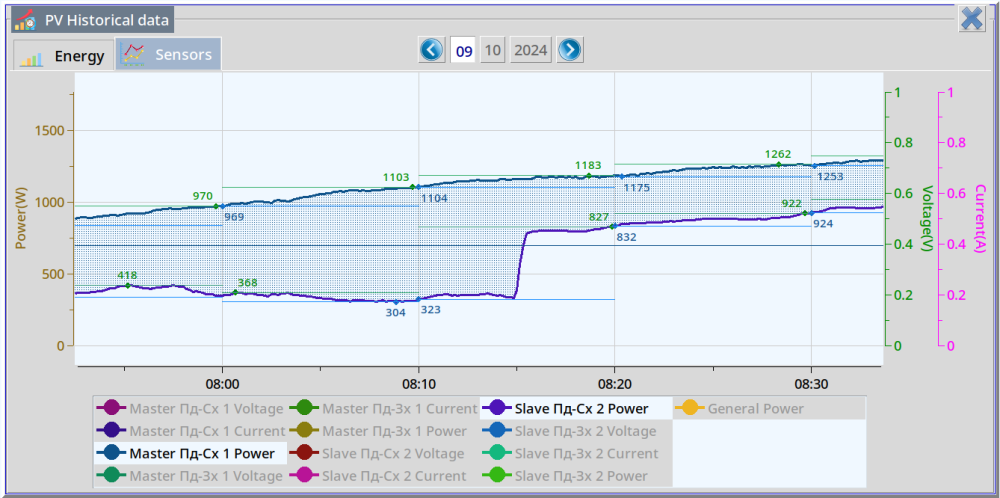
The difference in the generation of a partially shaded string when using the "MPPT Multi-Point Scanning" option. Until ~08:15 - the option is disabled After ~08:15 - the option is enabled The string "Slave Пд-Сх 2" have a two panels of six partially shaded. The string "Master Пд-Сх 1" - not shaded. The schedule is based on monitoring data dSolar http://doro.poltava.ua/dsolar with a one seconds interval.
-
Remote update
-
-
SUN-6K-SG03LP1-EU Firmware updated today. HMI: 0000-C36E Main: 0-4386-1515
-
-
Friends! About a year ago, I sent suggestions to the Deye development team for firmware modifications that would greatly improve the performance of hybrid inverters, which are useful and important. But, unfortunately, these proposals were not accepted. I ask the community to join the discussion of the proposed functionality, share the post, support it with a like. That is, let the Deye development team understand that this functionality is important for all of us. Thank you! Join the discussion! Deep Sleep Mode.pdf
-
-
I updated the firmware three weeks ago (Deye SUN-6K-SG03LP1). The situation with the speed of finding a new mppt point, in my opinion, is not good. Search by the Deye Inverter for the second mppt point with partial shading of one panel of a string of six panels: 14:06 - the first attempt 14:09 - second attempt 14:12 - the third attempt 14:14 - the fourth attempt

-
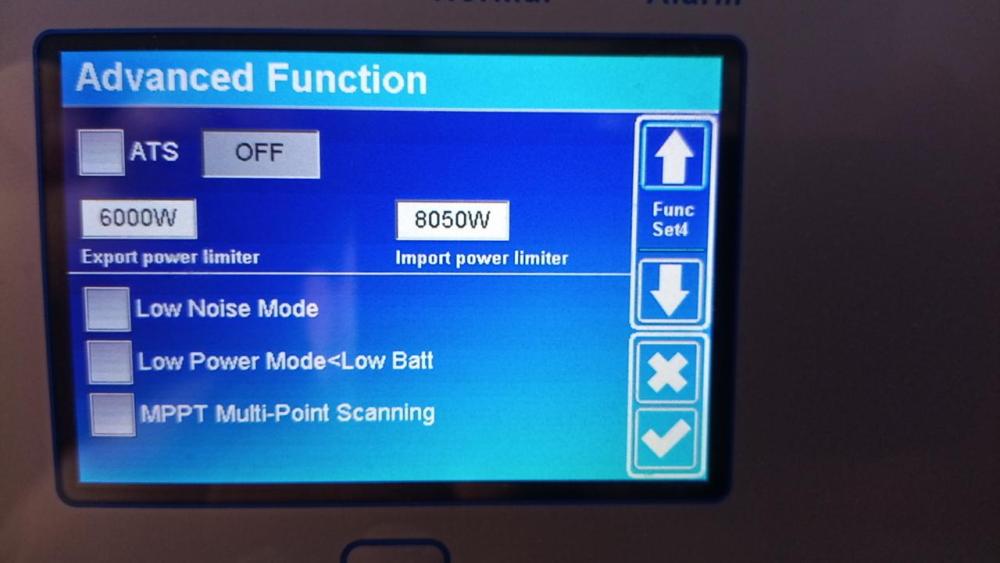
I checked. This option does not work for me. I highlight a checker. I save the settings. I am looking at the settings - the option is self-turned off (is not stored).
-
-
SUN-6K-SG03LP1-EU HMI: 0000-C369 MAIN: 0-4385-1515 New options in configure menu:
-
top left see picture on chapter "Equipment" to this link http://doro.poltava.ua/dsolar/index.html
-
-
SUN-6K-SG03LP1-EU ------------------------------ HMI: 0000-C366 Main: 0-4384-1515 firmware upgraded 23.09.2023 PS: Maybe a bag
-
Hello! Anyone using "low power mode"? It doesn't work for me. I have a parallel system of two SUN-6K-SG03LP1-EU inverters. Low Bat set as 51.2 Volt. Time Of Use Voltage set as 51.1 Volt. Checker for "Low Power Mode<Low Batt" set is on. Grid is connected. PV is disconnected. The battery voltage reaches 51.1 volts. But the inverters do not switch to the low power mode. Anyone have any ideas?
-
Battery Charge and Battery Discharge measured via Victron SmartShunt generation PV and Load measured via Deye. via formule SelfConsumption = PV + BatteryDischarge - BatteryCharge - Load here SellfConsumption means All Energy loss Where measuring error? Load, PV ?
-
There are nuances. Unfortunately, they are known only to the firmware developer.



