


ccrause
Members
-
Joined
-
Last visited
Everything posted by ccrause
-
Thinking/speculating a bit more about the on-board power supply, there is probably a single power supply connected to the DC bus that powers all the electronics - so there is probably some fat in the 12V supply. This is a good suggestion, will check to see how easy it is to make a connection inside the enclosure. Thank you for your input!
-
@Yellow Measure : Yes, I will use a buck converter to step down the voltage to 5V (the RS485 module is running at 5V). I am also running the Sunsynk dongle, so the 12V supply will have to power 2x ESPs. If the dongle is rated at 4W it implies it is using a linear regulator (12V * 0.33A). Using a buck converter (12V -> 5V) at 80% efficiency would then add another 2W to this. It doesn't sound like much, but I do not want to blow something on the inverter side.
-
I am running ESPHOME with slipx06 Sunsynk yaml on an esp32c-3. Currently I power the esp32-c3 from an external power supply, but I would like to get rid of this and power the esp directly from the inverter. sgs mentioned that the rapid shutdown (RSD) port can supply 12V. I checked this on my inverter and it indeed has 11.8V between connection 11 & 12. Does anyone know what the current rating of this port is? SUNSYNK-8K-SG01LP1
-
To some extent yes. One can interface with e.g. a smart LG product via the LG ThinQ integration, unfortunately this still runs via LG's cloud "service" rather than a local network. Similarly smart Sasmsung products can be controlled via SmartThing which also requires a Samsung account. It seems as if many commercial "smart" products are just honeypot traps designed to lock the user in a proprietary ecosystem. Note that I do not have experience automating these proprietary smart devices, I use smart switches running opensource ESPHome or Tasmota firmware. Maybe one day something like the Matter standard will put the power of home automation back in the hands of users.
-
My app does change the arrow direction to indicate charging/discharging, so your Power Flow view is unexpected. To double check go to the Battery view, it should show a negative value for power when charging.
-
Wanted to check firmware version this morning and noticed screen was off. Left the screen on and it switched off again. So problem appears to be gone. Firmware seems relatively old, so screen issue apparently not due to updated version: M 6.0.2.2 S 1.7.2.4 CE 4.2.A
-
Also noticed a similar issue with my 8 kW Sunsynk. The screen seems to end up on the date/time settings page and stay on. Need to check whether firmware version changed from last requested update. System installed 2 years ago, only noticed this a week or two ago.
-
Getting advance warning of a potential strike requires electrostatic monitoring. These units seem to be much more expensive than the lightning detector that abd7 suggested (hundreds vs thousands of bucks). So the cost appears to rise steeply for the increased statistical protection. Unless you try to DIY something.
-
As mentioned already, shielded cable is your best bet to reduce interference when running ethernet cable close to other cables. Note however that there are several different types of shielding: https://www.truecable.com/blogs/cable-academy/ethernet-cable-shielding-types So do not just search for "shielded" cable, also check the shielded cable type. Also note that shielded cable should be properly grounded, use shielded (metal) connectors to terminate the cables.
-
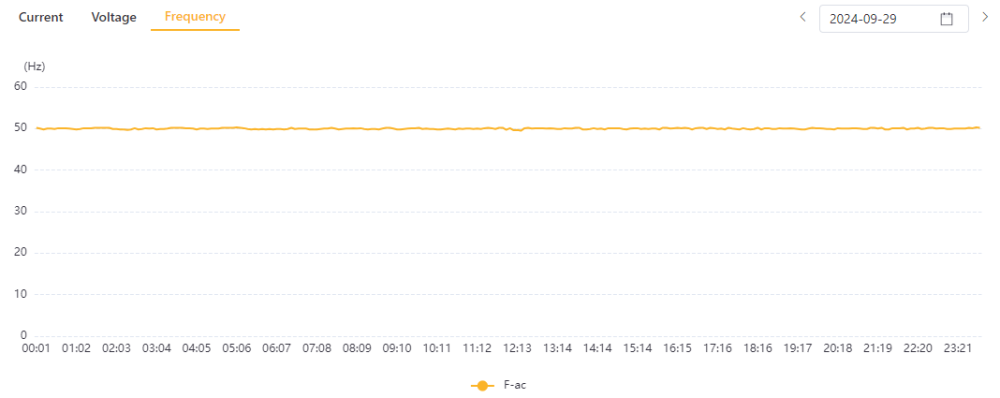
I'm based near Sasolburg. I've checked the data over the last two weeks and the largest deviation I could spot was 0.5 Hz away from 50. Below the grid frequency trend for yesterday. The daily plot over the last two weeks never looks noticeably worse than this.
-
The grid frequency seems unbelievable, especially the 0 Hz portion when the grid voltage seemed OK. My suspicion is that there is a frequency measurement problem on the inverter side.
-
The short answer is to discharge your battery at night so that excess PV during the day can be stored (as pointed out by Scorp). To achieve this, set you early morning slot (which ends around the time your PV start picking up) to something like 20% (or whatever low value you think will treat your batteries with respect). But also consider how much backup energy you need in case of loadshedding. To estimate this, monitor your night/early morning usage, then decide whether you need 2 or 4 hour reserve.

