


MightyDee
Members
-
Joined
-
Last visited
Everything posted by MightyDee
-
Maybe share screen shorts of your settings on your app. You should also contact [email protected], they can update it for you. Your installer can also do the same using the mobile app and the TCP connection Reply Reply all Forward
-
Hi Jacques, I see. Is there any official info from Luxpower that confirms the better Imp performance after this software update? I cannot seem to find anything online. The firmware update change log was not saying much also.
-
Sure 33W is tiny, but this also means people can now support larger panels if true, say 600W or so. I am more concerned with affecting Warranty, when panels produce more power than an inverter can handle. An MPPT freed from frequent clipping would also be a bonus.
-
Hi Colleagues, I saw a post on Luxpowertek SA Owners Support group on Facebook. Apparently all inverters with Serial numbers starting from 133.. can support 17A per MPPT if updated with the latest 2E8089 update. I got my update this morning, hopefully it will squeeze the extra 0.11A from my JA 550W pannels. That is, if the inverter was clipping the extra current since Luxpower SNA 5000 supports up until 13A by default. My panels have a current at max power (Imp) of 13.11A. I have 3 panels facing 15 degrees North, another 3 facing 195 degrees South (Due to limited North and East space). The extra oomp will go a long way 🙂 if this is true.

-
It was world of sunpower. They lied and said the battery communicates with Luxpower. They refused to take the battery back
-
Hi Buyeye, how does the feeding back work? Suppose you feed 100KWh to the municipality, will they allow you to use this 100KWh during winter? I thought the city just buys energy from you at R0.12C per KWh. I am not understanding this well, https://www.tshwane.gov.za/?page_id=23414 I heard the City of Tshwane supports feed-in if you have the right inverter that can cut supply when there is no Grid energy.
-
I see. I use it with CAN coms, on Pylontech battery brand (2). I use up to 60% of the battery in the evening so that I can utilise Solar to charge every morning. I have set my On-Grid End of Discharge to 40%.
-
I wonder if the BMS Bulk and Float voltages differ to the 5.4KWh 16-cell version of the SVolt batteries. I have contacted Luxpower SA to see if newer firmware updates can help on my side. Because yes even on Luxpower, the Charge Voltage is set to 54.7V and the Float at 54V. It is a BMS issue indeed, we should spam SVOLT tech support teams for help lool. Luxpower does send BMS updates for some batteries (i.e Hubble), not sure if they work with battery manufactures to make this possible. At this stage SVOLT is not under the list of supported batteries by either Growatt and Luxpower.
-
@PsyCLownalright I see w.r.t PBMS. Yes I saw the charging current setting. I meant settings to limit the capacity (SOC) of the battery. I do not want to fill my battery to 100%, I would like to charge it up until.. let us say 90% at most. So that I can cycle between 90% to 30% each day.
-
@JoeMobstarr28, which settings did you use on your Growatt for the SVolt battery? I once had a similar issue with an N-Energy battery reporting the wrong voltage of 5.0V (instead of 50V) to a Luxpower SNA inverter via RS485. I will avoid any battery that does not have CAN in future.
-
HI @PsyCLown, which BMS software are you using to read the logs? Is it Pbms Tools or something? I have also sent Luxpower some query. I believe the inverter should allow us to limit the PV charge the same way it does for AC and Generator charge. This would resolve all the problems
-
Thanks for the shared wisdom, I really appreciate it. I did check all 15 cells are 3.331V or 3.332V. They are balanced. I supposed the max values on the BMS are programmed incorrectly. I will leave the setup as it is for now. Thanks folks for all the help. I will monitor the voltage when the battery is close to 100% tomorrow morning.
-
Yes the battery is 15 Cells, my voltage normally ranges between 49V to 52.7, when full. I get warnings around this. 51.5V is actually 91% SOC. I am thinking of trying other battery brands and see if this occurs. I would have also prefer in charging my battery up to 85% max.
-
The comms are working via CAN port, and I have set the Battery brand/protocol to Polyntech (option 2). Yes OVP occurs when the voltage is about 52.9V which is way below the 55V.
-
The battery is an SVolt 5.09KWh 48V
-
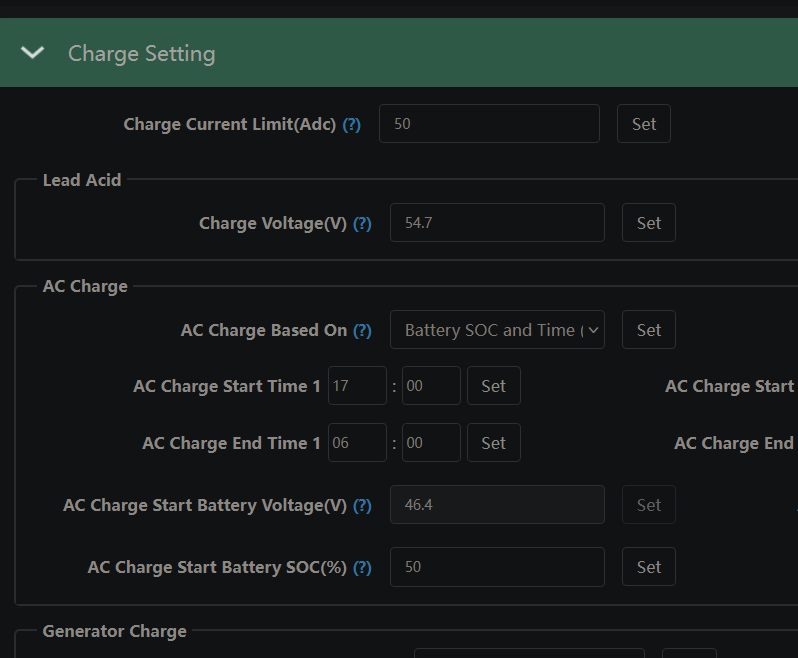
Hello everyone, Has anyone noticed how Luxpower SNA 5000 does not have settings to limit PV charge to the batteries? With PV Power, the inverter charges the battery to 100% resulting in multiple over voltage protection (OVP) warnings on the BMS and Battery High Voltage warning on the inverter. I thought it will use AC or Generator charge settings for PV charge but nope. Is there a method to limit the PV charge? I want to use the battery for loadshedding only. This issue is forcing me to discharge the battery over night to avoid filling them quickly in the morning, which avoids multiple OVP warnings on the BMS. I am using an SVolt 5.09KWh 48V battery with comms working via CAN port. This is frustrating, and shocking how this manufacture did not consider putting settings to control PV charging.
-
I gave up, and ended up changing this battery. This is a terrible battery if you want Comms with an inverter. But it worked fine with Lead-Acid Voltage Settings on the inverter. I changed to the SVolt 5.09KWh battery. It worked seamlessly with Luxpower and came with Comms cable and battery cables. The battery is super affordable than other brands
-
Hi @Revnge_SevnFold, did you get the error "Input string is not in correct format" when launching the monitoring software?

-
Hi, nope. was unable to get PBMS to detect the battery. Maybe the bms is different or my serial coms setup is incorrect.
-
Hi Everyone, Has anyone managed to change the inverter protocol of an N-Energy Battery with a computer? I bought a cheaper Solarix N Energy 3.8KWh Battery due to affordability, and a Luxpower SNA 5000 WPV. I am struggling to get the inverter to communicate with this battery via the RS485 port, despite trying PINs (1B, 2A) or (7A, 8B) on the battery as instructed by the manual. On the inverter, some o the battery brand/protocols show the SOC, however, the voltage is incorrect by a decimal i.e 5.0V instead of 50V. I installed PBMS V2.5 software to try and see whether I could change the inverter protocol of the battery as done on other similar batteries to get the coms working: Batteries with similar BMS: Ultra Energy, Jakiper, Essener, HoSelect etc. Someone on this forum managed to connect their Ultra Energy battery but they haven't shared the software they used (AIEnegy BMS software) With the help of my colleague, I am trying to connect the battery with "USB to RS485 TTL Serial Converter Adapter FTDI" pcb interface and a striped network cable. I tried using both pin layouts and Pin 6 for Ground but PBMS cannot detect the battery.

-
Do check your inverter's voltage, most 3kva inverters are 24V systems and cannot run on 48V batteries. Meaning you may be unable to upgrade your system with more batteries.
-
Alright cool, found some monitoring software PBMS, people from youtube are using this for connecting similar batteries to Growatt etc: https://shop.thesunpays.co.za/pages/technical-support I will also look for an RJ45 - serial - USB cable.
-
Your post got me worried a bit, I bought the same equipment late March but only got it installed last night. We also could not get the 3.8KW energy and Luxpower SNA 5000 Eco Hybrid to communicate. The inverter did read some info like Capacity etc but the voltage was incorrect 4.9V. Let's share our attempts in this journey, I am busy trying to find more info on the BMS, there is a "COMS Setting with digital values "000" that can be set. I wonder if this is the protocol setting that could be changed or just COM port. My BMS is written "Welcome to Bess" version "bms b005h30s11". I am having regrets with not swapping this battery with Revov R100 since its supported with the latest firmware.
-
Hi @Donalds, which pin layouts did you try on the RS485 ports? Does the inverter allow you to try different brand protocols? Ultra Energy batteries seem to use the same BMS as N Energy. Seems as if the guy below resolved the issue, please try and share your experience: https://powerforum.co.za/topic/14485-luxpower-sna5000-wpv-showing-wrong-battery-voltage/?do=findComment&comment=137722
-
Hi Arshad, I have been trying to dig information of these N-Energy batteries. They could possible share manuals with 4.8Kw Ultra Energy Batteries since are similar in design. I saw resellers selling all of the following batteries with a manufacture prefix name called `Solarix`: N-Energy Batteries, Ultra Energy, Essener, Sun Pays, HoSelect maybe too. These guys may have it. I only have the N-Energy 3.8 KWh manual (4880Ah) model
