


splunker
Members
-
Joined
-
Last visited
Everything posted by splunker
-
Sorry to hijack this thread Does anyone know what the AC and DC temperatures really mean? In simple dummies guide terms. I haven't found any documentation and I'm just a layperson with this stuff. Highest temperatures I've seen are when the Battery is charging kinda fast for long on a hot day (~64deg). I suppose another way to reduce the temperature would be to reduce battery charge max amps? Sower and cooler.
-
Thanks @phidz. Ya it never reaches 100%, despite there being more than enough power coming In. It's not the first time it's happened since the update. How does the starting SOC influence the reaching of 100%? Thanks again
-
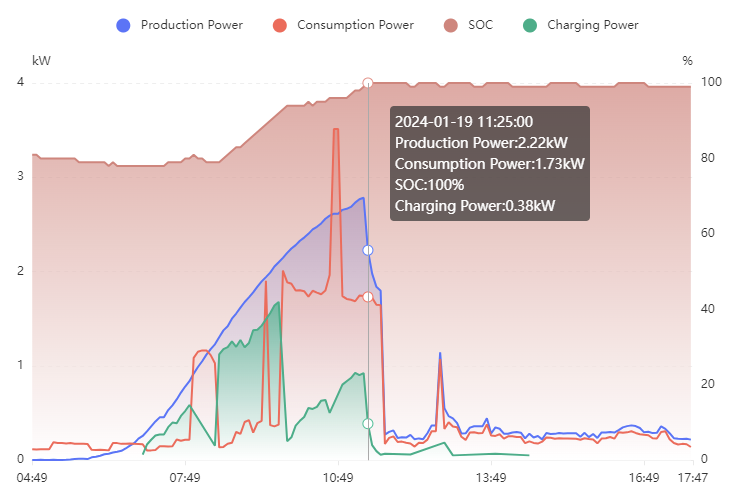
Hello My installer recently updated the FW on my Volta Stage 1 batteries, and (now that we had a sunny day in CT) I'm seeing some slightly strange behaviour. I would appreciate it if someone might share if they're seeing the same thing, and whether it's an expected change. Previously, on a sunny day, the batteries would reach 100% and then the Production power would drop away to match the house requirements: After the update, the batteries reach 99% (never 100%) and keeps drawing all available Production power: I chatted with the installer who told me that Volta's very rarely reach 100% and tend to get to 99% and float there.This is not in line with what I've seen from my batteries in the year and a bit I've had them. Also, I do't _think_ drawing all available production qualifies as floating, but perhaps I'm misunderstanding. I took a look at the BMS info, but I don't really know much about how to read it yet. I only recently got the cable (I am confused by the very high cycle count after 14 months...). If anyone might have any thoughts on this behaviour, I'd appreciate your thoughts. Is it just how the new FW behaves? Maybe the FW update was supposed to be accompanied by changes to the inverter settings? What happens to that extra power? Does the BMS just offload it somehow? Is it possible this could be damaging my batteries? If i were to get one of those meters where you feed back excess power into the grid, I guess this current setup would never have any excess power since the batteries grab everything they can. Thanks very much


-
Thanks @Sidewinder Unfortunately I can't plug the battery directly into the ha server as it's in a different part of the house.. will have to come up with a solution. I noticed something strange today again I think, maybe you can comment. For the first time in a few weeks, and the first time since the battery fw update, they actually charged to full. They got to 99% and stopped increasing, but the batteries appear to still be drawing current. Previously, they would stop charging, and the house would just run off solar. It's a little concerning that they seem to keep drawing but never increase. Typically the orange solar power curve drops.off to match the house requirements once the batteries stop charging. Thanks in advance

-
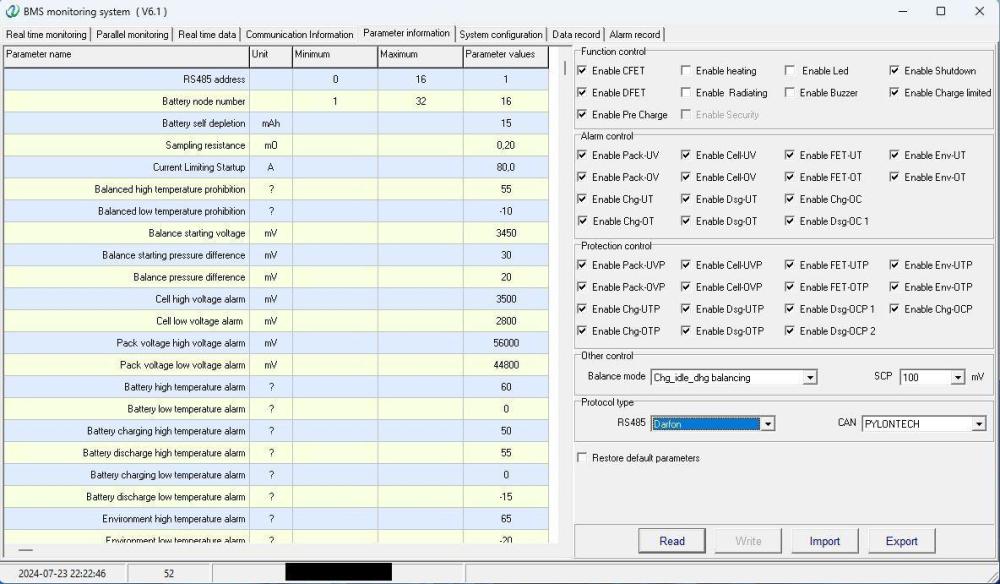
lol thanks @Sidewinder ja absolutely, monitoring change over time will be important to undersand whats happening. As of 1 day, only 1 battery has iterated a charge cycle... cant help wondering...I'll watch for a while and see what happens. 460 over 4 years is kind of amazing, your batteries will last forever! I poked around, and maybe the parameter tab shows what you are talking about. You're right there are a ton of battery configs in there, need to be super careful not to accidentally change something lol. yip the balancing stuff is in here too, 3.45V on this one. WRT the protocol, I'm not very clear on the RS485 vs RS232 distinctions, but RS485 is set to Darfon. Pylontech is in the dropdown but i'm way too nervous to make any changes :). CAN is on Pylontech though, and as I understand, that's the protocol that the inverter wants...? In terms of HA, theres no way to get a cable between the batteries and the server unfortunately. Way I'm seeing it at the moment, in order of increasing effort and decreasing cost: solar-assistant all-in-1 talking to HA over wifi R3k - looks easy solar assistant+Pi Zero ~R1500 - little more effort RS232 serial -> ESP board -. Wifi to HA via MQTT - Lots of effort, may be impossible, but no cost (unless I blow up the batteries) Will need to do some reading around the topic, i dont know much about serial protocols at all. Hopefully some clever person has already done this... Anyway, thanks again

-
Thank you for all the great info in this thread. Wondering if I could ask a qq or 2 please. I connected to my master battery using the 6.1 software, as described, and have attached what I see. I didn't seem to need a password. When I used a password, nothing seemed to change. I adjusted the config file to read 2 batteries and was then able to see both packs. Do the charge-discharge cycles seem high for a 1 year old system (1518/1503) and I wonder why they're not identical? Thanks again for all the info. It's a shame this isn't exposed to and by the inverter. P.S. I used this cable https://solar-assistant.io/shop/products/pace_rs232
-
Hi @Sidewinder Thanks for all your help. I got my cable tonight and it seems to work. I tried PBMS but that didnt seem to work, I might have missed something though. This thread https://powerforum.co.za/topic/20390-volta-stage-one-bms-software/ got me BMS software that seems to work. I found a config file I missed in my haste, and that allowed me to read both battery packs. I'm a little confused that the charge/discharge cycle count is so high for a 1 year old system (~1500), but I don't know how they're measured. To address the initial query, SOH says 100%, so that's great.. Thanks for all the help, really appreciate it. I'll keep fiddling and report back if I find anything interesting.
-
Sorry to be a pest. Got the cable this morning. You reckon it's safe to just plug it in and see what happens? I don't know anything about the protocol tbh.
-
Hi everyone. Apologies if I missed something in here that could answer. I'm interested in looking at my BMS info, 2 x Volta Stage 1s. I'm not planning on changing anything like firmware, just want to peek inside and see what's happening. Can anyone confirm whether or not this cable will work please? https://solar-assistant.io/shop/products/pace_rs232 Is there any chance of breaking anything by plugging it into a laptop and seeing what happens? Thanks
-
Right ok I see now. Sorry, got the wrong end of the stick there a.little. I can't connect the batteries directly to the HA server, it's in a different part of the house, but just seeing the battery state is awesome. I have some esps lying around, maybe I can figure something out using one of them... Thanks for everything, off to order the cable 🙂
-
Thanks it helps a lot! I'm very interested to plug into the batteries and see whats going on in there. I think I found the correct cable, https://solar-assistant.io/shop/products/pace_rs232 ? Do you maybe know of any local suppliers so I can get one sooner? I'm very keen now. I'm not able to find a battery dongle on https://smarthomeintegrations.co.za/, maybe they discontinued it. I think they have a youtube channel so I'll take a look there on the weekend. I had seen that Geyserwalah device before, and I think it would fit my geyserwise... looks very cool. Thanks again
-
Thanks for the info. I thought the deyen dongle was for the inverter, but didn't find any other dongle on the site. Will look again, shot. You're right, the other battery has 2 cables, RS485 and CAN. Can't see where they go cos of trunking but I assume it's what you say, thanks again. Great that the data can get consolidated via the one battery... I see, so the BMS itself is what I need to find out and then investigate HA support, I follow. I joined a Volta support WhatsApp group, maybe they will tell me... Out of interest, do the batteries make any attempt to balance their charge between them? There's an 'Activate Battery ' setting on the inverter that may have something to do with that. It's been on since we got the system, about a year ago. Thanks a lot for all your time and help here, honestly very grateful.
-
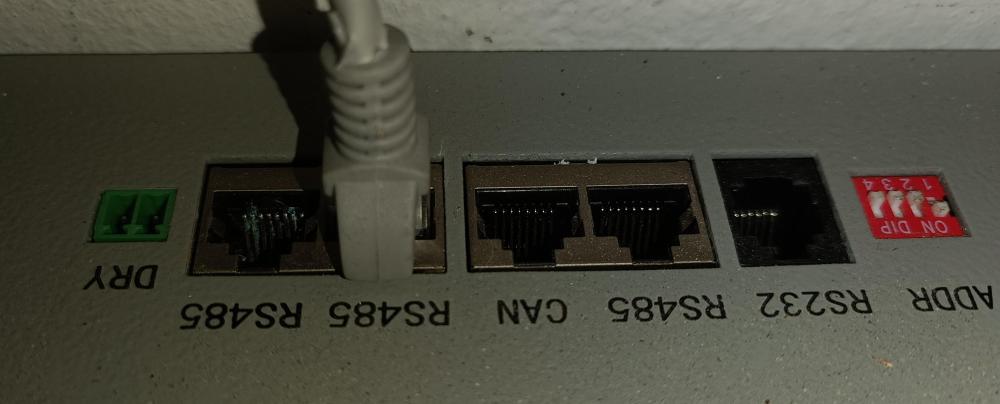
Haha true story, but the green lights are better than nothing. Thanks for the pic, mine look the same but different. Little confusing, the RS232 is a phone jack type plug, but mostly on the internet they're serial plugs? I guess that's the protocol, so the connector is just a connector. Bit confusing how that would connect to one of the smarthomeintegrations.co.za Deye esp dongles... I guess I'd need a dongle per battery... Or maybe there are other dongles I missed. I'll keep poking around and see what I can find out. Maybe theres some walkthroughs on these forums. Thanks for all the help, much appreciated.
-
Thanks I'll take a look at that. Ja I'm very curious about what's happening inside those batteries, I never knew where to begin though. I'll take a look at what you mentioned for sure! Firmware is updated a d batteries seem to be reporting the same charge as one another now according to the big green lights at least, but I'm watching them like a hawk... Thanks all for the assistance.
-
Ahh I see, thanks for the info. I have Home assistant connected to the data logger, but yes, it looks kind of like the inverter isn't aware that there are 2 batteries. Not sure though. I'll take a look at solar assist. Sounds useful to be able to see what's happening in each battery. I'm just kind of nervous to touch anything...
-
I don't see any SOH on my Deye inverter. Will keep poking around
-
Oh hectic. Thanks for the heads up on that. I'll keep an eye after the fw update... 😞
-
Wow thanks for that! Installer is coming round today to update firmware. Says I need not be concerned about the different charging levels. 🤞
-
Thanks @abd7. I've contacted the installer. Do you think there's any danger that the batteries are at such different levels now and are charging? It probably sounds dumb but if one reaches 100 while the other is still below the reserve level ... Will the full one stop taking a charge intelligently?
-
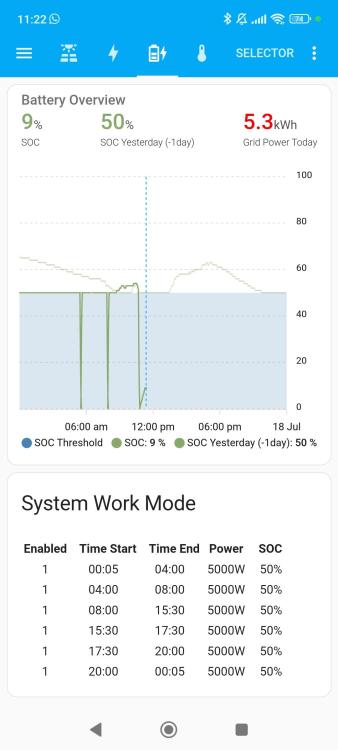
This shows the batteries strange behaviour this morning. The dips are immediately following a drain, from hot wash laundry which appeared to use Eskom power.
-
I've contacted the installer but nervous that they don't get back tomme before something goes wrong.
-
Hello all. I'm not sure what's happening. One of my lithium batteries went, I think, totally flat while the other stayed around 50%. Now it looks like they are charging but are not at the same level. I have no idea why one went down like that. Last night the inverter reported 50%. It's been so cloudy in CT, so that's kind of normal. 50 is my reserve level. This morning I ran a hot wash, power came from Eskom as far as I could see. But the inverter reported 0% for a short period, then back to normal. Geyser came on and it appears that it killed one battery, although that should also have come from Eskom. Not sure what to do because the batteries are both charging now but are at different levels. They have these lights that give an indication of charge.
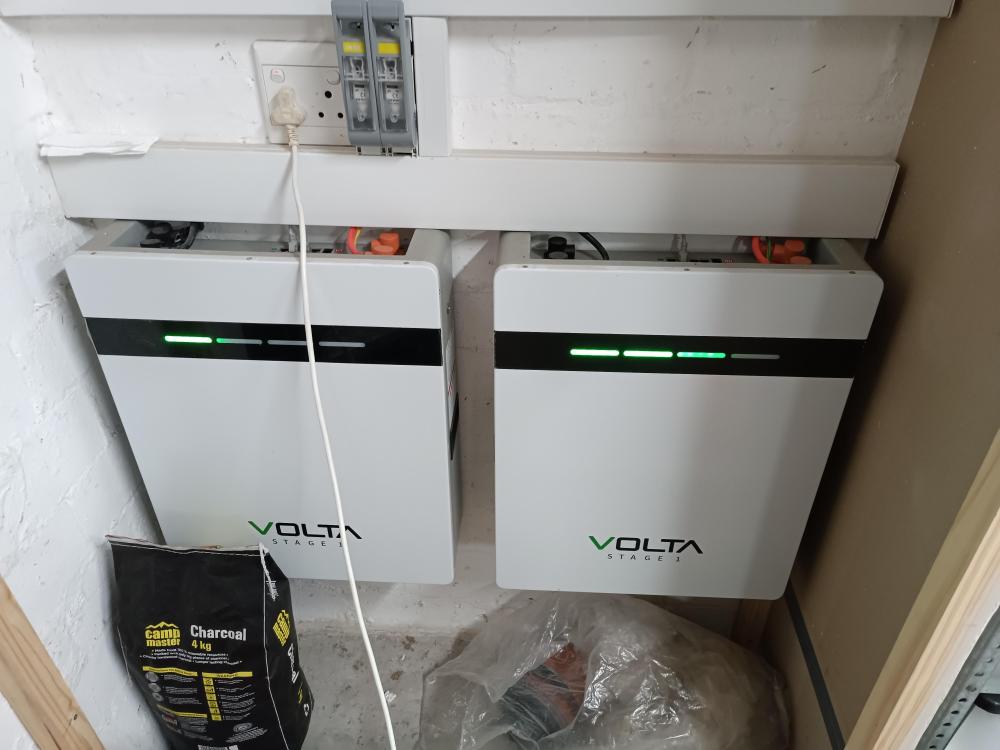
-
Thanks @TaliaB. What is the general consensus for domestic use reserve levels (Time of use on my Deye) to a flat line at 40 or 50%?
-
This is an interesting thread. In summer our batteries get to 100% almost every day but in winter we will often go into the night on the reserve level. I've taken to topping up the batteries to almost full before dark, mimmicing summer sun kind of, but I do wonder if it makes sense for the battery longevity.
-
This is really inspired stuff! Well done and thanks for sharing!


