


Boomer
Members
-
Joined
-
Last visited
Everything posted by Boomer
-
I'm supplied by the City. I sent in an application to notify them of my intention to install solar (in the future) and asked for permission to use my off-grid inverter which was purchased when off-grid PV/battery installations were allowed. My point is, after people have already spent a lot of money installing perfectly legal systems (with COCs), you can't just change the rules. My knee-jerk reactions is to tell them to come and cut my supply - I will literally go off the grid and they can kiss all their revenue goodbye!
-
So now I'm hearing that even if you don't have solar panels installed, or even if you never planned to install solar but only use your system for load shedding, your off-grid inverter still needed to be registered by 1 October. Is this correct? I thought SSEG registration/City-approved inverter list only applies to solar installations? What if you missed the memo and didn't register your off-grid inverter (used only for loadshedding) that has previously never required registering?
-
I am applying to the CoCT to install an off-grid solar system (before the 1 October cut off). Can anyone give me an example of what this schematic should look like (or can I eliminate this detail for now)? I haven't appointed an installer yet, I just want to get approval to be able to use my existing off-grid inverter for PV. Any advice/tips would be appreciated.
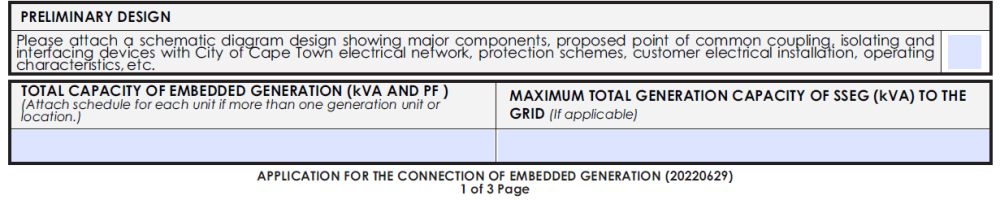
-
How do I do this - could you share the link, please and thank you
-
Is anyone able to point me in the right direction. I would like to apply for permission to install PV - as I understand it, you're supposed to apply for permission FIRST. So, my intention is to send my application for my off-grid tied inverter before 1 October (and then install PV at a later stage once approval comes through). How do I go about this - could anyone share a link for the "Passive Standby UPS utilised as a standby hybrid SSE" installation type, please?
-
The people who bought off-grid systems with the intention to add solar at a later stage (like me) now have a problem.... I specifically went for an off-grid system. It seemed illogical to me to buy an inverter almost twice the price if I had no intention to feed back to the grid.
-
I'm hoping they'll reconsider their lack of insight. Surely an off-grid inverter is the least risk to the grid.
-
I have an RCT-AXPERT MX2 TWIN inverter. I'd like to add PV. My roof space is small, I never intend to export to the grid. Am I going to have an issue registering my solar application with the COCT - I don't see any RCT/axpert inverters on their approved list. But if I understand correctly, the approved list only counts if you intend to export to the grid?
-
This is exactly what the manual says. But I'm told that SANS requires 1 fuse per battery.
-
Many thanks for the explanations above. Could anyone share where in SANS it says we need a battery fuse for each battery.
-
I have a 5.6 kw Voltronic inverter with one 4.8 kwh Dyness battery and 125A battery fuse. If I wish to add another battery, do I need another set of battery fuses, to be compliant. Or can I skip the 2nd battery fuse if the batteries are in parallel?

