Wesley.Davids
Members
-
Joined
-
Last visited
Everything posted by Wesley.Davids
-
Thanks for the help guys, I will get an electrician out to check the CT coil for any issues.
-
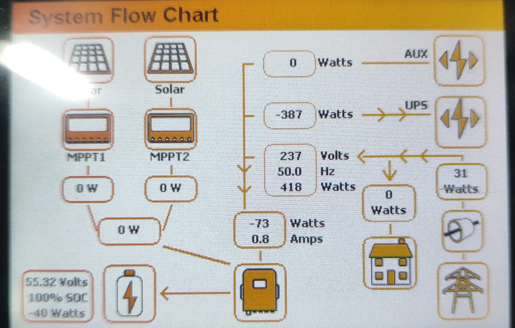
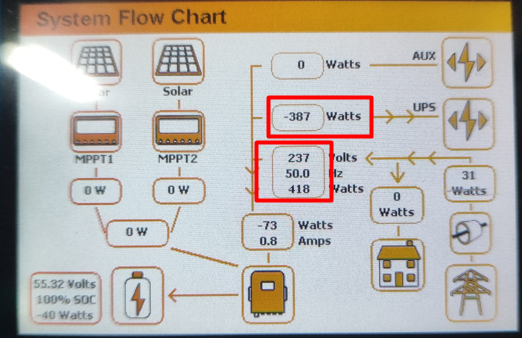
Thanks for the reply @Scorp007, my aircon is on the non-essential side and switched on at the moment and I don't see any huge usage on the flow chart. I believe I read on the forum that we must have a "Limit load" unticked before we can see the non-essential usage. I've attached pictures with "Limited to load" ticked. It looks like it just shows the essential load and not the non-essential load. Attached are pictures with "Limit to load" unticked and the difference is it now shows a -watts



-
Hi All, I wanted to know if it's possible to see the non essential load on the sunsynk app or inverter itself, at the moment I only have battery connected to inverter and not solar panels at the moment. I have zero export ticked and also limit to load ticked. I am now not sure if this will only work once I have solar installed. Regards,
-
@Contact1980 Was your issue resolved when you contacted Sunsynk
-
It was related to battery cell calibration; during testing, they found one of the battery cells had low voltage and advised replacing the battery. After installing the new one, they tested everything, and it worked. I believe they also had other clients to attend to in the Cape Town area.
-
I had an exceptional customer service experience with Magneto when encountering an issue with my Magneto Lithium LifePo4 Rack Mount 5.1kWh system. I had a problem where my battery would shut down at 30%. Despite this setback, the Magneto team flew from Johannesburg to Cape Town and then drove to my residence in Swellendam to address the issue in person, showcasing their commitment to resolving customer problems. I want to thank Brian Mclachlan and Ferdie from Magneto. I highly recommend Magneto for their exceptional customer service and reliable products.💫
-
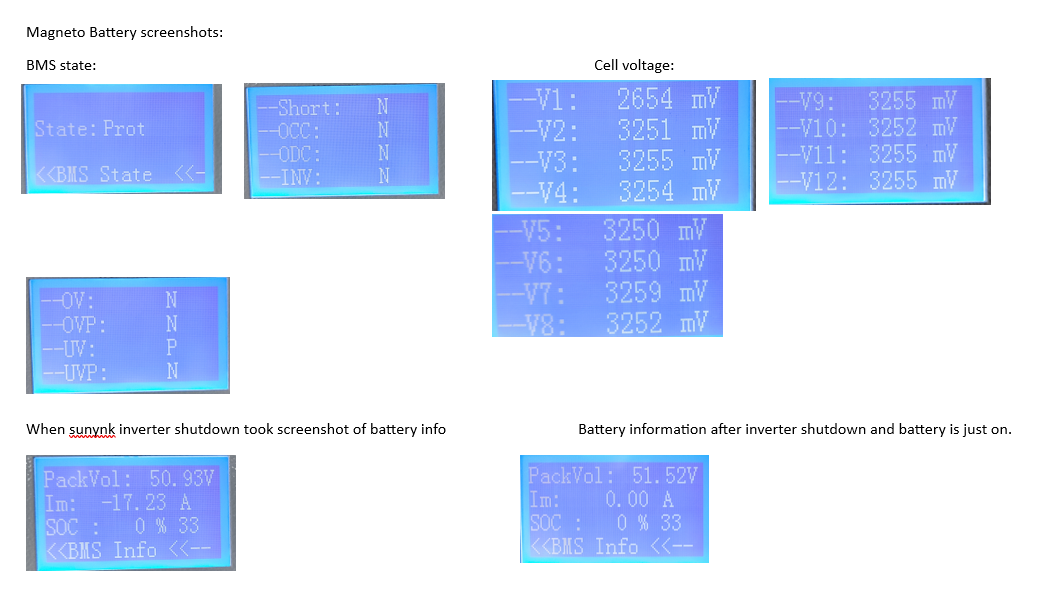
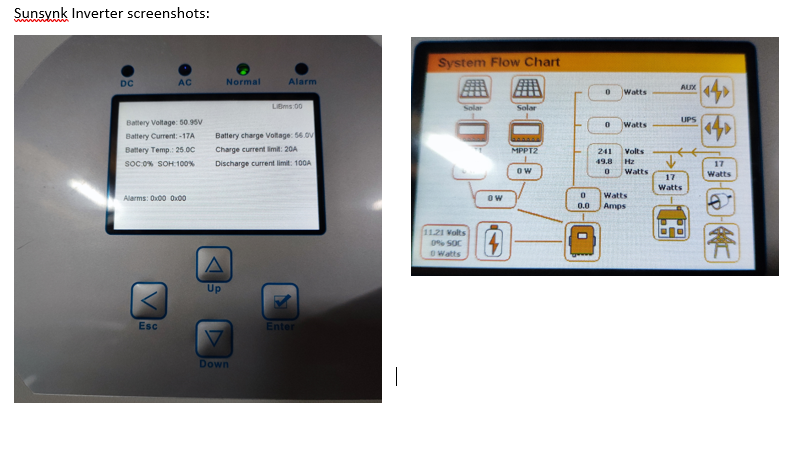
I have tested today the Magneto battery and it looks like when it hits 38% and 50.95v it shutdowns the inverter and then the battery shows 0%. Is this by design for Magneto battery as the datasheet shows it can go to 80% and 100% DOD but it only goes to 62% DOD, please advise on this. I checked the BMS state and it showed "State: Prot" Then I went further into BMS state settings and everything showed an "N" state except for "-UV: P". I am currently using a Sunsynk 5Kw inverter. I have attached a few screenshots of the battery info that showed and the sunsynk inverter. I am not sure if the issue is with the sunsynk inverter or the battery itself. Looking forward to your response.

-
I have tested today the Magneto battery and it looks like when it hits 38% and 50.95v it shutdowns the inverter and then the battery shows 0%. Is this by design for Magneto battery as the datasheet shows it can go to 80% and 100% DOD but it only goes to 62% DOD, please advise on this. I checked the BMS state and it showed "State: Prot" Then I went further into BMS state settings and everything showed an "N" state except for "-UV: P". I am currently using a Sunsynk 5Kw inverter. I have attached a few screenshots of the battery info that showed and the sunsynk inverter. I am not sure if the issue is with the sunsynk inverter or the battery itself. Looking forward to your response.
-
@AlexTZA the "PackVol" is showing 53.49v at the moment. @PsyCLown At the moment I don't have those tools, but I will try and see if I can get it.
-
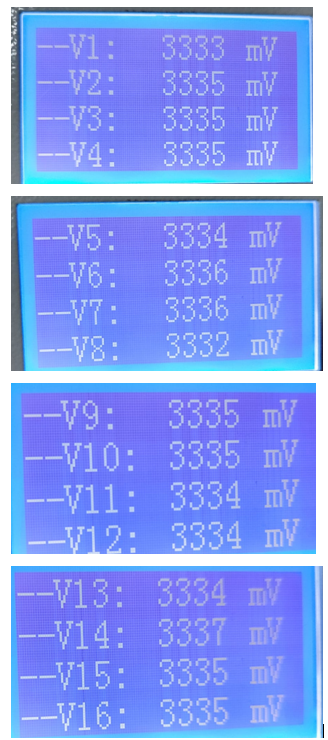
@PsyCLown I took a few screenshots of the battery info I checked and it is 16 cells

-
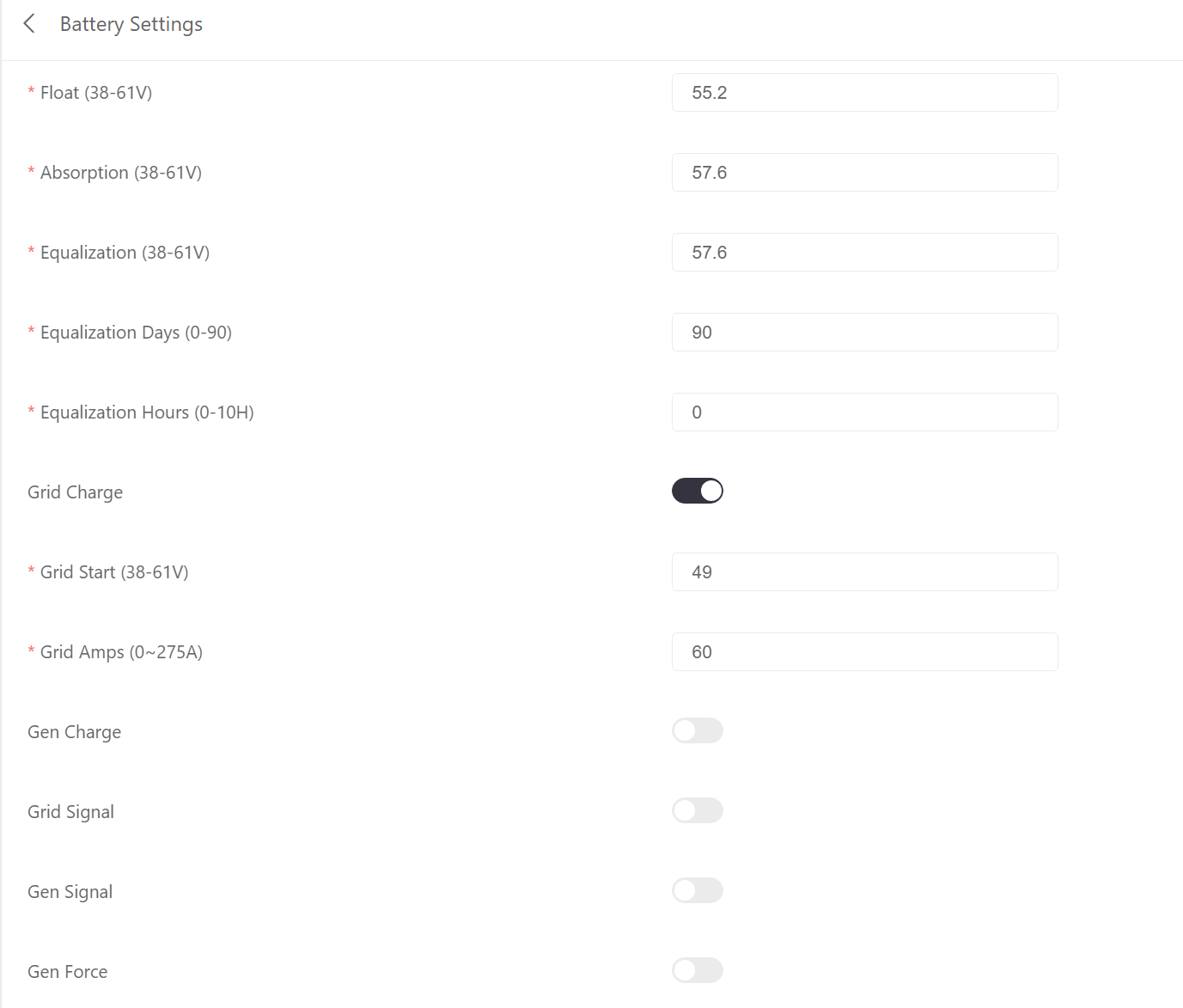
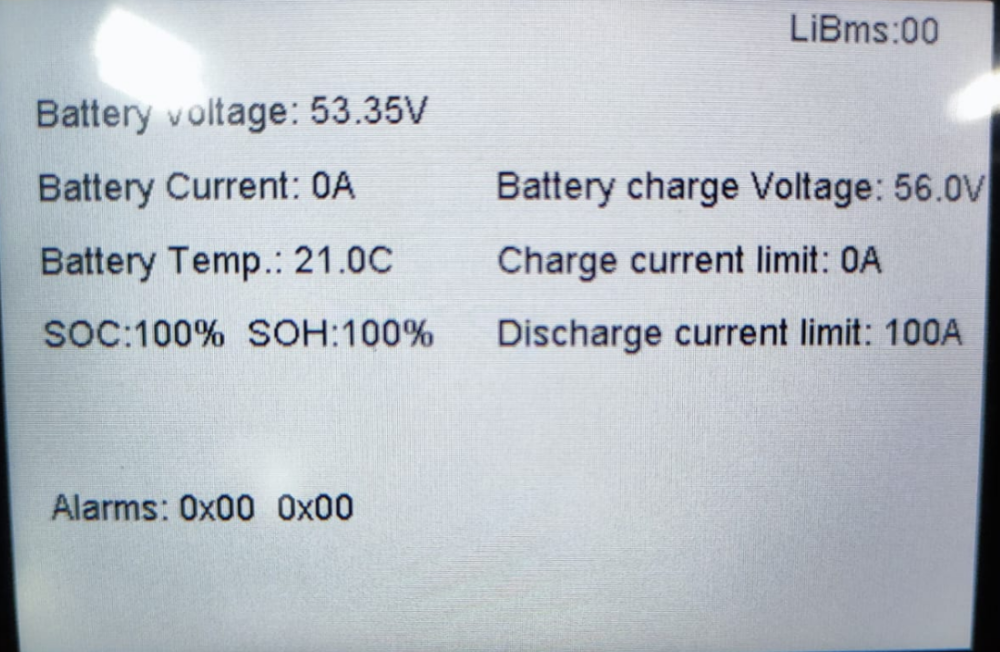
Thanks, @AlexTZA I have also changed the voltage to 58.4v and will leave it for a day. I took a screenshot of the BMS screen for you now.

-
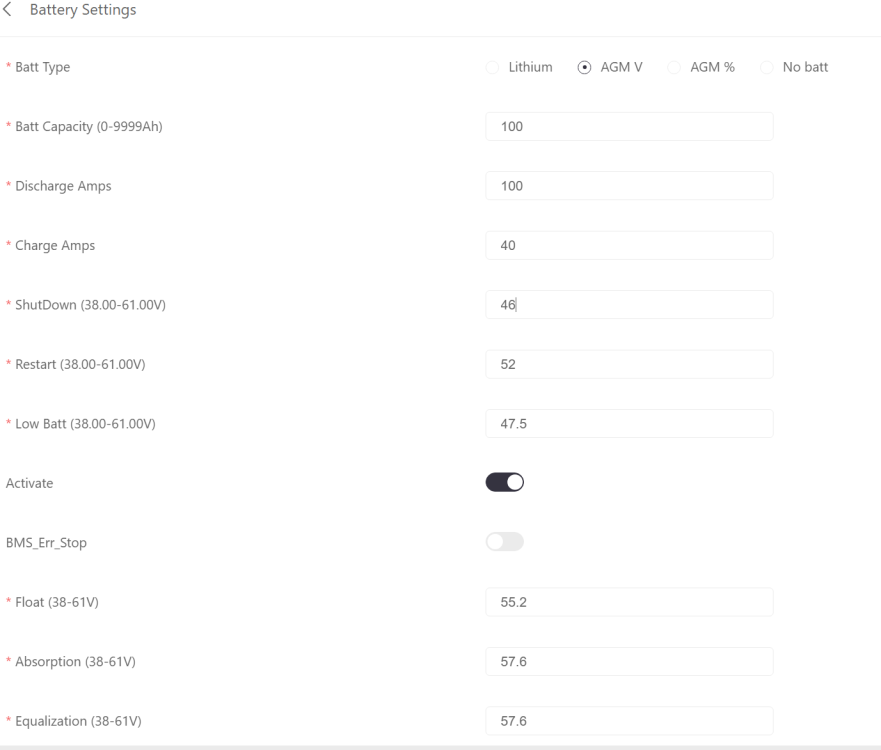
@AlexTZA If you guys are able to assist me with what must I set for the AGM V, I did attach the Magneto battery manual.


-
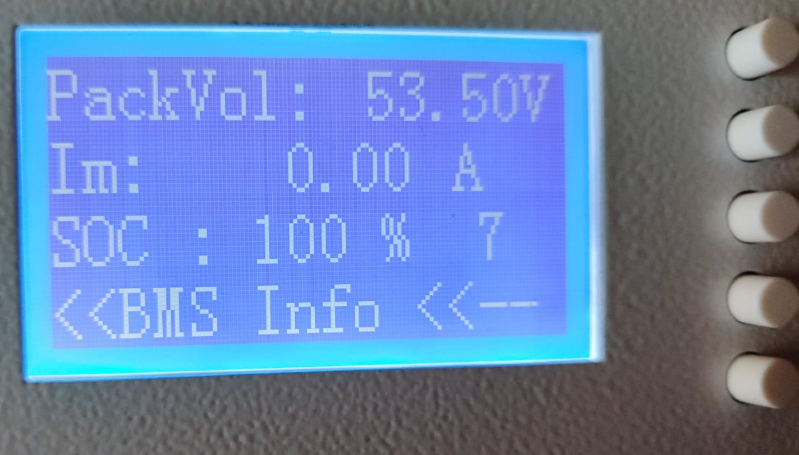
@AlexTZA Thanks for the information, My Sunsynk inverter has been recently updated to the latest version I believe the battery is also the latest version as I asked the supplier where I bought it. I will test with the AMG V settings and see if that resolves it. I also don't have solar panels at the moment I will be installing that in January. SOC 100% image @PsyCLown I am using a Magneto 5.12kwh battery and this is a new installation. Battery information details are attached. User Manual - IMS303 51V Wall Mount Rev6 (2).pdf Parallel Battery Communication-PIN Configuration (2).pdf
-
@JayMardern Thanks for responding, I am not able to change any settings on the battery just mostly gives options to view stats information like cell capacity and temperature, I will have a look at the dip switches perhaps. Thanks again for the help 😀 Magneto did provide the attached manual document, it only explains to do like a reset. User Manual - IMS303 51V Wall Mount Rev6 (2).pdf Parallel Battery Communication-PIN Configuration (2).pdf
-
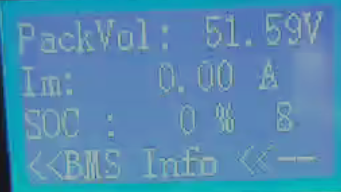
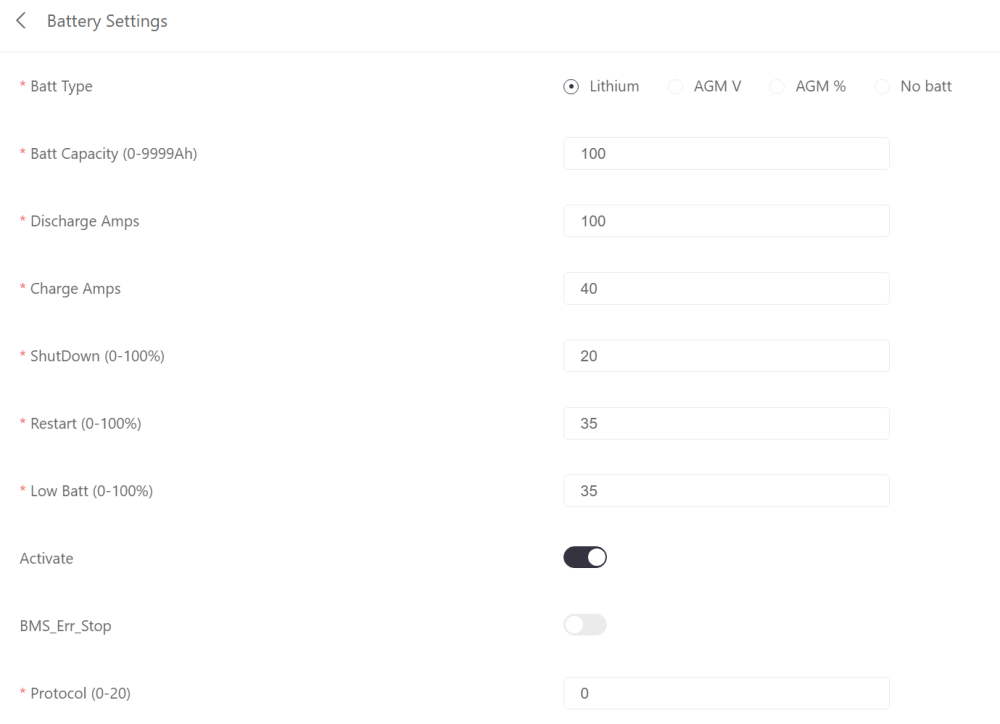
I was not home for a few hours and saw that the electricity ran out and that the essential load was off, the SOC dropped to 36% as seen in the screenshot and my battery shut down I think. Also, the Sunsynk connect app usually sends a notification if the grid is offline but not anymore due to an update of the app. SOC discharging and after 36% goes to zero percentage immediately, I believe the battery shutdown. Battery showing zero SOC BMS showing battery is zero Eskom power is off but the Inverter was still online and the battery also as can be seen in the screenshot. I shut down the battery and started it again and it showed 36% SOC, I guess this has something to do with a safety feature to shut down the battery. Do you perhaps know how to change that percentage to shut down the battery to 20% at least as it is set on the inverter to shut down at 20%? Not sure if I must adjust the below settings,



-
@JayMardern I was not home for a few hours and saw that the electricity ran out and that the essential load was off, the SOC dropped to 36% as seen in the screenshot and my battery shut down I think. Also, the Sunsynk connect app usually sends a notification if the grid is offline but not anymore due to an update of the app. SOC discharging and after 36% goes to zero percentage immediately. Battery showing zero SOC BMS showing battery is zero Eskom power is off but the Inverter was still online and the battery also as can be seen in the screenshot. I shut down the battery and started it again and it showed 36% SOC, I guess this has something to do with a safety feature to shut down the battery. Do you perhaps know how to change that percentage to shut down the battery to 20% at least as it is set on the inverter to shut down at 20%? Not sure if I must adjust the below settings,
-
@JayMardern Thanks for the information it make sense, In the future I would like to add another battery to my system am I able to add the Hubble AM-5 battery to the Magneto battery in parallel or do I need to stick with the specific brand when I do parellel ?
-
Hi Everyone I am currently using the Sunsynk inverter system only in UPS mode to cover me for load-shedding so the batteries are usually 100% during the day and if I load shedding it will discharge and charge again to 100%. I want to use the system mode timers and grid peak shaving to save on electricity during the day, at the moment I don't have solar panels I am planning to install them once funds are available. For example, from 9 a.m. - to 5 PM I am going to set the SOC timer to 50% to cover my essential load once 50% is left of the battery I will be only using the grid, also when enabling grid peak shaving it will blend the power between grid and battery but mostly prioritize the load to the battery side. From 5 PM to 9 AM I will set the soc to 100%. Now I want to know if I do that will I mess up my battery's life span like in cycles? I am currently using a Magneto 5.12Kwh battery. Example of settings I want to use: System timer: Grid peak shaving System mode 2 The Magneto battery shows me how many full cycles I have completed, at the moment I have completed 7 full cycles so far and the battery has only been once depleted to 0%, I feel like I should have used fewer full cycles since it has been only depleted once. I mostly just use the battery for load-shedding and my understanding is a full cycle is usually from 100% to 0 %. I tested this theory and I had twice load shedding in two days and it counted as 1 cycle that showed the battery display. Any ideas for this?
-
Thank you for the information guys it makes sense what you are saying.😀
-
Hello Everyone, I am new to solar and wanted to know if someone could clarify the below for me, please. I currently purchased a 5.12kva battery and Sunsynk 5kva inverter. My DB has been split into non-essential and essential DB's, for the non-essential I only have the oven and geyser on as we have a gas stove. The essential DB is connected to the load port of the inverter. I am planning to go solar now and wanted to know if someone could please explain to me how the non-essential will save me power as it's not connected to the load port when we have load-shedding we only use essential as non-essential is not connected to the inverter. I would like to use the geyser on the solar/battery/grid during the day to save power. I also heard that the hybrid inverter is designed so that you must not use non-essential but I am not sure of that.