Skip to content
View in the app

A better way to browse. Learn more.

Power Forum - Renewable Energy Discussion

A full-screen app on your home screen with push notifications, badges and more.

To install this app on iOS and iPadOS
  1. Tap the Share icon in Safari
  2. Scroll the menu and tap Add to Home Screen.
  3. Tap Add in the top-right corner.
To install this app on Android
  1. Tap the 3-dot menu (⋮) in the top-right corner of the browser.
  2. Tap Add to Home screen or Install app.
  3. Confirm by tapping Install.

Lilmonsta10

Members
  • Joined

  • Last visited

  1.    -cK- reacted to a post in a topic: SunSynk Logger Integration into Home Assistant
  2. You are another Star!!! Thank you!! Now the dashboard makes sense
  3. -CK- You Star !!! That has got me going. The only hiccup I have now is the Value for Load is now across both Devices. Can you combine Sensors to create a new one Something like - sensor: - name: "Sunsynk Total Load Inverters" state: > {{state_attr('sensor.sunsynk_Load', 'TotalPower') + state_attr('sensor.sunsynk_Load_2', 'TotalPower')
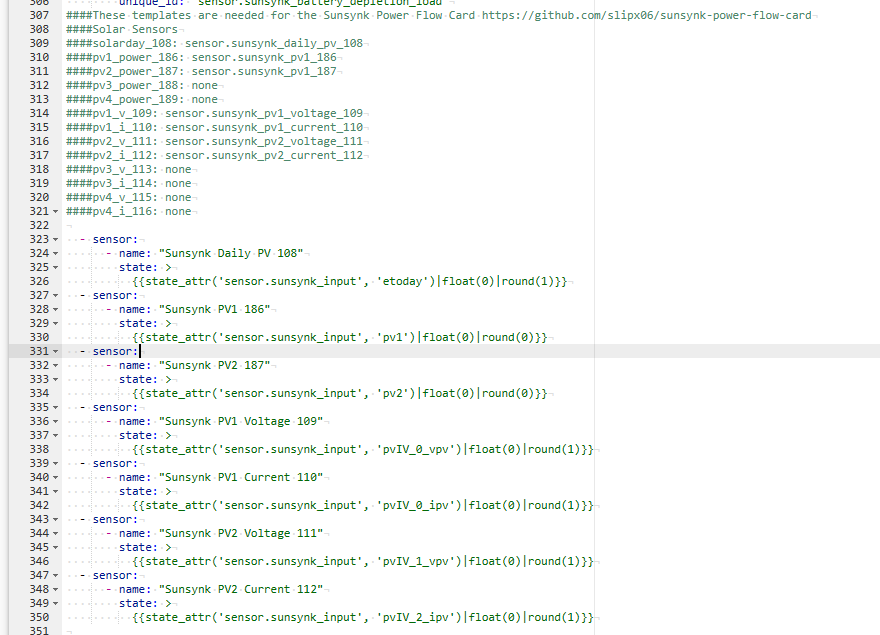
  4. Hi Everyone, I am very new to this and I have managed to get the data and card setup when we have 1 inverter. However we had a second inverter installed with 2 extra PV connections. I amended the Configuration.yaml to the second Inverter which is showing. How do I create the entities for PV3 and PV4 From inverter 2 ? I expect it would be here in the attachment however its under the section (##### DO NOT EDIT ANYTHING UNDER HERE)
Account

Navigation

Search

Search

Configure browser push notifications

Chrome (Android)
  1. Tap the lock icon next to the address bar.
  2. Tap Permissions → Notifications.
  3. Adjust your preference.
Chrome (Desktop)
  1. Click the padlock icon in the address bar.
  2. Select Site settings.
  3. Find Notifications and adjust your preference.