


-cK-
Members
-
Joined
-
Last visited
-
From my personal view point, I went with Sonoff to do all my lights and wall sockets to make them smart. The light switches have 2 routes you can go, replacing the whole light switch with a 1, 2, 3 Gang light switch but that will be pricey. What I did was just convert my existing switches with either a mini2 or DualR3 depending on if it was a 1 gang or 2 gang switch. There is 3 modes for these devices depending on the type of switch you have you can set it to and in my case I just set it to follow mode so the on & off indication of the switch will align to a point, meaning if you switch the light on/off at the switch it will align but if you use the app or HA it will not align but if say your switch is in off and the light is on turning on the switch will not turn it off but it will then sync up again and if you then turn it off the light will turn off. I did opt to pull down neutral wire to all my switches so just keep that in mind otherwise you will need to do little hack at the top of the light with diodes and resistors to work without a neutral wire. The other reason I when Sonoff is that it has a lan mode and if ewelink ever pulls the rug you can just flash these units with tasmoto or esp to make them work without the ewelink platform. I also found Sonoff easier and more stable to integrate with HA (bar the debacle a while back with ewelink doing a partial rug pull on the power reading updates in HA but this has been fix by the developer doing the HA side of things for now) The other thing to keep in mind is WiFi range and how far your devices will be from the AP to pick up the signal. I have 3 AP's that covers my entire home and still have one sensor on the edge of functional range that I need to reposition some time or another. It is fun and pleasing when it all works but a bit of chore to setup initially if you fail to plan ahead for some gotchas. I note you mentioned having lights turn on/off automatically depending on if someone is in the room. If you want to do something like that I might also suggest you look into mmwave presence sensors. I've got some ESP boards and mmwave sensors and made some presence sensors in all of my rooms so the lights can turn on and stay on while someone is in the room depending on the lux reading, yes I've added a lux sensor to them as well and turn off when there is nobody in the room. It works 95% as I've indented with one room keeps being a constant challenge where the dog sleeps at night to manage keeping it automated but not having the light turn on when the dog breaths to heavily. (need to fine tune that still) One more thing I just need to mention, if you are going to use DualR3's they sometimes die but it is usually just a single 10v 1000uF capacitor it blows and you can just buy some form an electronics store and replace them once it happens but mine lasted a good while until they started to pop them so I just keep a few on hand to replace them if and when needed, much cheaper than replacing the whole unit or sitting with a none functional switch and thus far I've only had this issue with the DualR3's. Note to self I need to fix this pages device naming, recent update in HA that looks like it is adding the device name details to the naming scheme of the individual entities if left to default...🤦♂️


-
-
-
Thanks @Denns Yea that helps a lot so in short the geyser will get heated with whatever PV there is from sunrise until you switch on the AC side and AC will only pull power if still below the thermostat cut off. Same goes for when AC is turned off to sunset, as temps drop below the thermostat setting it will heat up again from PV as long as AC is off. As I have a smart switch and temp sensor already on my geyser link to HA this opens some interesting avenues to explore with automations to optimize avoiding grid usage.
-
@Denns the Geysertech PI2R controller you got, can you just clarify how it works as it mention a timer on the AC side. Am I correct in assuming that the DC is "converted" to AC and then fed to the geyser and the output is a combination of AC and DC input reducing AC side by the available DC input. This makes sense when AC is on but if AC is off how does the system work. Does it feed DC input "converted" to AC to the element irrespective as long as the temp is below the set value. E.G. the AC is off and DC is only producing 1000w and the element is a 2kw unit will it run the element at 1000w or is it only operating when the elements required draw is reached? From my limited knowledge the element in a geyser is standard resistive heating element and will try and pull the required 2kw or is it a case of 1000w in 1000w heat out (kind of like a passive system until AC is turned on and if DC is more than the 2kw or temp is above set value now AC is used)
-
Moved my question to the more relevant thread...
-
That will come in handy as I'm in the market to add another 3 gang switch to my one room 😁
-
-
That would be a negative.
-
Apologies, I've re-uploaded the zip file. I was pulling it remotely from my neighbor's pc to my onedrive and think the onedrive wasn't fully synced yet when I downloaded the zip. The download file should now be "BMS Tools V3.31 [ZWN]-20260731T110729Z-1-001.zip" and the files should now be in the folders that was empty. Please check if it is working now, if not just let me know otherwise I'll need to re-pull it from his pc again.
-
Unfortunately no I do not have the password to be able to edit the BMS.
-
-
-
https://powerforum.co.za/files/file/230-bms-tools-v331/ Here is the one that my neighbor uses, hope this is the one you are looking for.
-
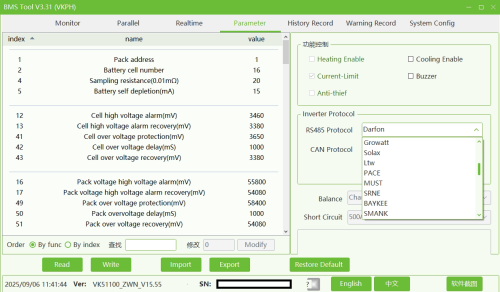 BMS Tools V3.31 Used for Hubble AM5 batteries to read BMS information
 -
I'm curious about this setup of a micro inverter to the aux in port. I know it is tied to the battery charge state when to kick in and off but what I would like to get more info on is how the power is split. E.G. on a 5kw Sunsynk on a sunny day the sunsynk hits its max 6500w and the micro can hit say 2300w (I understand you should not exceed 50% of the inverter size) will the system then utilize the full 8800w splitting the micro to the batteries (2300(micro)+2800(ss)=5000w Max charge rate on battery from DC) and the 3700w goes to load or is it going to still throttle down to the inverter max input of 6500w for the combined input? I know the home load side has about a 5500w limit on draw but that is on the load side so I do get you will not be able to exceed that. My shortfall is in the winter when overcast as the batteries cant reach 100% so just exploring options that will be most cost effective besides just using grid to top up when really needed.
-
I'm using sonoff/ewelink devices. If you are looking for breaker specific model I have a PSF-X67. Their wifi range is pretty weak so the Wifi access point needs to be pretty close. Make sure it is the ewelink model, I see searching it tuya models pop up as well 🤷♂️. These can be flashed to esphome or tasmoto but will require drilling out the fastner. There was recently a major shift from ewelink with blocking power data over the cloud to home assistant breaking stuff relying on power readings etc but the guy behind the integration in Home assistant has resolved this to push this data where possible via lan and not cloud on a 5s interval but not all devices support local power data. So it is working in Home Assistant via the Sonofflan integration but the option is there down the road if need be to flash these devices should the ewelink overlords truly turn to the dark side. There is also a POWR320D device from sonoff but those are 20a and bit bulkier so depends on your needs but will fit on a DB board but takes 2-3 slots.
-
 Sidewinder reacted to a post in a topic:
How to measure SOC individually on a bank of 4 batteries with a Sunsynk inverter
Sidewinder reacted to a post in a topic:
How to measure SOC individually on a bank of 4 batteries with a Sunsynk inverter
-
You will need to determine what BMS the batteries are using and then look into a third party option to access that BMS data. EG. My batteries uses the Pace BMS and I have an addon in Home Assistant that can pull the Pace BMS data from the batteries using an ESP32 bridge to the master battery's RS232 port.
-
I need to just state that here I was going on about Sonoff readings being virtually live on power readings and low and behold this feature just broke last week just before the weekend ☹️ Needless to say a crap ton of automations is now broken in my HA setup that was dependent on these live readings as it seems something on Sonoff/Ewelink side was changed or broke as now the readings only update if you open the app and that device power reading section and as soon as you close it it stops again. Waiting to see if they will resolve this or if the integration developer on HA can maybe find a bypass.


