


monsam
Members
-
Joined
-
Last visited
-
 monsam reacted to a post in a topic:
Collection of DSP Axpert Firmware for VM III TWIN and VM IV TWIN
monsam reacted to a post in a topic:
Collection of DSP Axpert Firmware for VM III TWIN and VM IV TWIN
-
esmail-kassir reacted to a post in a topic:
Collection of DSP Axpert Firmware for VM III TWIN and VM IV TWIN
-
 esmail-kassir reacted to a post in a topic:
Collection of DSP Axpert Firmware for VM III TWIN and VM IV TWIN
esmail-kassir reacted to a post in a topic:
Collection of DSP Axpert Firmware for VM III TWIN and VM IV TWIN
-
I have noticed this behaviour when observing through the Watchpower app that when the battery charge status reaches 100% the panels lower their production a bit, and the app shows that the battery is discharging, although imperceptibly, as it shows 0W. When the charge status reaches 99%, the app shows that the battery is charging, but also imperceptibly, showing a charge of 0W. And it maintains this behaviour constantly when the battery reaches 100% charge. What you say would fit with what I observe in the Watchpower app.
-
Hi, I think it is normal. My thinking is that when you turn off the 1.5 kVA consumption there is some residual unconsumed energy that is returned to the grid, and if it has nowhere to go it is sent to the only possible place which is the batteries. And for that reason the voltage goes up for a second or two. If this is the reason, you should notice the voltage going up every time you turn off the cooker, even if there is not another 1000 VA (of 2.5 kVA) extra. If you only notice it when there is extra power, it could be a simple momentary voltage adjustment, just like the voltage goes down when the battery is discharged depending on its state of charge, returns for a second or two to its resting voltage (higher) and then adjusts back to the discharge voltage (lower) for the remaining consumption. I don't know if there could be another reason, and it is just a consideration of what seems normal to me. I could be wrong, but consider it in case it seems like a feasible reason.
-
Jamil Tulimat reacted to a post in a topic:
Collection of DSP Axpert Firmware for VM III TWIN and VM IV TWIN
-
Yes, I will return the inverter y replace it with a new one. Today, The inverter started in 24V mode again. The MCU upgrade didn't fix the problem.
-
Jamil Tulimat reacted to a post in a topic:
Collection of DSP Axpert Firmware for VM III TWIN and VM IV TWIN
-
Tarek Yag reacted to a post in a topic:
Collection of DSP Axpert Firmware for VM III TWIN and VM IV TWIN
-
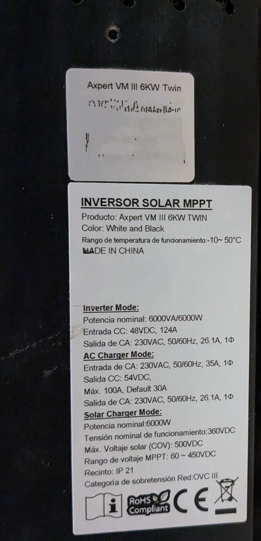
Hello. This morning I've been tinkering with the inverter. I've already had a chance to take a photo of it. I'm updating the screen firmware and testing its operation. Below is a photo of the inverter and its label: As I mentioned in a previous message, I have already updated the inverter to version 60.10, but the screen was still on version 25.12. Today I took the opportunity to update to version 25.15. The update went well the first time and everything worked correctly. Tomorrow we will see if it has served to correct the problem of starting in 24V mode. Regarding the other 2000W problem, which did not improve with the update to 60.10, I have tried to see the behavior by changing the "AC Input Range" parameter from APL "Appliance" to UPS. When changing to UPS, the consumption dropped radically to about 325VA. So, with APL and the round metal button not pressed, the consumption from the grid is around 40W, with the round metal button pressed, the consumption rose to 2000VA. Now, with UPS, with the round metal button not pressed, the inverter consumption from the grid is around 40W, with the round metal button pressed, the consumption increases to 325VA. And if I turn on the batteries in SBU mode, the consumption from the grid drops to 0W. This is the desired and expected behavior for me. The software updates of the inverter have not affected this behavior, and I believe that the inverter works correctly at this point, and I am just discovering how the parameters affect the behavior of the inverter. When I have more data on whether the screen update has positively affected the 26V start, I will continue to report.


-
Your solution seems very fine and elegant to me. I suppose you use a system like HomeAssistant. I would consider something like this in my own house, but I think it would be too much for the house where my father actually lives. My father does understand electricity, although not some things about solar panels. So I have helped him install the solar system in isolation from the grid without dying in the attempt. An automated system that requires computer systems would be too much. I plan to install a solar installation in my own house in the future and a system with HomeAssistant when I move near my father. I suppose I am looking for something similar to what I suppose you have set up. For my father, you made me think this morning about looking for some kind of DC switch or magnetothermic with a programmable schedule, and putting it in the battery wiring. And changing the manual ATS for a truly automatic and also programmable one. At night, before going to sleep, at a reasonable hour, I would transfer the loads to the general electrical grid, and about 5 minutes later, the programmed switch for the batteries would break the circuit with the inverter. The inverter would turn off as it had no other source of energy. In the morning, another timed schedule would close the circuit from the batteries to the inverter, before dawn, and thus the inverter would start well with the batteries, and later the ATS would automatically transfer the loads to the solar system. What do you think?
-
I think our use case is very similar. In my case the inverter consume about 80-100W from the battery at night with no loads, with a consume about 20W-40W more from house loads. I prefer to save the 80W-100W of inverter consumption from inverter at night because I don't have a very large amount of batteries and panels, so I ensure 16-24 hours consumption the next day if it's a cloudy day. That's why I tried the inverter Bypass system, but after testing and observations I preferred to put an AC ATS, and turn off the inverter with the metal button, that is, to keep it in charger mode and thus turn off at night and turn on by itself when there is solar energy in the morning. So the current use case is, at night I transfer the house loads to the general electrical grid, and put the inverter in charger mode. In the morning the inverter starts up by itself when it receives solar energy, so I transfer the loads from the house to the panels. However, the 24V mode problem started. Since this problem started, my goal now is to leave the inverter on at night. That's why I'm still focusing on the reactive energy consumption when I plug in the inverter and if I can draw any conclusions then use it in some way at night. I'm also thinking of putting another battery, although it pains me that it would be almost exclusively keeping the inverter on at night. However, an extra battery would be cheaper than changing to a Victron system, which would be my second choice, or even a Deye, which would be my third choice. A Shelly 1 PM switch like the one you mentioned before to use with the mobile phone would make life easier. And a truly automatic ATS instead of a manual one like I have too. As you mention, the goal would be to find a way to automatically detect the state of the batteries and panels and then activate the ATS of the house loads and turn off the inverter, or to make the inverter plug work so that it works with the electrical grid. Regarding the high voltage of the DC ATS, I have installed an AC ATS to switch the house loads to the mains or to the AC Out network of the inverter. I have not installed an ATS for DC in the panels, although they do have their magnetothermic and overvoltage protectors.
-
Hi @pintopf, thanks for the information about the measurement with the "Shelly 1 PM". Regarding the use of an ATS, that is how I currently have it. I have the grid and the solar panels system (inverter *edited*) connected to the ATS in case I need to switch to the grid because the batteries run out in a long series of bad days. I did the tests about bypass without battery, solar panels, or loads, to eliminate noises that could alter my measurements. However, my main objective is to determine if the inverter is in a suitable state or is damaged, since I still have time to return it and get another new unit. Likewise, I like to check the operating base of the equipment so that I can have the knowledge in case something happens one day. This issue began for me when I was interested in having the inverter connected to the grid with a plug located before the ATS. That way I could use the "Back to Grid Capacity" feature, and at a time when at night or if there is no one in the house (the ATS I have is actually manual), the Inverter's ByPass mode is activated, without having to use the ATS. However, I don't like that in order to have this occasional bypass feature, the inverter is using 2000VA 24x7 (40W of real consumption of the inverter). I could live without this feature, and I probably will, and I think that the inverter is still worth it in terms of quality-price, and with the ATS I would have it solved. But in any case I do want to clear up any doubts about this operation, whether it is normal or not, whether to change the inverter or not, or keep it and know what to do.
-
Tarek Yag reacted to a post in a topic:
Collection of DSP Axpert Firmware for VM III TWIN and VM IV TWIN
-
Tarek Yag reacted to a post in a topic:
Collection of DSP Axpert Firmware for VM III TWIN and VM IV TWIN
-
Thanks @Jamil Tulimat. You've given me the idea of testing the UPS mode. It hadn't occurred to me. I'll check how it behaves. However, do any of you know or have measured whether your inverters behave in a similar way in 4Kw or 6Kw? As @Coulomb said, it seems reasonable that it uses reactive energy, but I'd like to compare with the rest of you, if any of you have the data, whether so much reactive energy is normal in these models, or is it a particular case of my inverter.
-
The thought about the lack of voltage drop and the numbers was very cool. However, I can already tell you that it must not be because of the low voltage drop, and it must be more because of what @pintopf say. In any case, I'll tell you. I added more resistance to the solar panel circuit. I put 60 more meters of 6mm cable. A total of around 75 meters of cable in the DC circuit of the solar panels. It did not increase the voltage drop enough, but I hoped it would do something. Additionally, the day dawned very nice and clear. And the inverter started indicating 26V. I can't find or understand why sometimes, although rarely, it does start the first time at dawn in 48V mode, but most times it doesn't. I've had EEPROM errors in the past. Now I'm going more along those lines of thinking. That is, something went wrong due to intermittent, low power starts, and now it won't start properly except for some specific conditions. However, now it doesn't show any EEPROM errors when starting in 24V mode. I'm hoping that overwriting the display firmware will fix the problem, just for the sake of overwriting it. If it fixes it, I'll avoid starts with just the solar panels unattended in the morning.
-
Coulomb reacted to a post in a topic:
Collection of DSP Axpert Firmware for VM III TWIN and VM IV TWIN
-
Tarek Yag reacted to a post in a topic:
Collection of DSP Axpert Firmware for VM III TWIN and VM IV TWIN
-
Hello, thank you for the welcome and your comments. I do a test according to the following scenario: The inverter is plugged into the grid via AC In. The inverter also has the AC Out output activated, but the general circuit breaker from Inverter AC Out to the house is down to eliminate any load. No batteries or solar panels. I start the test with the AC Out circuit breaker down, with the round metal button on the inverter screen not pressed, and the inverter off and unplugged. Then I plug the inverter into the grid. It starts up and the meter on the AC In cable from the grid to the inverter indicates 40W. I press the metal button to activate bypass mode, but without loads. Then the meter on the AC In cable from the grid to the inverter increases to 2000W. Then I measure the rest of the ground/earth cables. And also the panel and battery circuits, although it is absurd because they are circuits that are open, but just in case there is a leak. And nothing, there is no leak. Unfortunately I do not have meters that distinguish reactive from active energy. However, as you say, there is no other option than reactive. Without thinking too much about it, I think it is a preventive load that the inverter makes in order to absorb changes between DC and AC energy sources in milliseconds. Or it is an error of the inverter. In any case, it is an aspect to consider because a considerable reactive energy is being introduced into the grid, and the wear on components such as the inverter, wiring, etc. as well. Something that would help me to discern if it is an anomalous behavior is to know if other users of the inverter also observe this same behavior. Or even if someone knows why this happens and how to mitigate this behavior. I used the second method described in the thread explaining how to perform the update. That is, I used a laptop to perform the update, connecting a USB A to Micro USB cable. I connected this cable from the laptop to the inverter to its Micro USB. The inverter was already on with only the batteries. Then I opened WatchPower on the computer to check that the inverter was correctly detected, and I downloaded logs and browsed through the different parameters. Then, from the WatchPower application on the mobile I activated the factory reset and removed logs (I preferred this option simply because it gave me more confidence). Then, I closed WatchPower on the laptop, and removed the automatic startup of WatchPower at the start of Windows 11 and restarted the laptop. I checked that WatchPower did not start in the task manager. And I started the update. This failed the first two times with a read error and at different times. This made me think that the inverter memory was fine as it was not writable error, and that the update file was not corrupted because it happened at different times. So I thought that Windows 11 might be slowing down by going into sleep or low power mode, reducing latency or voltage of the SSD. I thought this because the update takes quite a while without me, as a user, interacting with the computer. So on the third attempt I accessed the Windows 11 file explorer and kept browsing through folders and opening small text files, to keep a constant interaction with the computer. There is no real basis to what I did, nor anything to confirm that what I did helped the update go well that third time. But it did. It may just be a coincidence. Thanks, I think so too, that it's just the display getting this wrong. The problem with the 26V start is what has me most baffled. I have come to think that it happens on the days that dawn more cloudy, and that it does not happen on the clearest ones. I think that it could be that on cloudy dawns the starting voltage is reached very soon but that there really is not enough amperage for a correct start of the screen, and that on sunny days there is enough amperage. I also think this because the 5 panels each have a Vmp of 44.68V, a Voc of 53.99V, with an Imp of 13.43A, in a configuration of 14m (7m+7m) of 6mm DC cable of the panels, and it starts to get colder in the morning when we are in the mountains. That is, there is almost no voltage drop which improves the start of the inverter but without amperage. I have not really noted how it dawned each day, but I sincerely believe that this pattern coincides. It could be this, or that the inverter is broken. I also did another test yesterday. On the second start it always starts well. So yesterday I didn't let it start by itself, leaving the circuit breaker on the panels down. And when there was enough sunlight, I turned up the circuit breaker on the panels and the inverter started well on the first try. Yes, I will be brave and I will upgrade my display next weekend. Ok. I can't right now, because I'm not there right now, only my father is doing the tests for me, and I'd rather not bother him with the photos. But I'll send the photos next weekend. I am almost 99.99% sure that it is an original Voltronic, without a reseller. I bought it from a retail chain (Obramat) mentioned by Voltronic itself as an authorized seller. This one is brand new, unpacked and checked without any signs of use. In fact, I still have time to return it to the store. I installed the 60.10 because it is the latest version on Voltronic's FTP and because the inverter is in the basement of a country house and I don't mind the noise. In fact, I prefer them to run faster because even though Voltronic released alternatives for quieter operation, they preferred to keep the fans at a higher speed in the original retail products. I guess that way they think the useful life of the components is extended, even if it is a minimum. However, it is almost certain that the fans will not last longer and will break sooner. But these are easy to replace, I think. However, seeing that it is one of the most used versions, I had it prepared as an alternative to 60.10, and if I had had a third failure during the update I would have tried 60.95. And I don't mind that it makes less noise either . So I haven't ruled out trying it yet. Thanks for everything!

-
Tarek Yag reacted to a post in a topic:
Collection of DSP Axpert Firmware for VM III TWIN and VM IV TWIN
-
Hello everyone, I have a Voltronic VMIII 6K Twin with original firmware 60.07 / 25.12 (I haven't seen the 60.07 version around here). And I have two curiosities with the inverter (which I'll tell you about later), and after reading the 16 pages of the thread, I've decided to update the inverter to the latest version 60.10, although not the MCU because I don't have a serial to USB cable yet. I see that there are several of you who know a lot (thank you very much for all), and I've decided to write my first post to ask a couple of things about the inverter. My configuration is a Voltronic Axpert VMIII 6K Twin with 2 Pylontech US2000C 48V batteries in parallel, and 5 x 600W panels in one string. Location Spain, 230V, 50Hz. 1.- The first issue is that I'm very surprised that when I plug the inverter into the Grid, but without loads on the AC output of the inverter, in bypass mode, and without input from solar panels, or from the battery, the consumption from the electrical grid shoots up to 2000W. I don't understand where those 2000W go. I don't see any leakage through ground cables, no charge to the batteries, no leakage to the DC of the panels, no leakage anywhere. That makes me think that it is reactive energy, but the measurement taken on the ammeter doesn't go down and the cable heats up. And it worries me. Do any of you see this as normal or do you know what could be the cause? 2.- The second thing is that in a scenario in which I deactivate every night the inverter from the round metal button located on the right side of the led screen, then the inverter turns off when it goes into charger mode without loads and without having power from the panels and having it unplugged from the grid. Once it turned off in this way, in the morning it starts up by itself when the panels reach 60V. But the thing is that, it has been like 10 days, in which at the first start of the morning it is configured as if it were the 4Kw and 24V model. It works fine at 48V according to the voltmeter, but the app and the screen and everything shows values of the 24V and 4kw model. Then I turn everything off and restart everything again and it starts fine with the parameters and values of the 6kw and 48V model. Why can this happen? Today I updated to version 60.10 to see what it does tomorrow when starting up and if it gets fixed, and if it starts fine the first time at 48V. And I've already checked to see if it continues doing the 2000w thing in bypass mode. That hasn't changed. By the way, I also take the opportunity to tell you that the update has failed twice due to a reading error, once at about 1400 bytes and another time at about 700 bytes. The third time I put a very small reading into the computer's hard drive just in case for some reason it was going too fast, or went into energy saving mode. I don't know if it was a coincidence but it went fine the third time. My heart almost couldn't count when I saw the reading error. Now I'm scared to upgrade the MCU when the serial cable I ordered from Amazon comes. Anyway, thanks you for all the contributions in these 16 pages! Greetings! (Sorry my english. I used translation tool)