Skip to content
View in the app

A better way to browse. Learn more.

Power Forum - Renewable Energy Discussion

A full-screen app on your home screen with push notifications, badges and more.

To install this app on iOS and iPadOS
  1. Tap the Share icon in Safari
  2. Scroll the menu and tap Add to Home Screen.
  3. Tap Add in the top-right corner.
To install this app on Android
  1. Tap the 3-dot menu (⋮) in the top-right corner of the browser.
  2. Tap Add to Home screen or Install app.
  3. Confirm by tapping Install.

taha.alakiele

Members
  • Joined

  • Last visited

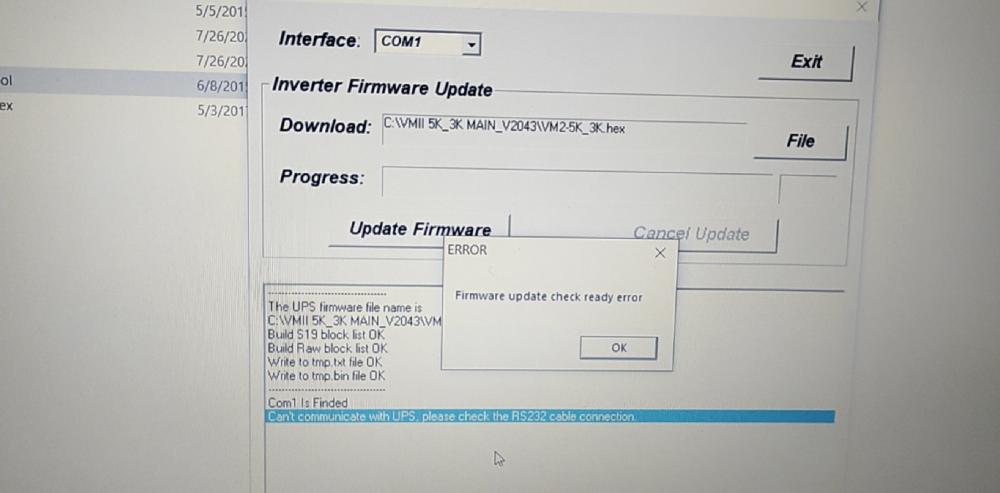
  1. Hi Coulomb, Thank you very much for your help Watch power connected as well and read all parameters but don't have any options for update the firmware How can I show the update options in watch power? Is there any way to show the options?
  2. using reflash tool
  3. Hi @Coulomb I trying all ports and all of it failed using reflash tool . and watchpower connected but don't have any options for update
  4. Hi @Coulomb What are the steps to update the software of VMII? Because the inverter charger does not work well Thanks in advance.
  5. taha.alakiele started following Coulomb
  6. taha.alakiele started following Backbone Energy
  7. Hi I trying to repair inverter 3k shows error code 06 I checked all transistors in section and out section with drivers all parts is ok. I checked most of parts in main board i didn't see any abnormal parts Any suggestions Thanks in advance. I attached pictures board
  8. Thanks That exactly what I looking for The system is 24V If you have a 5K /48V too Thanks for your help
  9.    taha.alakiele reacted to a post in a topic: Need help to repairing 3k axpert model
  10. Hi all I need help if anybody have a service manual for axpert 3k MKS Thanks in advance.

Account

Navigation

Search

Search

Configure browser push notifications

Chrome (Android)
  1. Tap the lock icon next to the address bar.
  2. Tap Permissions → Notifications.
  3. Adjust your preference.
Chrome (Desktop)
  1. Click the padlock icon in the address bar.
  2. Select Site settings.
  3. Find Notifications and adjust your preference.