edy99
Members
-
Joined
-
Last visited
Everything posted by edy99
-
The existing capacitor were 2μF on tester i replaced with 100nF...... still the same effect! The transistors were smd sot223 i managed to squeeze full size ones! Still no success! I powered the inverter from grid and a 24v power supply..- to weak to test the standalone inverter part(gives error 52 low battery) "So it might be worth replacing those with decent quality 50V parts, if you can find them in a suitable size." Thank you .i.will
-
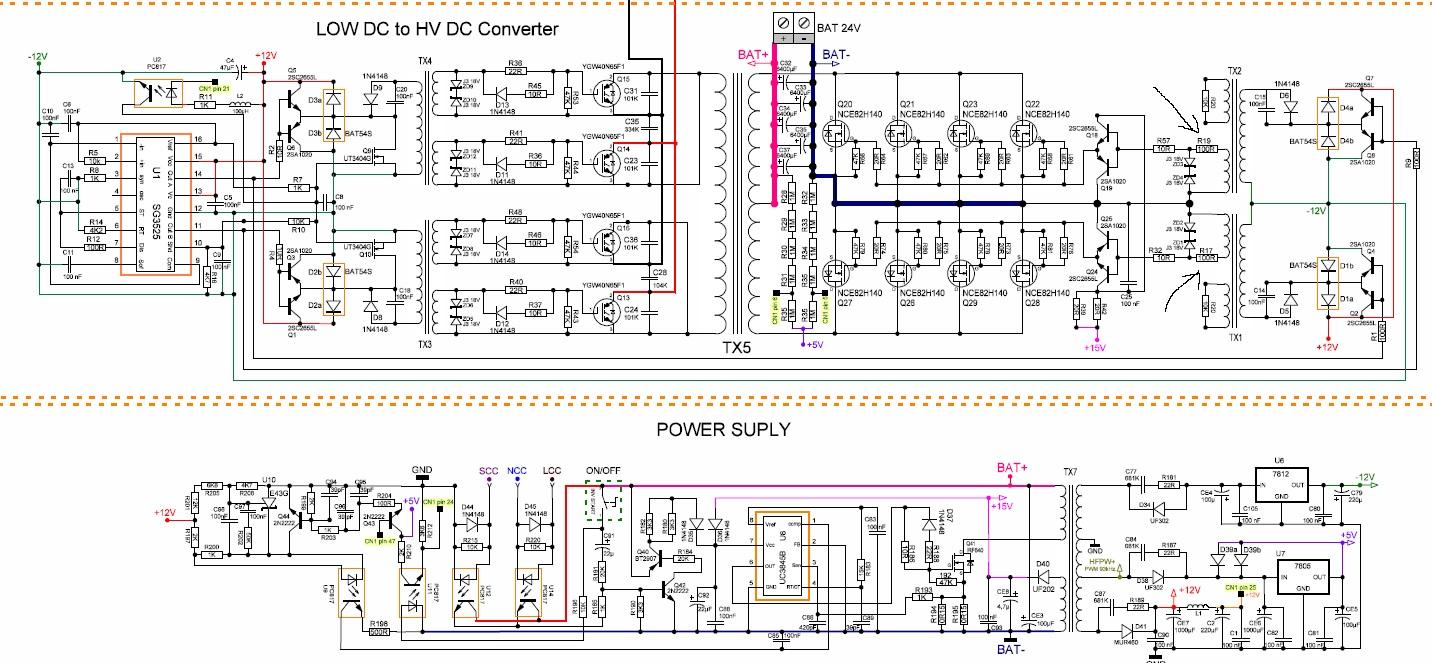
Hello! Because you have an inspiring 29 pages of useful information ..i dare ask a question about my situation!I received an blown POWMR 3,2kw and try to get it to work for my personal use! Error 57 few Mosfet blown and OP07 replaced and a Zener 18v....Now starts well... but with a thermal camera i noticed 2 resistors near TX1 and TX2 overheating... bad! i checked the parts ...all good! Replaced the nearby mosfets and zeners , decoupled the other side of tx1 and tx2 (d6 and d5) After disconecting the capacitors c15 and c14 the heating disapeared.. so the problem is on the other side...theSG3525 is new... reconected all only left the capacitors...no heat

-
Hello! I am in the same situation..Have you found the defect?