PilgrimToHyperion
Members
-
Joined
-
Last visited
Everything posted by PilgrimToHyperion
-
Thanks! The 2kW element sounds like good idea!
-
Inverter: Goodwe 5048ES Panels 8x365W Battery: Dyness Powerbox-F10 (9.6kW) - DOD = 65% (max 90% per manual) DOD = 65% (so I have 35% available in case of loadshedding / power failure) We use about 30kW a day. Essential load on the battery / inverter: Everything but the washing room (possibility of going over 4.6kWh requirement), geyser (4kW element) and oven (3.3kW). The manual for the battery states: The battery's long-term continuous charging current should be ≤0.5C The long-term continuous discharge current of the battery should be ≤0.5C The recommend maximum depth of discharge (DOD)of Battery PACK is no more than 90%. ---------------------------------------- Somewhere around the beginning of the year my Powerbox-F10 (6 years old) started giving issues where it would suddenly drop from 30% SOC to 2% and then shut down. It has an extended warranty of 20 years so I took it in to Rectron. Within 2 days they replaced the 4 modules inside as well as the BMS (apparently faulty and was telling me that batteries are at 98% health). I was impressed and surprised with their turnaround time! The way this has been configured by the installer is that the geyser, oven and washing room CAN make use of the battery, but ONLY when the grid is available. The geyser is automatically switched on from 10:30 to 12:30 (trying to maximise PV usage) and then again from 17:15 to 18:00 (heating geyser for the kids' bath) each day. So for 2hrs 45min each day the battery delivers +/- 4kW (normally around 2kW, depending on PV performance at the time). Outside of that there's an average load of 800W-900W per hour for the rest of the household. Here's what SOC looks like on an average day. My questions are whether this configuration has contributed to the damaged cells and whether I should ask my installer to reconfigure so that the geyser and oven can never use the battery no matter what? I think this might leave me in a situation where my battery will reach 100% SOC in the middle of the day (portion of PV will be wasted as generation > household demand). The battery will only start discharging +/- 16:30 when PV < household demand. Apologies for the wall of text. What do you suggest I do? Thank you in advance!

-
That's Grafana speaking to some sort of DB in the background. Perhaps Home Assistant's DB.
-
Was just upgraded to 1242417 and have requested to be registered as an installer. Thank you for the tip. I'm going to try and understand the eco mode settings in the other thread. Still seems a little overwhelming. Might come begging for help!
-
Thank you! This just saved my sorry arse. Changed to general mode in the morning and set on-grid DOD to 30% and off-grid to 90%. I tripple checked the values because this had bitten me before. Lo and behold, When my battery reached 60% during loadshedding everything switched off. PV Master showed off-grid DOD set to 40%! Damnit! Anyway, your method helped get it on during loadshedding. Thank you! Anyone have an idea how to make sure the inverter has saved the values? Secondly, when it says it needs to restart after settings changes, is it MUST?
-
Instantaneous (no login), real-time data (way more than PV or SEMS gives you, extractable to file, history of performance and parameters, a system tray icon that gives you SOC%, a friendly dev. The list goes on and on! Worth a try.
-
Cef, since upgrading to Windows 11, I've been getting a error message every 30 or so minutes. When I click OK, the inverter values it was capturing in the background while the message was being displayed rapidly cycles until it catches up with the current time. I have reinstalled into a new folder but the behavior is the same. Any ideas?
-
@Cef, I think I might have found a bug. I was changing my nominal power PV string values and I made them too low which pushed the efficiency percentage > 100% : Even after putting in the correct values which should give me an efficiency of around 85%, the value stays on > 100%. Restarting the application does not work.

-
I've checked PV Master and I don't have an option to edit that value. I pick my battery type (Dyness Powerbox F-10 and whatever default settings it comes with. Look at page 8 of this for specs of my battery (4 modules). https://cdn.enfsolar.com/Product/pdf/storage_system/5d5644162bfa6.pdf
-
Now that we can see the D.O.D percentages, I was wondering if would be possible to indicate estimated times to reach those level of D.O.D based on current discharge rate e.g. the SOC% might be at 100% and the discharge rate is 10% an hour, to reach D.O.D of 89% (if off-grid) it would take approximately 9 hours. Looking at the on-grid D.O.D % it would take approximately 3 1/2 hours. I understand that these estimates would fluctuate wildly as the discharge rate changes, but I think it would be nice to see it. The opposite could also be nice to see. An approximation of time to reach 100% SOC based on the batteries charging rate.

-
Agreed, they're swopped around. Thanks for adding it, Cef, much appreciated!
-
Thank you, Cef. I've set my values to 0 again. I remember reading somewhere that the Goodwe inverter's self consumption is around 66-72W, so I entered it. I was wondering if it was possible to read the values for DOD (on grid) and DOD (off grid) as set per PV Master and display it?
-
Cef, please help me understand what my settings should be. The grid is not available and I don't understand how my house consumption can be 899W but my panels are doing 721W and the battery is 100% charged but it is not discharging to make up the 178W difference. I think my settings must be wrong. I've set the I have the GW5048D-ES with 8x Canadian Solar 365W panels in 2 string of 4 each. The battery is a Dyness F10.


-
Wow, now even I can understand all the values! :D Awesome work, Cef! Are you using a different font for the "Power Balance"? Mine looks like this and it is cutting off: I have reinstalled the supplied fonts, but no change. If possible, could it be so that if you click on X, it gives you the Exit option immediately instead of having to right-click on the systray icon? Loving this new version!


-
If you're on the same network as the inverter it should work regardless whether you're using wifi or LAN. If you can't ping it from the device you're trying to run the program on, you need to solve that first. Successful pings is a requirement to establish a connection to it using this program (unless you have some super complicated firewall rules that block ICMP). Also make sure port 8899 is open. The other high port I can see seems to be dynamically allocated.

-
@Tokolosh, see this post I made: Maybe you have a similar issue.
-
Barry, you can click the MODE button to get to the parameter input screen.
-
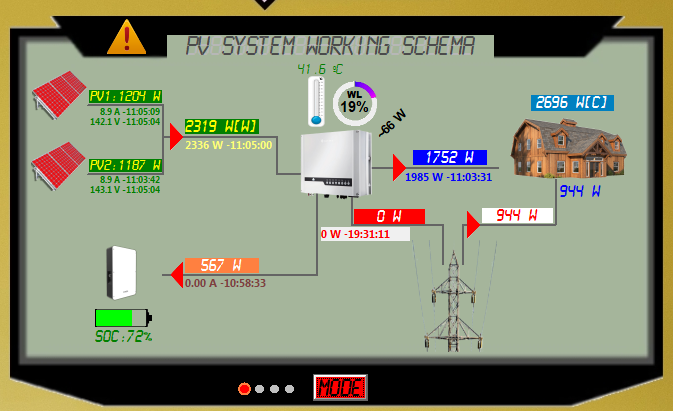
I think this confirms that the non-essential loads work as expected, @Cef . My airconditior uses just under 1,000W when on. It is not connected to the Back Up supply. Airconditioner off: Airconditior on:

-
Perfect! It works.
-
Thanks, Cef. New version looks great. A few observations: * The info when hovering over the systray icon is great! * The tooltips help a lot to make sense of it all. * My total PV shows as 0 all the time: * The white inverter is very nice! ❤️ * My non-essential loads seems to work correctly but I still need to look at it a bit more. * I like that if there's an event the icon in the systray changes and warns you to check it. As I spend more time with it, I'll give more feedback. Thank you for the updated version!


-
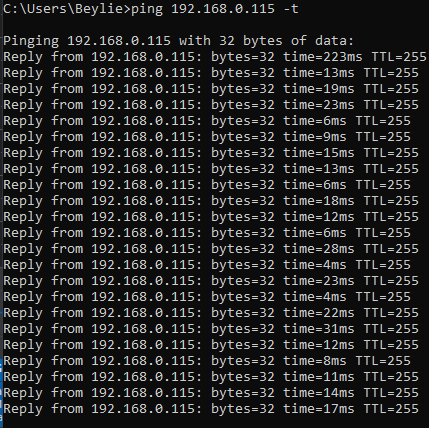
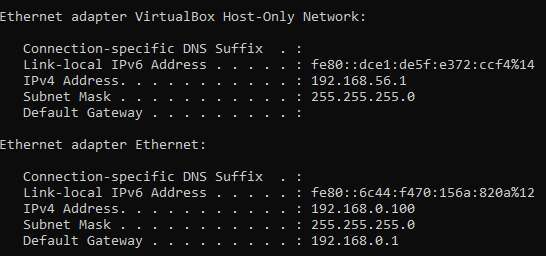
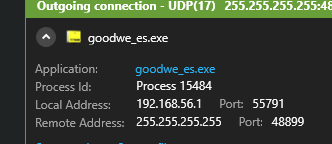
Ping is successful. Connected to the same IP from V1. V2 does not find the inverter on 192.168.0.115. Firewall sees that it tries to reach it from 192.168.56.1 (virtual adapter) instead of 192.168.0.100 (physical adapter). Uninstalling the virtual adapter fixed the issue, but then you can't use VirtualBox. I did find a solution though. You can set the priority order for network adapters in Windows. I followed the instructions in here - Instructions - to set my physical adapter (192.168.0.100) to priority 1 (it was set to automatic) and set the VirtualBox adapter to 75. Immediately the auto-detection for V2 of your program started working as it was now using the correct adapter to look for the inverter! Thank you for helping me test and leading me in the right direction. This information might be beneficial to other users who have more than 1 adapter (physical or virtual) in their computers. You might also consider adding an option to choose which adapter to use if there is more than one in the system.


-
I started having issues with v2 yesterday. It says it cannot find the inverter. With v1 I can connect to it by specifying the IP. I can also connect to the inverter with PV Master. A wifi diagnostic in PV Master shows that all is good. I then realised that I installed VirtualBox to test something. This created an IP of 192.168.56.1. For some reason the autodetection is trying to look for the inverter from this IP: How can I force it to look for the inverter from 192.168.0.100 (which is my computer) instead of the VirtualBox host adapter?
-
Cef, v2 is a thing of beauty. The detection worked fine. Not sure what the fourth mode is for? Mine just stays blank. I see you've pasted part of your post twice above. Happens if you post at 3am! Thank you for this, it is very useful!
-
Just to correct myself. The text isn't cut off if you actually follow the installation instructions. Apologies. It works 100%.
-
Just wanted to say thanks for this, Cef. V1.0 works great! Some text are cut off, but besides that great!