


Chris Olivier
Members
-
Joined
-
Last visited
-
It is a new plant all updates & versions were updated to both inverters check coms cable changed also coms cable but slave inverter still give error F29 parallel canbus fault reset & restart inverters but still the same only master inverter working Normal & slave with error F29 also no usage are ahown on the solarman app the inverter & dongle coms are there as they do show all online on the app any other ideas solving this We also changed the master & slave inverters and set it up again but still same ishu


-
If you have a parallel system with 3x 8kwatt 1phase sunsynk inverters will you be able to ran one 1phase Generator to only one inverter gen input to regarge bTteries will that work or will the inverter coms pick up 2 missing fases ?
-
-
ok so this means it is a 15 sel Battaery pack sovar looks good will hear what the client say when he test the set as he is fully off grid & di welding work & the other types Batt he had could not handle 60a discharge when the welder strike
-
-
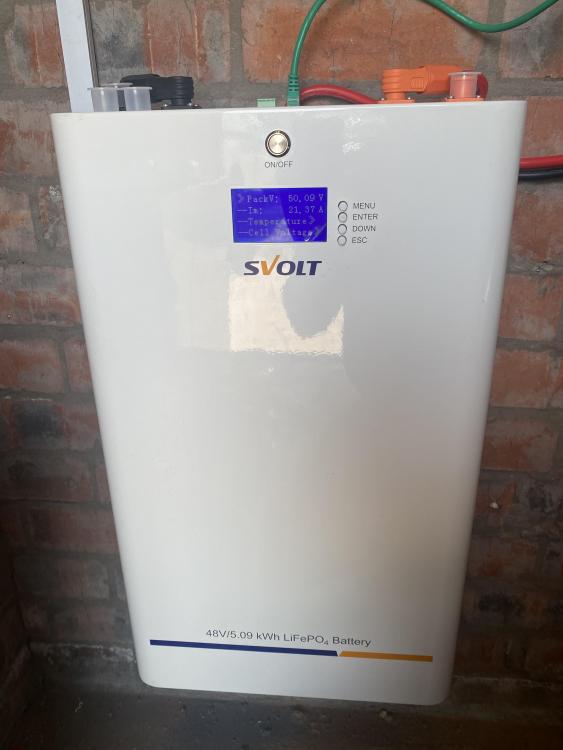
Hi i have set up a SVolt 48 Volt battery that the client have i am not familiar with this product i noticed some one earlier post that it is compatable with pilontec BMS onfig i have tried but inverter gives Error 61 “BMS falure or not compatable i have set inverter back to USE and set the Bulk & Float on 53VDC as i am carefull due to the Battery spec on side of batt only gives Rated Voltage 42,0V-53,25VDC Also noted that on Batt spec it says Rated Charge & Discharge is only 20Amps ? I will forward a pic of Batt en spec as i cant find a manual also there are no manual in box

-
Thanks yea they do have screens but are already 2 years old still working good just the Bms coms thats an ishu
-
-
Thanks Moffat
-
Hi thanks i have already changed to 8kw Deye inverter
-
Hi thanks for reply yes both do have Can & RS485 points bothe have been tried but with no succses i did set Battery spec to USER with the Battery Voltages & spec from the Batt as per Sun Pays but it is not working nice as the App show battery Persentage as 15% but on Battery BMS it is still at 57% so i am not able to monitor correctly outside/Away from home
-
Good day i have changed from 5kw Mercer inv to n 8kw Deye inverter with my existing 5x 4,8/100Ah Sun Pay’s Lithium Batteries. it seems that the BMS is not communicating on the Deye inverter is there any solution as to get it working any asssitance will be appreciated Thanks Chris
-
any help or assistance in my request please ?
-
Chris Olivier joined the community
-
Hi i am new to this forum , but would like to ask a question as to get more information. i had to replace a older 4000 watt Highbrid solar inverter with a newer Expert 5000Watt/5KA inverter the older inverter had automatic Equalizing setting but the new Expert inverter does not support or have this function . the max voltage setting for charging on new inverter is 56,4 Volt /14,1 Volt per batt max will this be ok for Flooded batteries , or is there a other way of getting these batteries Equalized, also i want to know is the Inverter manufacturer's forcing us to go to Gel/ pilot or other newer type batteries. Thank you for your help Chris


