


eHunterADJ
Members
-
Joined
-
Last visited
-
Thanks for all the feedback everyone. Very informative! I need to have a chat with the electrician tomorrow and I really hope it did not cause damage to my inverter.
-
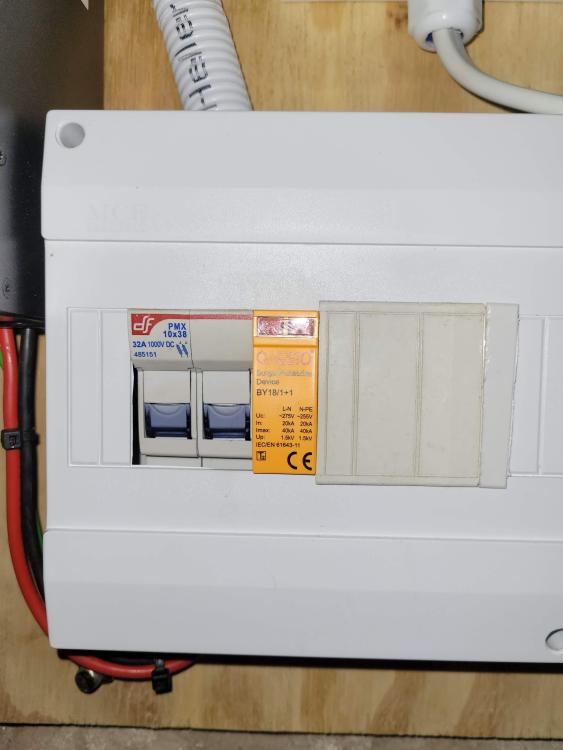
Can I jump in and ask a 'similar type of question' ? I recently had an electrician come and finish my solar job (previous electrician vanished when it came to delivering the CoC). The new electrician modified and installed a few extra bits, one of which was this SPD on the DC (solar) side - BY7-18/1+1_ONESTO A few days in to it, my inverter started making some strange noises with the PV voltages jumping all over the place, then eventually, the MPPT 'died', and I noticed the 'green' indicator on the SPD was now red (so assuming the SPD went pop). Is this the correct type SPD? Is it even DC as I have my doubts (as they installed the same one on my AC DB). My solar panels 'used to' supply between 180V - 200V DC and the inverter can handle MPPT Range @ Operating Voltage 120VDC~430VDC (Maximum PV Array Open Circuit Voltage 500VDC) Feedback from some experts really appreciated!
-
It was under the very first post of this link -
-
You wont be disappointed with https://solar-assistant.io/. I've been making use of it for a while and it works great. *Can monitor the inverter & battery remotely with a neat looking app (can also be installed as Android / IOS app). I have a Pylontech battery and needed an additional cable to get more stats.
-
I can only speak for the 41.17 and mcu 2.66... it didnt state if it was for a 24v or 48v, but i installed it on my 24v vmiii and it was fine. the version i had before was the 41.x range so didnt want to try anything from a different range, like 91.x.
-
Feedback, after almost a week, is that all seems to be working well. The 69 code battery warning is gone and system operating fine. Very happy with results! Thanks
-
Decided to charge the pylon from Grid for a while and viola, I am again able to manually switch to Battery! ... Very bizarre. I'll keep an eye for a day or two and see how it behaves.
-
So finally, I managed to get the correct USB to RS232 setup and flash the MCU. I decided to go for version 2.66 uploaded by @Coulomb and this is what I have noticed thus far: - I dont have the 69 warning for when the pylontech is float charging anymore, which is great. - A problem I have encountered is that for some reason, I cant manually flip over to battery anymore. It's set to SBU (no power from solar atm), but still it's supplying power from the grid (bypass). If I kill AC power, then it does go to battery just fine, but not when I do the manual switch while AC is supplied. I'll try a few settings but else I might flash 2.61 tomorrow to see how that behaves.
-
-
many thanks! will feed back post update.
-
Interesting... where can a person find @Coulomb's upload?
-
Nope, not yet. But early days still. I have the annoying 69 error when my Pylon UP2500 starts to float, and I am still seeing that, but am also looking to give it a day or two to see if there's any difference (and it hopefully goes away). - or maybe that gets fixed under MCU 2.61? Will report back if/when I notice any changes.
-
I can say that I successfully flashed this firmware on to my VMIII 24v - and all went well. (flashed via USB) It did prefer a proper restart as ICC didnt communicate properly with some settings but after the inverter restart, that was fine also. I was hoping to flash MCU 02.61 also, but seems you must do that via a COM / RS232 interface, so will acquire that and perform the flash at a later stage.


