


alistair
Members
-
Joined
-
Last visited
Everything posted by alistair
-
Thanks Helius. Will set to 20a as only 20a and 30a as available options. Appreciate any advice you can offer later on Axpert DOD settings.
-
Hi Helius. Thanks for the comprehensive feedback. Battery is n100mf. On the battery itself it shows follows: Float charge 13.65 (slightly less than datasheet 13.8 i assume [2.3x6] Bulk charge 14.7 (same as your suggestion [2.45x6] Current axpert settings: Float charge is 27.3 (should i increase to suggested 27.4 but could differ to datasheet and battery values?) Bulk charge is 29.0 as max axpert setting (assume 29.4 is ideal based on 14.7 x 2, is this an issue?) I do currently see 4 solid bars with axpert battery reading toggling between 26.9-27.0v Concern is battery D still shows "replace" after 41 hours of charging although actual battery reading is showing 13.35-13.38v while connected. So not sure if trashed or not while battery C is still "green". Should i give it more time and expect battery D to return to "green" on battery hydrometer? Can you recommend a cost effective battery charger please which is readily available. For charge duration, axpert is currently set to 30a with only other option 20a. Should i leave as 30a? Also to set DOD, would this be option 29 on axpert currently on default setting of 31.0v thanks again!
-
Hi Helius. Readings below as you requested. Hope this helps shed some light on my issue. I have yesterday disconnected the 4 batteries from their original series/parallel setup and only have 2 x 12v connected in series to the inverter.

-
Thanks Helius. Very detailed indeed. Would a change to gel batteries do away with some of these "challenges" making installation less problematic.
-
Hi Helius. It is the built in hydrometer showing red, green or clear (replace). I will post the readings once taken. Issue is with both new and slightly older batteries. Remaining "good" one is older battery.
-
Thanks Carl. Prior to running only on pv the settings were as you describe. I reverted back to these last night for 2/4 "good" batteries where hydrometer still showed green. However this morning after a full night of utility charge 1/2 shows "replace". Question is whether it is faulty hydrometer (unlikely if impacting 3/4 batteries) or actual battery failure. Is it safe to continue trying to charge up all 4 if 3/4 show "replace" or are you saying this could potentially reverse the 3/4 and could get them back to "green". Setting 4 is on default not enabled. Deepbass9, thanks i will reduce to 20a.
-
Thanks Carl. I bought original 2 batteries end April and then a further two in June. Was initially using two in parallel before adding the additional two in series/parallel a week and a half ago. On Saturday i changed the Axpert settings to run my backed up circuits from solar/battery first with a fairly small load with max around 800w for short intervals. It was after doing this for a day that i noticed the first battery showing replace. at this point i stopped charging all batteries for two days due to concern around this only to find 3/4 batteries yesterday with this issue. After one came back to life i ran two batteries last night but this morning back to situation where 1/2 shows replace. i havent checked the dates yet but per dates above were purchased recently albeit different suppliers. setting 2/11 i reduced initially from 30a to 20a but back to 30a. setting 5 was originally changes to flooded but had changed after this issue to user defined to change settings 26/27 to battery specifics for float 13.65v (
-
They are sealed batteries.
-
Got home today to find another 2/4 batteries showing "replace" so now a total of 3/4. Disconnected all 4 and each still give 12v on voltmeter. Gave the 3 a shake and can hear electrolyte. 1 of them came back to life (green on hydrometer) and have now connected only remaining 2 x 12v in series to 24v inverter. Any ideas what could cause this kind of outright failure or is it faulty hydrometer if still getting 12v reading?
-
Thanks Helius. Very useful advice to follow. Was not aware of individual charging requirement.
-
Re-read your post now Mike where i realise these "extra" pos and neg connections are what you refer to as additionally connecting across the banks.
-
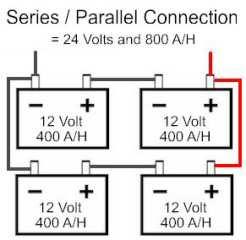
Mike, i also notice that in your diagram pos and neg for the two series of 24v each are connected twice vs once in my diagram which seems very different. Appreciate if you please advise on differences. Thanks
-
Also, would using different cable size on the pos and neg be an issue. E.g. 35mm on pos and 25mm on neg?
-
Thanks Mike, will do.
-
Thanks Helius, Clint. However still not sure what this means in terms of what i have experienced with 1/4 batteries showing they need to be replaced as virtually brand new. Checked bulk and float settings on battery and close to Axpert defaults posted above. Bulk charge = 14.7v = 28.4v Float charge = 13.65v = 27.3v
-
Diagram attached

-
Thanks Mike. They are connected as per diagram except that they are 100ah as mentioned. Could it be that the Axpert settings are causing an overcharge situation. bulk charging setting - option 26 = 28.2v floating charging setting - option 27 = 27v
-
I have 4 x 12v 100ah stride batteries connected in series and parallel for 24v. 2 of the batteries are 2 months old, the other two a month old. They are connected to an Axpert 3kv/2400w inverter being charged via solar/AC mains. I noticed today that the battery connected to the inverter positive cable shows replace on the hydrometer. I am not sure why all of a sudden 1/4 batteries is faulty. Could it just be a dud or other reason - overcharging? Appreciate any advice on this. Thanks Alistair
-
Thanks Jakes. Can anyone offer any advice on connecting this axpert 3kva/2400w inverter to my db using a changeover switch to switch between Eskom mains and inverter to supply the db.
-
-
I bought mine from geewiz.co.za. very good service.
-
Thanks Mike. I will earth my pv panel/rails like this. Anything additionally i need to do from a "system" grounding perspective. Can you let me know of anyone in Montague Gardens area who could supply these earth clips? Thanks.
-
Thanks Clint. Any idea perhaps on how to do the earthing correctly for both the pv panel and mounting rails.
-
I have recently purchased an Axpert 3kva/2400w MKS inverter connected to 2 x 10²ah batteries as a standalone unit currently only connecting to AC for charging of batteries. Using to run tv, dstv during load shedding via extension cable. I would like to make use of the solar charging capability and have a single 250w Renesola pv panel which i want to connect but not sure how to earth as well as the roof mounting rail. I understand that both equipment and system earthing is required. Would appreciate any advice on how to do this please. For equipment grounding can i take to existing earth spike or does it require its own. For system grounding not sure at all how to do. Thanks Alistair


