Skip to content
View in the app

A better way to browse. Learn more.

Power Forum - Renewable Energy Discussion

A full-screen app on your home screen with push notifications, badges and more.

To install this app on iOS and iPadOS
  1. Tap the Share icon in Safari
  2. Scroll the menu and tap Add to Home Screen.
  3. Tap Add in the top-right corner.
To install this app on Android
  1. Tap the 3-dot menu (⋮) in the top-right corner of the browser.
  2. Tap Add to Home screen or Install app.
  3. Confirm by tapping Install.

Kosie

Members
  • Joined

  • Last visited

Everything posted by Kosie

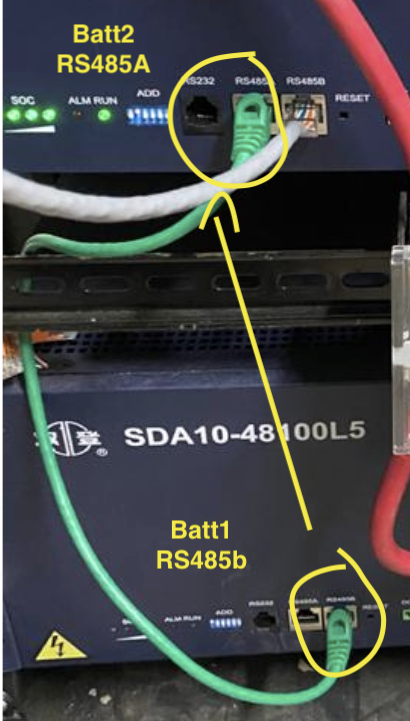
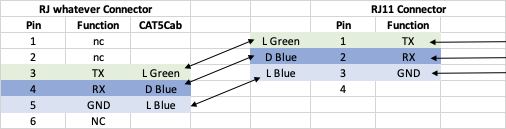
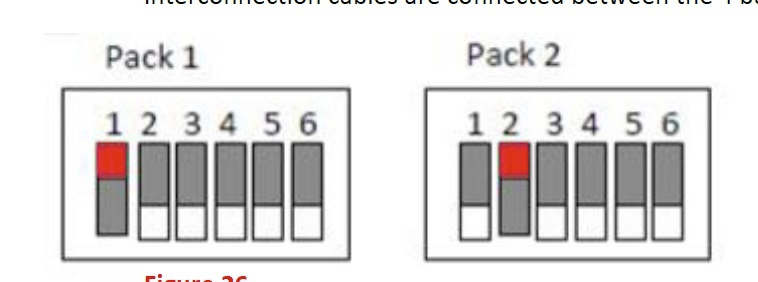
  1. Hannes. Their documentation is messy, but this is what I have figured out so far: 1. Battery 1 dip switches 1 up, rest down, Battery 2 dip 2 down rest up. 2. Cables. You need to use RS485 from one battery top the next. See below. You can use a standard lan cable. Battery one RS485B >> Battery 2 RS485A see image 3. Connecting it to a pc, is also sucky you can use either the RS232 port or the open RS485 port on battery one and link to a pc. RS232 pinout
  2. Hi Guys. Any progress on this topic. I have the rs485/rs232 comms protocol documentation for these batteries. If Centurionsolar can built an integration, i will provide support.

Account

Navigation

Search

Search

Configure browser push notifications

Chrome (Android)
  1. Tap the lock icon next to the address bar.
  2. Tap Permissions → Notifications.
  3. Adjust your preference.
Chrome (Desktop)
  1. Click the padlock icon in the address bar.
  2. Select Site settings.
  3. Find Notifications and adjust your preference.