


ASH_JHB
Members
-
Joined
-
Last visited
Everything posted by ASH_JHB
-
Needing to get a simple set up to cover loadsheding for my Mom place. She lives alone and her usage is very low, around 300kw per month and budget is aorund R25k. Looking to only have essentials on, lights (LED) and TV. Reading a few posts I think the below could work which goes slightly over budget once you inc installation. Axpert 2kw 50a Inverter 2x Hubble S-100A 1.2kWh A few questions: Does this inverter have passthrough, as in she wont be limited to 2kw when grid is avialable Read about hubble requiring a battery balancer, is that required with this inverter or does does it have a decnt BMS Any special requirements when on prepaid meter? Seen a few issues around this on other posts Any other reccomendations or suggestions welcomed.
-
Have noticed a few times that the entities are diabled and need to be enabled. check the devie out and see if there are any entites that are disabled.
-
Do you need to do a manual reboot or does it automatically update once you select beta?
-
Great work thanks, Will give it a try.
-
What's the concerns around the frequency of messages? data build up, system slowing down? I have noticed its almost immediate and real time if i compare against the inverter
-
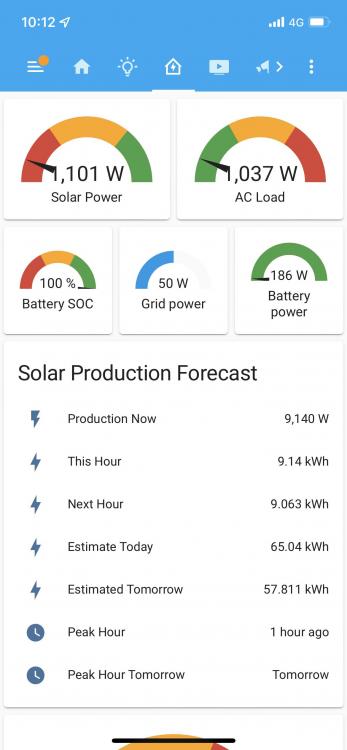
So hooked up Solar Assistant on Friday and did a quick config to into HA, it needs a fair amount of tinkering to get it looking right in terms of daily, weekly/monthly averages. I cant seem to get it displayed into the default energy integration. I had the same issue in the past with efergy (before the official integration) and recall it was something about the kw vs kwh. Anyone suggestions to get these entities changed to to work with the the energy integration or can i just add it the platform in config.yaml and change the class to energy from power?
-
Went ahead and ordered the solar Assistant as couldn't have been bothered to wire up a cable, Solarman seems pretty limited and slow and seems like a headache to get it into homeassistant.
-
Installation finally done but got a fair amount of tweaking to do. Figured will run everything as is for the next week and then start adjusting things like battery COC etc at different times of days. Also got to figure out the geyser situation to get it on remotely when production is strong. Considering been mostly cloudy since the install was quite interesting to see production relatively good considering. during the day still got my batteries charged and kept up with the current AC loads. Had some decent sessions of sun today and production holds nicely at 7-8kw

-
install finally started today.

-
Ya have found the same. I have 2 vac geysers and been playing around with different timers vs usage. Now in summer, I do find that leaving the geyser on permanently uses less energy overall. I did adjust the temp to 65 degrees and for the most part needs very little eskom to keep it there overall. Trying to avoid the morning and evening spikes that would ultimately eat into battery. Sure this will change in winter but for now it seems to work well.
-
Thanks, nice summary of things to consider. I think I have my peak loads covered with the 8kw. Even with the geysers on I don't pull more than 5kw and on average 3-4kw being the highest with my base loads around 1kw on average. I decided to go with the 4x pylons US3000 and an extra 2 panes (as suggested by someone on here) to give me 9.6kw array which are mostly north facing. Will make some shifts to higher energy consumption to the day time and see how it goes, sure there will be a lot of tinkering to try and maximize solar vs my consumption.
-
Agreed I probably could get away with a 5kw but looking at more futureproofing and go slightly bigger on the inverter to cater for future. Also want to avoid the education process with the household and what can and cant be used as much as possible. That's the plan atleast
-
The concern stemmed more from zero knowledge around it but what was mentioned on here by @Nexuss. Wasn't aware there were different chemistry make ups of batteries and assumed it was inferior. Immediately went to the notion of products claiming to be one thing and they not but use the general wording of a product such as lithium batteries. But reading into it more seems its common amongst manufactures.
-
Thanks that makes a lot of sense. If I look at my daily usage over the last month, I don't tend to pull more than 5kw which is between 4am-7am (peaks at 6am) when 2 geysers turn on (2kw each elements) and then again around 5pm when they turn on again. I have recently starting adjusting the times based on the anticipated solar install to maximize sun usage rather than grid/battery but with the +-13 kw of battery I am thinking it should be enough to handle as well as get me through the night if the household complains about about the water not being at 100 degrees for midnight showers.

-
This isn'tt helping my decision 🙈 Good info none the less. I do like the idea of having less batteries as wall space is tight so logically the Hubbles make sense. But @Nexuss comments about the chemistry make up is concerning. considering pricing isn't convincingly different between the two. What are your thoughts on the 5kw plyontechs. See everyone seems to mention the US3000 only
-
Thanks, on the pylontechs, cants seem to find a decent summary of the various models similar to those of hubble. Do you know which is the best equivalent to the AM2?
-
Thanks. Ya at a crossroad between them. Everyone seems quite happy with the hubbles but on the other side like the longevity and name of the other. On the hubbles, are the Am2 and X series the same and only difference is mounting options? Also on the plyontechs, keep reading about limited warranties and amount of batteries you need to have with the sunsynk (like 3 or more)- Do the hobbles have any of these restrictions. Thanks for the advise on the panels, will definitely go that route to try and future proof
-
Howdy, been lurking on here for some time trying to learn as much as possible. been a steep learning curve. About to pull the trigger on an installation but want want to get some ideas around my requirements. Some background. The main idea was initially to beat loadshedding but that has turned into trying reduce my reliance and cost to Eskom. I started with an energy monitor to get a good idea of my daylight and night time usages. currently averaging around 30kw per day, mostly split between daylight and evening, (20kw daytime and 10-15kw nighttime) Seems a bit lower in summer now. Got 2x2kw geysers which are both on solar tubes, gas hob (electric oven) and LED's throughout. so most of the groundwork has been done already. Got a fish pond which is 0.75kw which needs to run 24/7, borehole pump (0.75kw) and pool pump. all of which are connected to smart switches and automated with Home assistant so will be able to control which appliances turn on based on availability of solar generation (except for the pond of course). Interesting, I noticed if I left my one solar geyser on permanently it used less kw than turning off/on with a timer, initially was set from 05h00-07h00 and back on in the evening from 17h00-20h00. Guess now in the summer its only topping up the water rather than going from cold to hot Thinking of the following: 8kw Sunsynk 16 x 535 JA solar panels 3x +-5kw plyontech or hubbles (need some help here) wont being doing a DIY but got a few companies I am looking at. Any recommendations to the above will be appreciated especially on the battery front.


