


MyOwnPower
Members
-
Joined
-
Last visited
Everything posted by MyOwnPower
-
@PowerUser Looking at the diagram I think you are correct. So for the Sunsynk, ATS connects to the coil (A1 and A2) and Neutral and Earth you have to wire either 1 and 5 OR 4 and 8. Regards
-
Thanks Tariq. I'll also be putting mine a small DB. Just got the relay. Regards
-
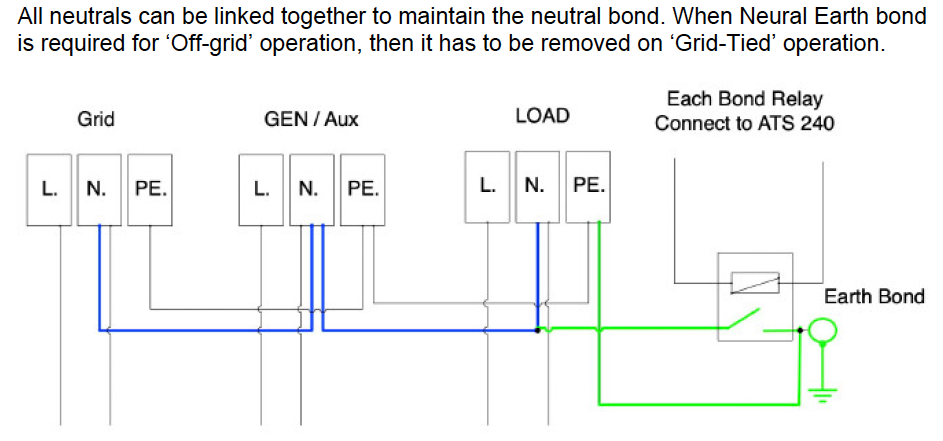
@Tariq and @ianm I refer to Ianm's diagram and the following as per the Sunsynk Manual: Question to you guys, do you have the neutral bonding on your systems as per this diagram?? Per Ianm's diagram I do not notice that drawn in. And if you have the neutral bond, did you make the bond at the inverter or in the separate DB close to the Inverter (not the Main DB)??
-
Hi Ianm, Have you installed your inverter?? I'm currently going through this planning phase. I have my 5kw Sunsynk and Hubble AM2 batteries. My wiring diagram is similar to yours. Just wanted to know if it all worked out well (if you installed). One question I still have, the Neutral Earth Bond Contactor, I see you have the Earth as going to the DB Earth, did that work fine. Also, is installing the Neutral Earth Bond Contactor a requirement in SA?? I notice @Leshen also always install these. Some advice on this would be welcome. Regards
-
I also have an Imeon installed with Monitoring Box and Smart Meter. Solid as a rock since installation in 2016. Was thinking of installing one at my holiday home but now also decided to go with 5kw Sunsynk and Hubble AM2. Imeon is not supported that well in SA. I manage to log into the settings remotely via a Dynamic DNS service activated on my Router. The Imeon online monitoring does not allow entering settings. With DDNS I'm able to access my Imeon from anywhere. Very good inverter, just a pity of the support, although I've had remote support out of France.