


MaurizioZA
Members
-
Joined
-
Last visited
Everything posted by MaurizioZA
-
Exactly. I have been away from this forum for a while and I now realize that some guys who had been developing alternative management software might no longer be in this forum. Are you able to suggest any pointers to JCN or maybe suggests relevant treads in this forum?
-
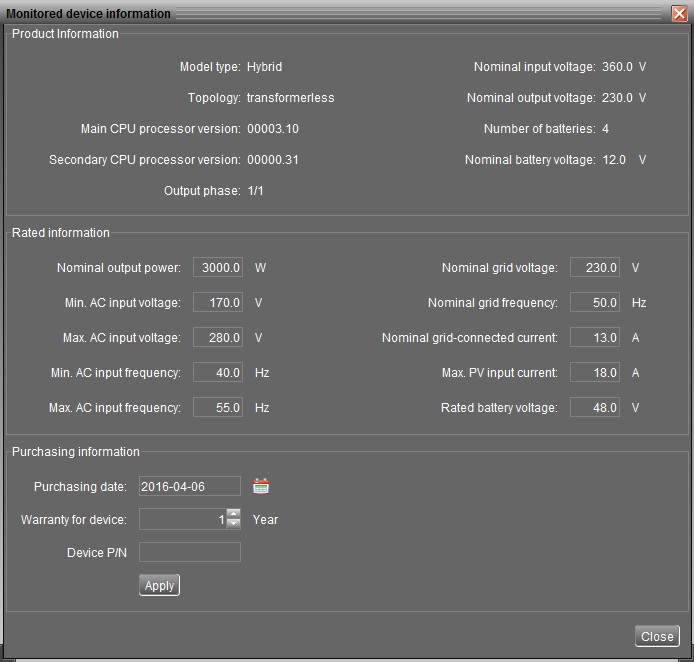
Thanks to Wagga links to protocols and utility for sending commands can be found here: RS232 Protocol.pdf note: protocols are generic and possibly only valid for Axpert inverters (solar inverters which unlike Infini are not hybrid / do not feed grid). However most commands should be valid. AccessPort_and_SOP_battery_calibration(1).rar also read: the above refers to adjusting min/max frequency without factory password but method is exactly same with other commands. I have tried to tried to change inverter mode to capture the command string sent to inverter. Since I was in "Grid-tie with backup (II)" I switched to "Grid-tie with backup (I)". the string is "GTS1" which inverter replied accepted (ACK9) ... and the re-booted This test was a BIG mistake: I sent the command while my wife was preparing dinner and children doing their homework and I had forgotten that switching modes causes inverter to reboot thus leaving everyone in the house (including me) in the dark. I had also forgotten that my computer is not linked to inverter by com cable but through Ethernet (+ WiFi) to com port via a WiFi rooter + Ethernet cable + com-to-LAN adapter: as inverter rebooted and power was cut to these devices my link PC-inverter was lost. It took me one hour to re-established link, switch back from "Grid-tie with backup (I)" to "Grid-tie with backup (II)", go through a second inverter reboot (and loss of power to the COM connection) and by the time I managed I realized that I had not captured the command string because I had been monitoring the old virtual com port (a new virtual port was created in my PC because previous port was busy monitoring the old broken connection). All this was done while everyone was shouting at me Bottom line: I do not know for certain what the command string for switching to "Grid-tie with backup (II)" is. Maybe "GTS2" ... or maybe not I just know that I will not try this again until the weekend and when everyone is not at home: in a single hour I collected more insults and screams than I get in a whole year
.jpg.686a402a222b6ab36cd232c388e3eabe.jpg)
-
Tonight I will modify my setup and take note of the string which is sent to the inverter. Somewhere on the forum there is a description on how to change some frequency/voltage parameters without factory password: you should then be able to send that string to your inverter and record the answer from the inverter (NAK if command is not accepted)
-
JCN, From what I read it looks to me that firmware 0.32 prevents you from accessing "MyPower Management" menu. For what reasons I don't know and I would query this issue with Voltronic before attempting firmware updates. My point of view is that firmware should not be fiddled with unless there is certainty that it is correct for the hardware (but then nowadays firmware updates do check for hardware compatibility before updates). It might be possible that you get an answer of the type "pay an additional fee and you will get the MyPower Management feature unlocked": at that point if I were you I would be prepared to try to change firmware to see if menu becomes unlocked. In one of the earlier posts in this tread I read about a firmware upgrade for the 3kw from Voltronic: if I were to try one I would try that one. Sending commands to inverter would work but it might not be a great idea since without the MyPower Management menu you would not be able to see what is going on with your inverter. There are a couple of guys in this forum who have made their own enhanced management software (I am a little tight for time at the moment so please try to search this forum yourself ... or maybe someone else can point you to the topics ?) and I think they offer trial options: however you need to check if the Infini 3KW is supported. If they do this might be your best bet.
-
Hi Jens Christian, Although my inverter is an Infisolar 3KW Plus by Santech (model 3KW PV 4.5KW) my conversations with Santech is that it is essentially the same machine available with different shells for different countries (for the UK is branded Infisolar) I assume that it is a similar story for the Voltronic version. My first comment is that my inverter was manufactured for Santech (China) in June 2015 with: Solarpower version 1.04 ( Santech pointed me to a new version from their UK distributor but after downloading it I never found time to install it) Main CPU processor version: 3.10 Secondary CPU processor version: 0.31 So I am a little puzzled by your question: I can set by Solarpower version 1.04 my inverter to do what you say you cannot do. In particular at the moment I am running mode "Grid-tie with backup (II)" but with "Allow to feed-in to the grid" disabled (I also cannot feed to grid ... otherwise I will be charged for my supply) and I do not al;low grid to charge batteries (PV only). In this mode the Priority is: 1st load > 2nd battery > 3rd grid After experimenting I have found this mode more efficient by ~ 2KWh per day than the standard "Grid-tie with backup (I)" i.e. Priority is: 1st battery > 2nd load > 3rd grid since batteries are only recharged with excess PV not used by load (I have 4000w panels and my production in sunny days in winter is generally slightly above 3000W). I see little point in supplying load from batteries unless there is a power outage or voltage is very high. Reason: my energy savings using batteries are not consistent enough to offset battery costs once I take into account increased PV production in mode 1st load > 2nd battery > 3rd grid (and my batteries are always ready for backup). On issue of voltage very high: in June we had >250V during night hours (from 00:00 to 04:00) for more than a week and most appliances, neon lights, cold-room compressor as well as my APC UPS (it was going off-on-off-on-... indefinitely) were very unhappy/very noisy due to excessive voltage). It was very disappointing (and inconvenient) that Solarpower version 1.04 was not able to be set to switch to battery mode when Voltage from grid was higher than a pre-determined voltage value. In theory "Grid-tie with backup (V)" should do just that but Solarpower version 1.04 was unable to send the correct command to the inverter (bug?). That meant that before going to sleep I had to manually set "load priority: battery-grid" and make sure I remembered to switch back to "load priority: grid- battery" before sunset. I need to install a later version of Solarpower to check if this bug is resolved Probably I don't understand your question correctly: can you please illustrate with Solarpower screenshots why since my inverter is from 2013 -this menu point is not available? If we have similar firmware (if anything it looks to me your Secondary CPU processor version is one step head of mine) and same Solarpower version this does not make any sense. regards
-
above was replied to in
-
very interesting observation. I had been assuming that inverter would have switched to PV and keep abnormal supply from grid out of the system, but obviously it is the other way around. That one reason more to keep my two servers under UPS with voltage regulator. Originally I had planned to sell UPS and 4 x 150Ah batteries once inverter and PV was installed. Then I realized that it was nice to be able to be able work on inverter and DB board / earth leakage without worrying about supply to servers (I have UPS under inverter). Then some faulty appliance tripped the earth leakage and it became obvious I still needed the UPS. Eventually we had a very long power outage and by early morning inverter batteries were out and PV power was insufficient for about one hour: at that point UPS took over and saved the day: it's great peace of mind to know that UPS can still run servers for >9hours after inverter is out.
-
just to follow up: My understanding is that your inverter sends your MONITORED DEVICE INFORMATION to the software: Then you may adjust PARAMETERS SETTINGS within those MONITORED DEVICE INFORMATION parameters (I did not try if software accepts any parameter outside range but I would imagine not and in any case I do not suggest to anyone to attempt that): Obviously the closer to the preset factory settings in DEVICE INFORMATION and the happier your inverter should be. For example I was having trouble with min and max AC INPUT FREQUENCY. Although device supports a range between 40 and 55Hz I found that altering the range between 47.6 and 50.4Hz was perfectly sufficient for me. I saw no point in widen the range further because wider ranges might have negative effect on appliances and even trigger earth leakage to trip.


-
A few guys contacted me directly with questions about "how much overload" the 3kw inverter can really take?. My assesment is that maximum load from grid is just below 30A (last peak measurement I noticed was a 6798kw 227%) which happens to be also thee value of the trip switch recommended by supplier for connection of the inverter to the grid. The next question was: for how long can load exceed 3000W when connected to grid? My assessment is: as long as power is being supplied by grid. As Cobus asked me this question this was what the status was: No problem at all although load well exceeded 3000W (up to a max of 5382W) for more than 5 minutes. I had not tested overload during a power outage till today. Today I experienced a 3hour 9 minutes power outage: I actually did not experience it since I became aware of it only >2 hours after it had started.when I was asked what had gone wrong with the borehole water supply. Sun power had completely taken care of load with batteries temporarily compensating any shortfall and immediately being recharged back to 100% Sweet ... and I still have to plug in 2 more panels ( already on my roof ) to the arrays because I have been too lazy to disconnect the arrays and re-route existing solar cable. While checking logs I realized that I had been in overload a couple of times already while I was unaware of the power outage (in one event 3172W for over one minute). Finally a real life opportunity to check overload ! Starting the microwave for a minute was not enough to enter overload mode: from 1127W to 2553w and back to basic 1178W load. I need more load: what about the kettle? Overload warnings ... I wait to see what happens next while load is at 150% and more ... I am expecting shutdown but nothing happens excepts more warnings. It feels this has gone on for a very long time and the microware timer runs out. My wife restarts it immediately (but load never goes below 100%) and overload warnings continue for some time. Eventually some 15-20 seconds later inverter shuts down. Microwave and kettle are switched off and I wait to see what happens. For some reason (did I read this in the manual?) I expect inverter to restart supply of load after 300 seconds (5min) so I wait and wait. After 5 minutes I give up and I push the inverter ON button and supply to load is restored. The fault log tells me 151% load level, 19.5A This is the full data log of the event: Logs tell me that overload only took place over 2 intervals (30 sec each). It felt almost as it was more than 1.5 minutes at least. I should have timed it. Contact between PC and inverter was lost because when power supply stopped my rs232-to-LAN unit lost power as well. I will connect it to a ups in my next test. And looking at the log I am no longer sure that I have actually waited the full 300seconds for the restart ... maybe I was too quick to push the ON button. A doubt remains: will inverter recover automatically after an overload fault or does it need for the ON button on LCD to be pushed? Nevertheless I am very impressed with my inverter: 150% load for well more than one minute is an unexpected result. I would have been satisfied with 15 seconds at 150%. I am now curious to see if time would have extended with a lesser overload %. In any case I know now that accidental overloads will not be a problem: I'll have enough time to shut to my wife: SWITCH IT OFF !!! This inverter is well above all my expectations. At this point I know I would not swap it for a 5kw inverter as I had originally planned. In addition to the inverter cost a change would also require complete re-wiring and a further investment in batteries (I am running only a 150Ah battery bank). Maybe ... only if I had space available on the roof for extra PV arrays (which i don't) and I could feed back to grid (which I cannot). I hope my experience can help someone in decision making.


-
my options are limited by the fact that Jhb City Power pulse meter will charge me if I supply to grid. I see little point in using batteries except when load is well below 50% of inverter load (which is after everyone has gone to sleep) and below 55% battery capacity (although specs say I can discharge batteries to 0% a few hundred times) otherwise batteries will discharge too quickly which is not good for battery life. Before any comments: I am pretty happy with my batteries values (which are same as set by the battery manufacturer in the Infini used in their "Energy Storage Unit") and having spent a bit of time with the factory engineer I am convinced they are the best for my system. It's too easy to overlook the reality that batteries are the major running cost and that there is little point in saving 50 bucks of electricity when it comes at a battery cost of 100 bucks or more. In my tests I can notice that a lower battery discharge is much more efficient in terms of total daily kwh output so I intend to use batteries only for power outages and/or from 1am to sunrise. I need to figure out a way to make it happen automatically. The other challenge is how to maximize PV usage: my load under inverter is too erratic jumping from 20-30% of PV potential production to 200% of PV production. The net result is that for same sun conditions in different days I waste up to 8kwh of production. Even by running pool pump under inverter. I have tested that simply by synchronizing feed-to-grid (meaning I "click" fed-to-grid on and off) with running of heat pump (which is out of inverter) I can save (or rather "produce") ~4kwh per day more. How to implement this without wasting most of the day is another story Since winter is coming I wouldn't mind to try to run the kitchen underfloor heater (1800w - also out of inverter) between remaining gaps in load but synchronizing this manually would mean to waste the remaining half of the day eh eh ... anyone who gets bored easily should buy a solar inverter
-
Thanks Wetkit! ... and why didn't I think of that? I've just realized that from day one I have been stuck like a donkey on "Grid tie with Backup (I)". Possibly I will find some answers by exploring all other options.
-
Stupid question: in SolarPower (version 1.07) sw settings there is AC output ON/Off Timer: Set up on/off time for AC output of inverter. If setting it. as 00:00/00:00, this function is disabled. I always assumed this to mean AC output to grid ON/Off Timer Since I cannot feed back to grid I have never tested this function. Do I understand this setting correctly? What happens if "Allow feed-in to the grid" is un-ticked and "AC output ON/Off Timer" is active? Another question: there is no setting anywhere for scheduling supply load from batteries, is there? Maybe in later sw versions? Thanks.
-
uhmmm ... just got a new fault message ... I wish I had been logging com port 2024 Warning 2016-04-06 13:24:39 Fan fault 2012 Warning 2016-04-06 13:24:39 Require power from the power grid nothing wrong with any fan. and there was no power outage of any type so I am not sure what that "stand by" is supposed to mean: ... dish washer is heating up water. It looks to me that better communication through LAN is actually returning fake errors which I did not use to receive before. confusing ... EDIT: I am changing virtual com port settings disabling "strict baudrate" option (which I had also disabled for wifi) : may that resolve fake errors issue? Option "synchronize baud-rate (RFC2217 similar)" I think was enabled for wifi so I will keep that enabled.

-
Thanks Coulomb and superdiy That was my first concern but device parameters seem as they have always been: My assessment was that some partial command might have caused the hangs and that is why I decided to switch to a LAN cable. I think I need to keep logs of virtual com communication so I can check in logs what actually happened after a hang event ... but I must first figure out how to do that in Win 7 (remote IP 198.162.0.83 port 8080 mapped to virtual port com 1 - parameters 2400,N,8,1) in perfect agreement with " crappy bundled software ". Also I am still using SolarPower v 1.07 because i am a little wary of upgrading to a version which might be not compatible with firmware (excuses: factory a few days ago has sent me a new version V1.08 which I have been too lazy to install). QPIBI command: good to know that NAK is the reply you also get so that is not my problem.. On the other hand some of those information could be easily returned if command was valid. In the past I did get some PV value at night with moon. But last night with overcast sky and a little rain as well it was odd. Even more odd that " Power grid voltage falls below the lower threshold" which occurred at same time as "An external Flash device failed" happened while grid supply seemed pretty stable and well within valid parameters to me. I just hope they are just freaky messages and not an indication of incoming inverter failure. I could do well without an inverter before ... but now I could definitely not survive without one
-
jpd: thanks FYI motors are ok. Problem is with aircon software on control board: aircon IDU "thinks" it is driving some different types of swing motors. I fear I might have been sent two parts which are not fully compatible with each other (manufacturing date of components is 6 months apart and color of wires in connecting cables do not match).
-
I am not sure where to post this since not about settings but about weird inverter behavior and weird fault messages Firstly: I am connected from PC to rs232 port in inverter in an unusual way: I use a rs232-to-wifi/LAN device (the wifi signal is converted to a virtual com port). Not the ideal connectivity but the only possible since PC is far away from inverter. So far away that in the last few days I have started to have dropped connection and loss of packets on wifi connection for unknown reasons and decided to connect directly with LAN cable (that seems to have resolved loss of packets and dropped connections). I added LAN cable connection after inverter "froze/hang" twice in recent days, both times as I made some minor changes in "My Power Management" settings of SolarPower: 1) first time as un-ticked "feed to grid" 2) second time as I changed "Load Supply Source (PV is unavailable)" from "Battery-Grid" to "Grid-Battery" In both occasion inverter hang in the instant I clicked the "Apply" button: first time I justified this as a freak coincidence but the second time it is no longer coincidental. "Inverter hang": as frozen as a computer which needs a hard reset. 0 values everywhere on LCD screen, no power recognized from grid or solar panels or battery but still inverter remained on. No error message was displayed. I shut down first grid supply and PV supply with no change: only after shutting down battery supply I was able to power off inverter. After that I was able to restart inverter and everything seemed to work as expected. Has anyone experienced a similar "Inverter hang" ? I analyzed packets and realized that I was receiving many NAKss replies from inverter. So today I decided to switch from wifi to more reliable LAN cable. This has improved communication very much (faster and more reliable) and now I only get NAKss reply to command "QPIBI" (no idea yet of what that request might mean). Then suddenly tonight I started to get repeated warnings "Input PV is found lost": no idea why that should happen in the middle of the night. Eventually I received two fault warnings: "An external Flash device failed" Does anyone have any idea what that "external flash device" might be? the first event: 2008 Warning 2016-04-05 18:27:36 Power grid voltage falls below the lower threshold 2002 Fault 2016-04-05 18:27:36 An external Flash device failed and the second event: 2003 Warning 2016-04-05 20:57:56 Input PV is found lost 2003 Warning 2016-04-05 21:25:06 Input PV is found lost 2002 Fault 2016-04-05 22:49:25 An external Flash device failed 2003 Warning 2016-04-05 22:49:42 Input PV is found lost I am getting a little worried by what I don't understand Has anyone any idea of what is happening ? I hope my inverter is not about to die on me (crossing fingers)
-
Eventually ... I found ACDC invoice for earth spike as in http://www.acdc.co.za/getPage.php?page=220 I used ER1216 plus ERA1, 2, 4 (R 89.25+23.80+21.25+22.10 excl.) Also 10mm green/yellow wire to panels and to db board where I joined to Initially they recommended earthing mat plus earthing compound http://www.acdc.co.za/getPage.php?page=494 but when I mentioned I had clay they suggested I first tried without it.
-
no idea what present regulations are but in a 3-phase board (phases on red-yellow-blue with neutral black) blue for neutral is misleading (I guess that's why it had been covered with black tape). To me it does not seem right to have some conduits where blue is phase blue and others where blue is neutral. On the other hand electrician who wired house on output of 3-phase circuit breaker of borehole pump used black-red-red-yellow and then in a box (where armored cable black-red-yellow-blue is connected) one of the reds becomes blue. confusing Also confusing is yellow or white: all new cables come with yellow but in the old days it was white. And some electrician insist on using white for yellow adding a new colour in board (I replace with yellow once they are gone). By teh way: JHB CityPower uses yellow and technicians refer to yellow phase.
-
no clue I am just repeating Kwikhot inspector instructions to their installer as I heard them Confession: I had switched off geyser (and GeyserWise) at board. Then one month later I had heatpump pressure trouble due filter being dirty. White dust was found to have clogged filter. Installer send back for check up aid it was from magnesium rod. So I quickly went back to board and put circuit breaker up again I have to take this second opportunity to compliment Kwikhot professionalism and customer care: it is at a level last seen in the XX century! They had sent installer to recheck installation a couple of more times (once unsolicited) and inspector followed up by phone to make sure all was good.
-
viper_za, great feature description. only the obvious one is missing: can start / stop geyser manually (but next timer cycle will resume timer) or switch off geyser without going to board or isolator. After installing heatpump (using exising geyser for storage) Kwikhot installer put timer on 1min/day to protect magnesium rod inside geyser from quick corrosion. Manual start / stop is useful to easily resume geyser operation should heatpump enter an error mode (example: when filter needs to be clean) and daughter starts screaming before I had a chance to resolve error because she wants HOT WATER NOW ! ... if you have certain older models of geysers. For some newer models (example: my Kwikhot) replacing is not required since GeyserWise can use existing thermostat
-
I followed up at the Solar Show. Growatt Solar MeBoost is not in production yet. At Growatt stand they did not know much about it except it will only work for the grid-tied inverters. "Good" I said "then they will work with your Growatt 3000HY, Growatt 5000HY and Growatt 10000HY (which are equivalent re-branded Infinis but at double the price)" they replied they wouldn't since the hybrid are not grid-tied. I showed them their brochures stating that these are grid tied and then someone said "maybe but the Solar MeBoost is very expensive". How expensive? Nobody knew. Upon inquiring about the "cool gadget" I received similar answer. I gave up. These sales people have no clue. When I have have time I will follow up by mail. Growatt was a frustrating and depressing stand. No comment about Tesla. Interesting stand at Must where they have released their Axpert clone with a grid-tied option. Good value for money for a 4Kw grid-tied but the 145V max PV and the 3000W solar charger are the limiting factors. I managed to convince a friend that an agreement to stock Oliter batteries was worth a try: he will be running tests to check if those impressive specs (13 years expected life, 572 times 100% DOD) match reality. Although slightly worse than Lead Crystal those specs are still very impressive and the batteries look sexy I am happy that Oliter engineer has recommended battery values to enter in the Infini set up (which they also use in their "Energy Storage Systems"). I used them last night and they worked much better than what I had previously used (but I still have to re-calibrate the inverter battery values). Interesting day
-
above conversation just reminded me of that strange neutral (blue wire covered by black insulation tape) I had found in the main board. Obviously during house wiring they ran out of black wire and they must have made a "plan". I need to trace it because I have a feeling it might bring to light the reason why I have a couple of plug points intolerant with E/L when some appliances are plugged in and cooked a notebook power supply while I was moving some circuits from one phase into another.
-
I just discovered an interesting device: http://ginverter.com/html/2016/01/29/20160129030223580003188.html Growatt Solar MeBoost The Solar MeBoost is designed to be used in conjunction with solar PV system, where surplus energy generated canbe stored within a domestic hot water cylinder in the form of hot water. No idea of cost or anything more than I read in this page. However tomorrow I have a meeting with these guys and I will ask more details. Another but unrelated cool gadget: http://ginverter.com/html/2014/01/16/2014011601132644293434.html
-
Theories should be based on observations: if observations don't tie up with theory something is not 100% with the theory itself I have no opinion about E/L electronic components but I tend to agree with the statement above: I suspect that mechanical components might be the main weakness of CBI E/L units (no experience with other brands). More on observations: most qualified electricians I have come across (except one) whenever have trouble resolving a leakage issue for work they have done will resort to take a circuit out of leakage and have no trouble issuing a CoC. Wear and tear is a tricky subject: would you define as wear and tear 10-20 trips in 60 days? Or is wear and tear defined by a magnitude of hundreds of trips ? The previous E/L unit (I still have it somewhere) progressively became more and more sensitive to trips so much so that after a few months since purchase it could not be re-engaged (unless main was switched off as discovered later). This unit was returned to CBI which found it to be in order rejecting the electrician guarantee claim (although with recommendation that e/L should only be re-engaged only with main power off - I see no such warning printed on E/L unit). A few (20?) trips later it became unable to be re-engaged at all but by then it was out of guarantee Until this unit worked satisfactorily under supply from grid (notwithstanding nuisance that main had to be switched off before it could be re-engaged) it never worked at all under inverter: within one hour it would trip for no apparent reason. On the other hand a brand new identical unit has worked and is working well under inverter ... at least until an actual leakage event recently triggered it. Once that leakage issue was resolved it has worked well once more.
-
In case anyone wonders: I have installed under inverter a brand new E/L just to be sure there is nothing funky with the E/L breaker itself. I have another two E/L breakers in the cb board (one 3-phase E/L and one single phase for outbuildings ... any cr@ppy device connected there does not affect me) which I can use as control in case of doubts. I have noticed that the outbuilding E/L is extremely sensitive to tripping. I was explained that this is to be expected since the more the trips the more sensitive an E/L becomes ... until eventually it needs replacing.


