Douw Gerber
Members
-
Joined
-
Last visited
Everything posted by Douw Gerber
-
+1 - Runs my system perfectly - I have a very similar setup to yours and I have reduced consumption from 30Kwh/day to around 16Kwh/day. All automated and easily changed when loadshedding is going to happen.
-
Hi all Just putting this here for the next guy that wants to DIY this - I fried the first one LOL - R399 school fees 🙂 Notes: -You need to be pretty close to you WiFi router for this to work - it obviously doesn't contain a high strength antenna - my poolpump is +- 10m away from my router and it just gets enough signal. -When setting up the switch in their app - choose generic WiFi breaker -Press and hold the switch button for 5 sec and release when discovering the switch in the app - bluetooth MUST also be on. Info on Switch here: https://www.acdc.co.za/pages/atms1601-230vac-smart-wifi

-
Also try your jumpers as follows: 0100 1000 0010
-
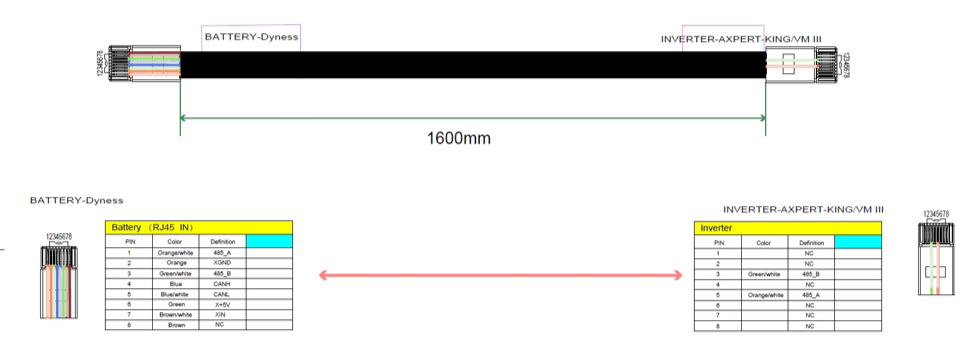
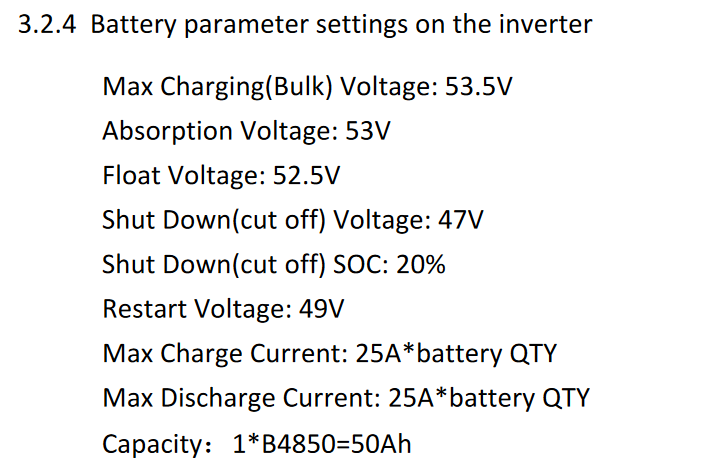
Hi there Vaughn I have the Mecer MKS IV - with Dyness B51100 battery. Also had initial problems getting the battery to comm with the inverter - I had another issue which I had to send the unit back to Mustek and upon return the BMS and inverter can now comms. I believe the ciruit board that they changed may have a later firmware. In terms of your BMS cable Confirm that your cable has these pinouts or make one: This is the cable for the Dyness B3 but I think your battery will be the same. Also go check out SolarAssistant: https://www.solar-assistant.io and MultiSibControl: http://www.multisibcontrol.net/ With both of those you can manage your inverter and battery bank. EDIT: Use these values for USR settings:
-
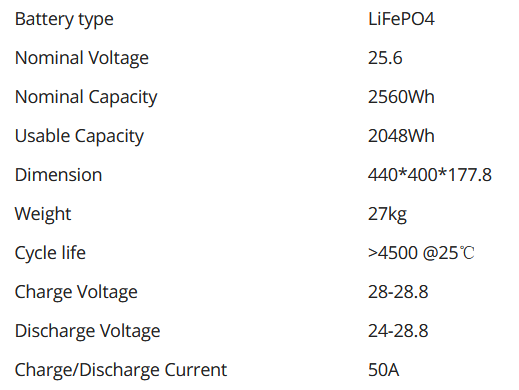
Your inverter seems to be a 48v unit...this is a 24v battery. How do you plan to use it?
-
Hi there M Best to start a new thread for your question - much better chances of getting it answered 🙂
-
My Mecer Axpert MKS IV 5600 - same thing out of the box - cable (Axpert-King) supplied with Dyness battery would sync for 30 seconds then error 61. Then after another 30 sec it would sync again and so on. I had it back at mustek for a faulty display - the repair note said "replaced remote board" which I assume is the MCU. Anyway since it has been back i perfectly sync with the Dyness with the cable that was marked Axpert-King. Pretty sure the new MCU board had a different or later firmware that now works.
-
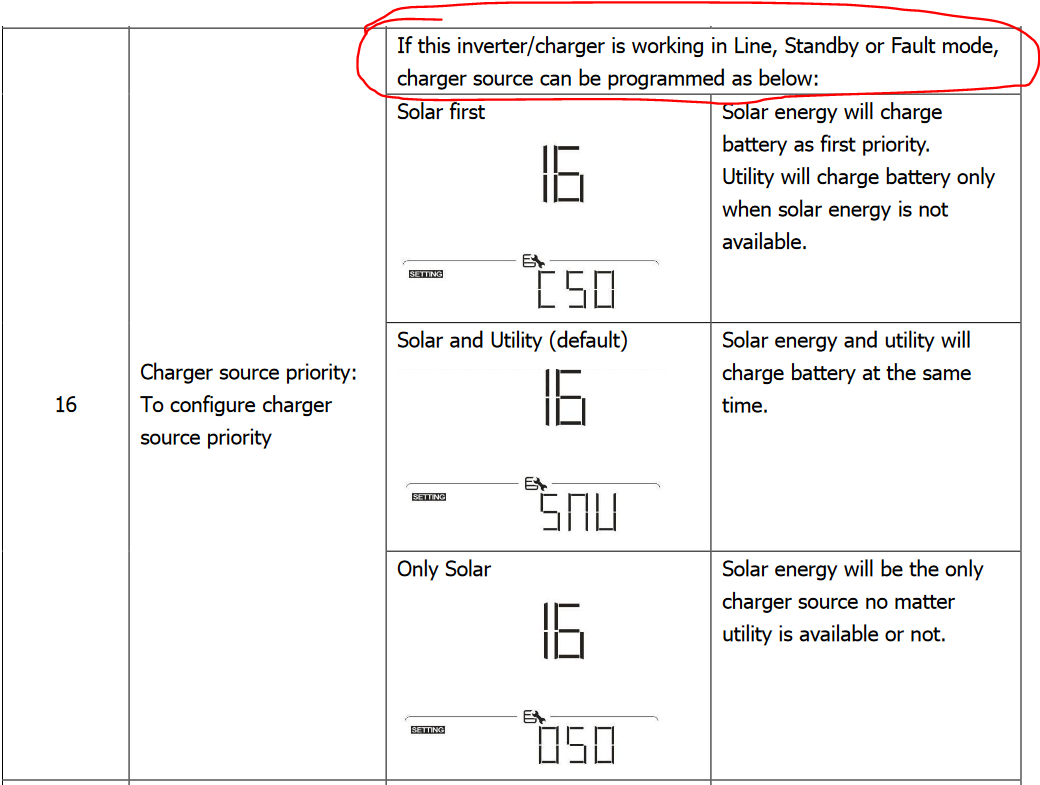
From what I can gather from my Axpert MKS IV manual it seems like these settings are only available when in line (SUB)(USB), standby or fault mode. So your screenshot is showing that you are in line mode - it should be using solar and utility (SNU) to charge. In battery mode (SBU) I assume its always solar first mode CSO.

-
Hi all Inverter back and reinstalled. SCreen working again. Guess what - now the Dyness BX51100 BMS and inverter are happily chatting 🙂 Pretty sure Mustek did a firmware reload/update which was a newer version anyway. Out of the box I would get error 61 then comms, then error 61, then comms and so it would loop. Installed SolarAssistant to get around that. Well now the inverter and BMS comms is established. I might go back to using SolarAssistant to monitor the battery - I get much more info there such as temps and cycles etc. Cheers Douw
-
I used that USB to Serial adapter from Matrix - doesn't work - it needs to use the FTDI chip to be 100% sure it works. This one also works https://www.takealot.com/ce-link-usb-2-0-to-rs232-db9-serial-male-a-2m-cable/PLID51855970 Cheers D
-
You can buy the correct RS232 cable from SolarAssistant https://solar-assistant.io/shop/products/voltronic_rs232
-
This display firmware file bricked my Mecer MKS IV 5600 - so caution on using it on those units - I was having jumbled characters every now and then and thought that this update might fix the issue. Anyway Mustek seems to have fixed it - not sure what they did yet as I am only getting the unit back on Monday but they confirmed that it is repaired. Will keep all posted.
-
Hi there I had to load up the beta version of the software for everything to work - without the beta you dont get the option to select the Dyness protocol as per the instructions in your link. https://solar-assistant.io/help/updates/beta My Dyness BX51100 communicates perfectly with SolarAssistant Also remember to set your dip-switches to down on down down.
-
This may help - https://www.aliexpress.com/i/1005002864371950.html My suggested inverter settings: Charge: 28.0v Float: 27v Back to Grid: 24.5v - others can pitch in here Back to Battery: 25.6v - others can pitch in here Max Charge: 30A
-
Mecer/RCT Axpert MKS IV 5.6 Well I dont have it right now - LOL - its with Mustek as I write this...screen died... loooong story available in another thread - just search my name 🙂
-
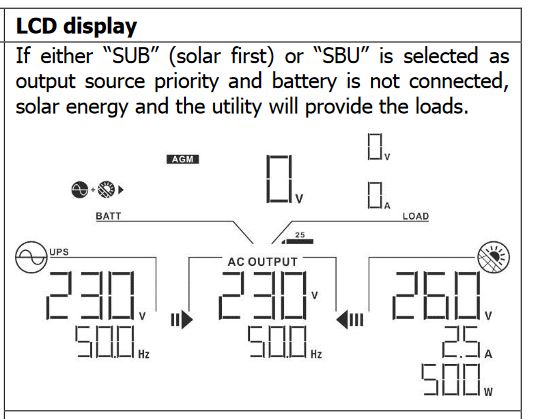
See the image attached @MKRandburg sorry @TimCam LOL I was thinking you posted OP 🙂 OP asked for: My requiremement Reduce eskom bill - solar can help here Prevent feedback onto the municipal grid - inverter should have this option No batteries (I think sunsynk requires a small one) - you will need a gennie as eskom backup Solar PV only - PV only systems are for grid backfeed solutions where backup is not required. Daytime loadshedding back up from solar panels - your gennie will fire up if eskom is down - somehow you will pay - cannot guarentee panels will be able to supply load always Use the generator during night time loadshedding - feasable but you will still need a battery to carry the loads during generator start Blend Eskom and Solar when load is too high - can be done So bottom line is I think what OP is asking for isn't practical. You will be able to reduce your energy bill using solar but with no battery you wont have backup. Well you could fire up a gennie but everything would go offline while that gets started if the load is higher than wht the panels can supply at that moment in time.
-
yeah I assumed you meant manually - but sounds like a lot of pt 🙂 I guess an ATS could possibly start the gennie if eskom is down (battery still needed during generator startup) but that still isn't achieving what you want with the infill when solar isn't generating enough. I tested what @MKRandburg is looking for with my Axpert Hybrid inverter - solar and eskom only - no battery - supports the loads and fills in with eskom where necessary when in SUB mode. [EDIT]
-
Wouldn't the generator need to support autostart ? Dunno if 2.2kw gennie will have this function unless its an electric start. Also, now I am asking to learn 🙂 how would he connect the gennie and eskom - I assume these inverters have two seperate inputs or a mechanism of detecting eskom outage and starting up the gennie remotely - but this would not really work for the idea to use the gennie to fill the solar production gaps. A battery is needed for this I would think.
-
Obviously if your budget allows go for a Lithium battery - but if not and all you are really after is battery backup during load shedding, then there is nothing wrong with going for an AGM battery bank - 12v100ah x 4. You run the inverter in SUB mode. Will cost you in the region of R10-11k.
-
Analogue BNC
-
Hi all Recently had an inverter installed and all is working fine - except my CCTV camera's. It seems like its an issue with the power supply unit that the cameras are connected to as the actual DVR and monitor attached to it seems fine. The video feed goes black and then comes back again in a pretty consistent time interval. Anyone here have an idea what may be causing this?
-
The battery is pretty much managed by SA using the automatic power management features.
-
Hi there Michael From my little experience with firmware updates its seems like you HAVE to use a USB to Serial adapter that uses the FTDI chip to avoid these connection fail messages. Cheers Douw
-
Thank you for the feedback @Coulomb I would say I am 99.9% sure its the MKS IV as even SolarAssistant picked it up as a "MKS III or later" and I recall the triangular part - color also corresponds. Seems like the Infinisolar is retailed here in SA under RCT and Kodak brands. Mecer only has the MKS IV. We returned the unit this afternoon to Mustek. Will provide feedback on the outcome. Thanks Douw
-
UPDATE The FTDI usb to serial adapter that came with solarassistant worked to perform the flash. Returned successfull - I left it for quite a few minutes after this to see if it reboots itself but screen remained off. Eventually rebooted the system. Screen still dead and now I cannot establish any comms with the unit... Frustrated as hell...