slipx
Members
-
Joined
-
Last visited
-
Hi @MikeBham I'm not seeing that. INFO ESPHome 2026.6.5 INFO Loaded validated config cache for inverter.yaml, skipping validation. INFO Starting log output from inverter.local using esphome API INFO Successfully resolved inverter.local in 1.097s
-
-
Hi. Only a maximum of 2 at the moment
-
-
V7.2.0 ## What's Changed 🚀 Exciting New Features * feat: add custom labels for daily charge and discharge closes #637 * feat: add custom labels for autarky and ratio * feat: add Chisage inverter image closes #769 * feat: add SRNE HES inverter image closes #732 * docs: add ecoflow example by @windmueller in https://github.com/slipx06/sunsynk-power-flow-card/pull/756 * docs: sigenergy.rst: Simplify text by using links by @reedy in https://github.com/slipx06/sunsynk-power-flow-card/pull/762 🐛 Patches & Bug Fixes * fix: essential_load4_extra entry in sigenergy.rst closes #773 * fix: load 6 not clickable and unecessary rendering of static icons closes #764 * fix: missing defaults in editor * fix: sungrow dispatch run code #739 * fix: localisation of custom labels when using defaults * fix: typo in OnGrid Status by @Roving-Ronin in https://github.com/slipx06/sunsynk-power-flow-card/pull/758 **Full Changelog**: https://github.com/slipx06/sunsynk-power-flow-card/compare/v7.1.3...v7.2.0
-
Hi @MikeBham its probably a config issue. You can display up to 2 batteries. Make sure you define battery 2 options as well as entities. If you need assistance have a look at the documentation https://slipx06.github.io/sunsynk-power-flow-card/index.html
-
@-cK- Sure. Here you go type: custom:plotly-graph title: Battery 1 Cell Voltage hours_to_show: 24 ha_theme: true refresh_interval: 10 entities: - entity: sensor.battery_pack_1_cell_01_voltage name: 1 - entity: sensor.battery_pack_1_cell_02_voltage name: 2 - entity: sensor.battery_pack_1_cell_03_voltage name: 3 - entity: sensor.battery_pack_1_cell_04_voltage name: 4 - entity: sensor.battery_pack_1_cell_05_voltage name: 5 - entity: sensor.battery_pack_1_cell_06_voltage name: 6 - entity: sensor.battery_pack_1_cell_07_voltage name: 7 - entity: sensor.battery_pack_1_cell_08_voltage name: 8 - entity: sensor.battery_pack_1_cell_09_voltage name: 9 - entity: sensor.battery_pack_1_cell_10_voltage name: 10 - entity: sensor.battery_pack_1_cell_11_voltage name: 11 - entity: sensor.battery_pack_1_cell_12_voltage name: 12 - entity: sensor.battery_pack_1_cell_13_voltage name: 13 - entity: sensor.battery_pack_1_cell_14_voltage name: 14 - entity: sensor.battery_pack_1_cell_15_voltage name: 15 - entity: sensor.battery_pack_1_cell_16_voltage name: 16 layout: showlegend: true hovermode: x unified height: 500px yaxis: tickmode: auto nticks: 20 fixedrange: true legend: bgcolor: rgba(0,0,0,0) itemsizing: constant font: size: 11 defaults: entity: show_value: false hovertemplate: "%{y}" line: width: 1.5
-
v7.0.0 Latest What's Changed🚀 Exciting New Features Performance & Efficiency OverhaulThe card's performance has been optimized to feel more fluid, responsive, and efficient. Smoother Visuals: The user interface now groups updates together, resulting in smoother animations and a less "jerky" experience. Smarter Updates: The card now actively monitors only the devices and information visible on screen, significantly reducing unnecessary processing. Optimized Rendering: Significant changes have been made to how visuals are rendered. This includes a much faster method for displaying icons and "guarding" complex interface parts so they are not re-drawn unless something changes. Faster Initial Load: By pre-computing settings and caching visual templates, the card now loads much faster after the first time. Conserved Resources: The card now pauses animations and data updates for off-screen elements or powered-off devices to save processing power. Editor Experience ImprovementsThe editor has been updated to be more intuitive, helpful, and clean. More Guidance & Clarity: Helper text has been expanded throughout the editor to better explain what each option does. Fewer Errors: The editor now sets limits on number fields, helping prevent invalid or out-of-range values. A Smarter, Dynamic Interface: The editor is now more intelligent, hiding or showing certain options based on other selections. This keeps the interface clean and focused on what's important. Improved Color Selection: The color pickers are now more reliable and show a live preview of your chosen colors, taking the guesswork out of customization. Full Changelog: v6.9.2...v7.0.0
-
-
This is in my sensors.yaml file but I'm using the Open-Meteo Solar Forecast integration. If you are using Solcast the change required is in the last post https://github.com/dbuezas/lovelace-plotly-graph-card/discussions/422 Remember to update your sensors - platform: template sensors: energy_production_today_sum: friendly_name: "Energy Production Today Sum" unit_of_measurement: "kWh" device_class: energy value_template: >- {% set sensor1 = states('sensor.energy_production_today_2') |float %} {% set sensor2 = states('sensor.energy_production_today_3') |float %} {% set total_watts = sensor1 + sensor2 %} {{ total_watts }} attribute_templates: watts: >- {% set sensor1 = state_attr('sensor.energy_production_today_2', 'watts') %} {% set sensor2 = state_attr('sensor.energy_production_today_3', 'watts') %} {% set ns = namespace(output={}) %} {% for time, value in sensor1.items() %} {% if time in sensor2 %} {% set sum_value = value + sensor2[time] %} {% else %} {% set sum_value = value %} {% endif %} {% set ns.output = dict(ns.output, **{time: sum_value}) %} {% endfor %} {% for time, value in sensor2.items() %} {% if time not in sensor1 %} {% set ns.output = dict(ns.output, **{time: value}) %} {% endif %} {% endfor %} {{ ns.output }} wh_period: >- {% set sensor1 = state_attr('sensor.energy_production_today_2', 'wh_period') %} {% set sensor2 = state_attr('sensor.energy_production_today_3', 'wh_period') %} {% set ns = namespace(output={}) %} {% for time, value in sensor1.items() %} {% if time in sensor2 %} {% set sum_value = value + sensor2[time] %} {% else %} {% set sum_value = value %} {% endif %} {% set ns.output = dict(ns.output, **{time: sum_value}) %} {% endfor %} {% for time, value in sensor2.items() %} {% if time not in sensor1 %} {% set ns.output = dict(ns.output, **{time: value}) %} {% endif %} {% endfor %} {{ ns.output }} energy_production_tomorrow_sum: friendly_name: "Energy Production Tomorrow Sum" unit_of_measurement: "kWh" device_class: energy value_template: >- {% set sensor1 = states('sensor.energy_production_tomorrow_2') |float %} {% set sensor2 = states('sensor.energy_production_tomorrow_3') |float %} {% set total_watts = sensor1 + sensor2 %} {{ total_watts }} attribute_templates: watts: >- {% set sensor1 = state_attr('sensor.energy_production_tomorrow_2', 'watts') %} {% set sensor2 = state_attr('sensor.energy_production_tomorrow_3', 'watts') %} {% set ns = namespace(output={}) %} {% for time, value in sensor1.items() %} {% if time in sensor2 %} {% set sum_value = value + sensor2[time] %} {% else %} {% set sum_value = value %} {% endif %} {% set ns.output = dict(ns.output, **{time: sum_value}) %} {% endfor %} {% for time, value in sensor2.items() %} {% if time not in sensor1 %} {% set ns.output = dict(ns.output, **{time: value}) %} {% endif %} {% endfor %} {{ ns.output }} wh_period: >- {% set sensor1 = state_attr('sensor.energy_production_tomorrow_2', 'wh_period') %} {% set sensor2 = state_attr('sensor.energy_production_tomorrow_3', 'wh_period') %} {% set ns = namespace(output={}) %} {% for time, value in sensor1.items() %} {% if time in sensor2 %} {% set sum_value = value + sensor2[time] %} {% else %} {% set sum_value = value %} {% endif %} {% set ns.output = dict(ns.output, **{time: sum_value}) %} {% endfor %} {% for time, value in sensor2.items() %} {% if time not in sensor1 %} {% set ns.output = dict(ns.output, **{time: value}) %} {% endif %} {% endfor %} {{ ns.output }} energy_production_d2_sum: friendly_name: "Energy Production D2 Sum" unit_of_measurement: "kWh" device_class: energy value_template: >- {% set sensor1 = states('sensor.energy_production_d2') |float %} {% set sensor2 = states('sensor.energy_production_d2_2') |float %} {% set total_watts = sensor1 + sensor2 %} {{ total_watts }} attribute_templates: watts: >- {% set sensor1 = state_attr('sensor.energy_production_d2', 'watts') %} {% set sensor2 = state_attr('sensor.energy_production_d2_2', 'watts') %} {% set ns = namespace(output={}) %} {% for time, value in sensor1.items() %} {% if time in sensor2 %} {% set sum_value = value + sensor2[time] %} {% else %} {% set sum_value = value %} {% endif %} {% set ns.output = dict(ns.output, **{time: sum_value}) %} {% endfor %} {% for time, value in sensor2.items() %} {% if time not in sensor1 %} {% set ns.output = dict(ns.output, **{time: value}) %} {% endif %} {% endfor %} {{ ns.output }} wh_period: >- {% set sensor1 = state_attr('sensor.energy_production_d2', 'wh_period') %} {% set sensor2 = state_attr('sensor.energy_production_d2_2', 'wh_period') %} {% set ns = namespace(output={}) %} {% for time, value in sensor1.items() %} {% if time in sensor2 %} {% set sum_value = value + sensor2[time] %} {% else %} {% set sum_value = value %} {% endif %} {% set ns.output = dict(ns.output, **{time: sum_value}) %} {% endfor %} {% for time, value in sensor2.items() %} {% if time not in sensor1 %} {% set ns.output = dict(ns.output, **{time: value}) %} {% endif %} {% endfor %} {{ ns.output }}
-
Hopefully it was stored correctly. You should probably try charge it ASAP. I wonder what the SOC and SOH will be?
-
-
Hi @Gambit I'm running this python script on a raspberry pi https://github.com/Tertiush/bmspace/tree/main/pace-bms-dev
-
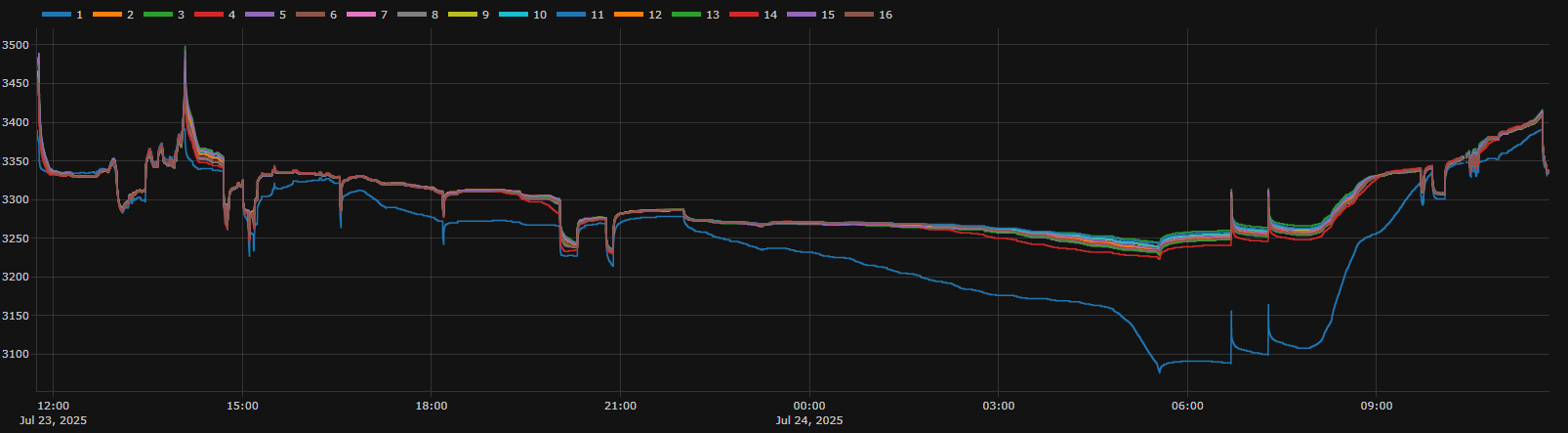
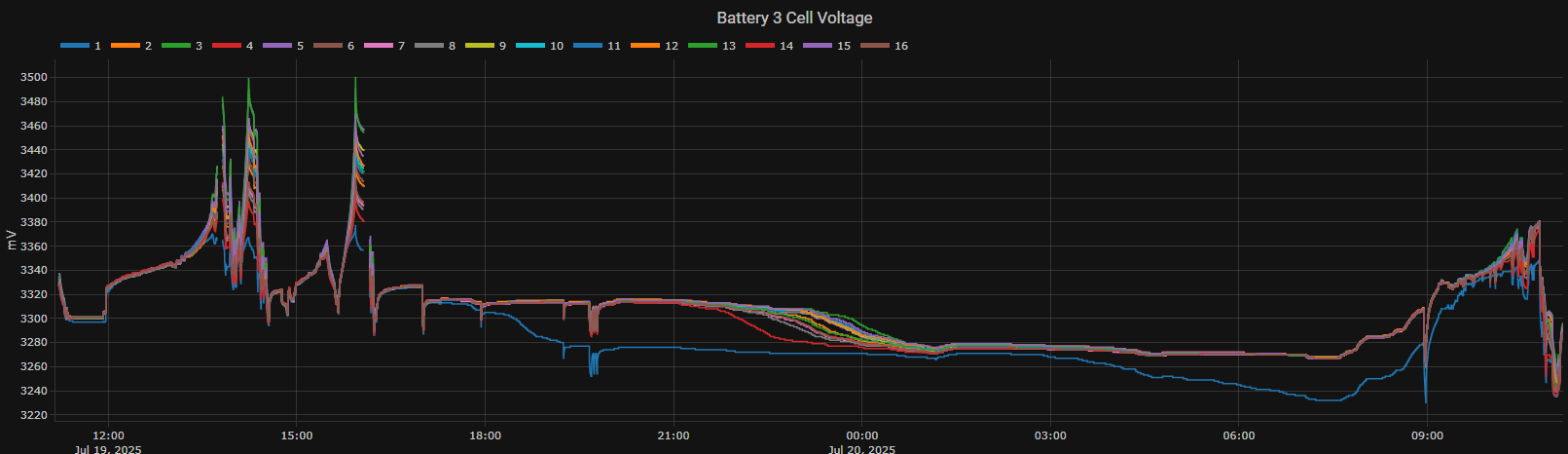
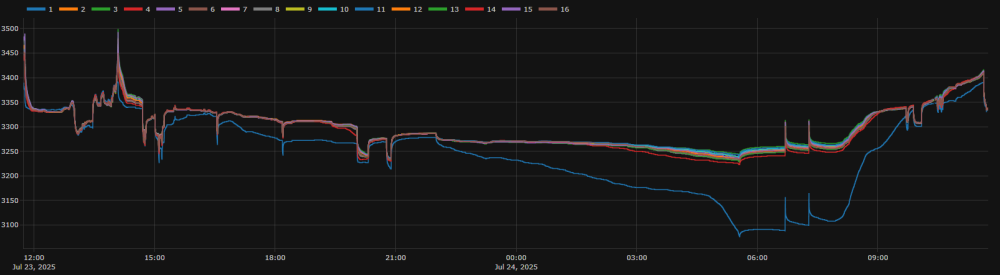
Battery 2 was sent in for repair. When it comes back I need to sort out battery 3. Cell 1 is not holding voltage.
-
You will need to buy the cables separately as they don't come with the battery. You will also need the RJ45 for battery comms
-
Pleasure. Out of interest do you know when that sunsynk battery was manufactured that you bought from Voltex . I heard they were trying to clear old stock.
-
-
https://www.jendustries.co.za/sun-batt-lv
-
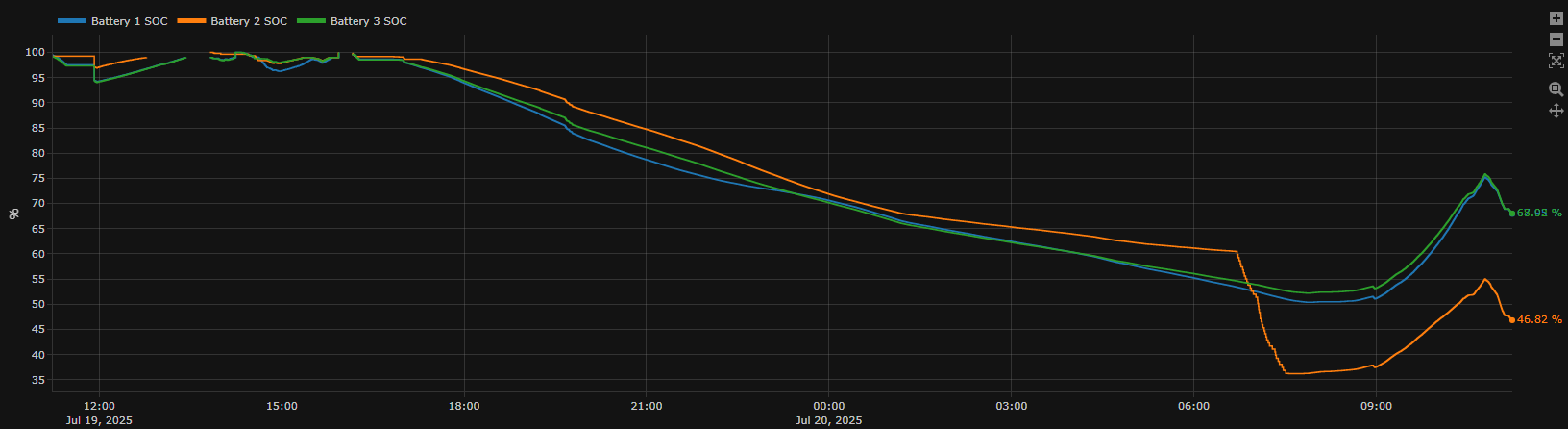
Apart from the weak cell 14 on battery 2, looking at all the batteries over a 24 hour window I've noticed that cell 1 on the third battery is also always below the others. Its this something to be concerned about and is it a sign of a weaker cell? Does not cause the battery 3 SOC to deviate much?


-
There is no active balancing on the BMS and I was not able to correct that cell even after lowering the balance threshold.