


Marcel
Members
-
Joined
-
Last visited
Everything posted by Marcel
-
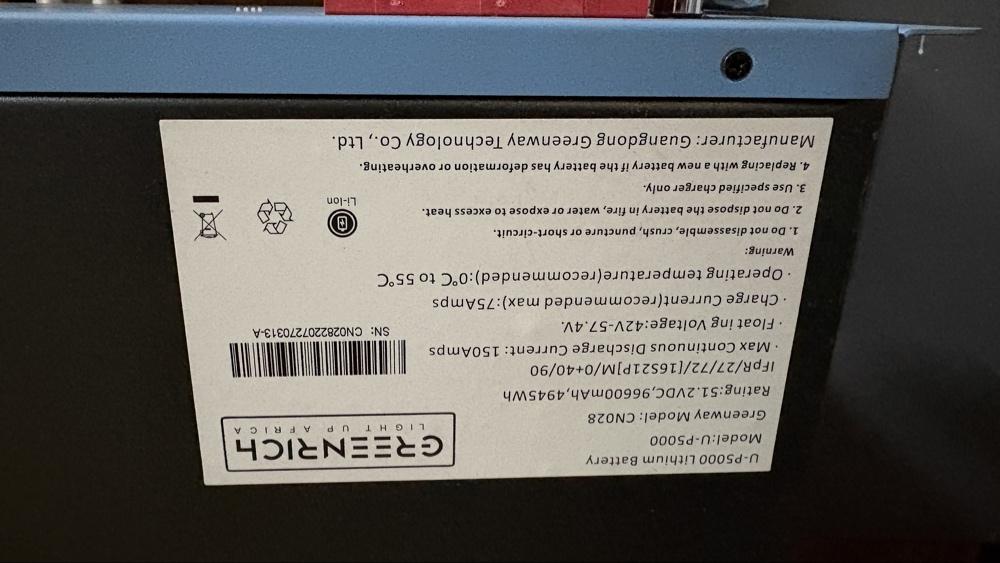
Item: Greenrich UP5000 (AU7500) 4.95kWh 51.2V LiFePO4 Battery (Rack-mount, 1.5C / 7.5kW peak) Age: +- 4 Years Price: R5000 neg Payment Method Accepted: Instant EFT / Cash on Collection Warranty: None Packaging: None (Bare unit) Condition: Cosmetic condition is great. Operates normally, but has a cell imbalance issue (BMS shuts off when reaching ~70% SOC). Selling strictly "As Is" / for spares / for DIY top-balancing or cell rebalancing. Serial Number: CN0282207270313-A Location: Pretoria, Gauteng Reason for Selling: Upgraded to a bigger battery Shipping: At buyer's cost and risk (Unit weighs ~51kg) Collection: Preferred due to weight (Pretoria) Link: https://greenrich.co.za/product/au7500-up5000-lithium-battery/



-
Not sure if it is the same, but we have an RCT Axpert MX 2 which also has built in WIFI. We use the WatchPower app on any phone or tablet. When you search for WIFI networks on your phone you will have to find the inverter, mine starts with W and then a long number. Basically just follow the instructions on the app to set up. The app keeps a history of input and output, how much PV you have generated each day as well as battery percentage and so on. Maybe just get the app to work and then see if you still need data logging.
-
Thanks Everyone, I think I will just get 4 more of the 545w panels and add them 2 on each string. That should be my best and cheapest option currently. That will keep me under 8000w in total and probably the closest I will get to that with my current setup.
-
So are you guys saying I can go 500v x 2, so 500v on each side? Is it not 500v in total for the full system, meaning I can only go up to 250v per side. This is the recommended panels to put on, but that would be so expensive to get 32 panels of 250w

-
Hi all, So I have the following setup and wondering if there is a way for me to add more solar panels. Every way I see, I will either exceed the amps or voltage that the inverter allows. Currently have 5 panels in series going in on either side of the inverter. This almost hits the 250v on each side but I stay under it nicely. Any way for me to get to 8KW of panels while not exceeding the inverter specs? 1 x RCT Axpert MX2 8KVA/8KW Inverter 48V 2x4000W MPPT Solar Charger Type MPPT Maximum PV Array Power 8000W (4000W x 2) MPPT Range @ Operating Voltage 90VDC ~ 450VDC Maximum PV Array Open Circuit Voltage 500VDC Maximum Solar Charge Current 120A Maximum AC Charge Current 120A Maximum Charge Current 120A Maximum Input Current 18A x 2 48V DC Build-in 8000W MPPT Solar Charger With 500V DC Max Open PV Voltage BMS Port Include Parallel Kit for Parallel Operations up to 6 Units Configurable Color With The Built-in RGB LED Bar Built-in WI-FI For Mobile Monitoring (app is required) Supports USB On-The-Go Funtion Built -in Anti-dusk Kit 10 x 545 Watt Canadian Solar Nominal Max. Power (Pmax) 545 W Opt. Operating Voltage (Vmp) 41.2 V Opt. Operating Current (Imp) 13.23 A Open Circuit Voltage (Voc) 49.4 V Short Circuit Current (Isc)13.95 A Module Efficiency 21.3% Operating Temperature -40°C ~ +85°C 1 x Greenrich UP5000 Lithium battery
-
Just make sure on those Naradas, they are 0.5C as far as I know so make sure to set a limit on discharge current.
-
Was anyone able to establish communication between this inverter and battery? If I connect the LAN cable provided it gives error 61 when setting 5 is on Lib or Pyl. Currently it is running fine when on USE with settings: Bulk: 56v, Float: 54v, End: 48, Charge amp: 40a