


Deondup
Members
-
Joined
-
Last visited
Everything posted by Deondup
-
Ok problem solved; software issue it seems. First did an upgrade of firmware, but then the system still didn’t charge the battery from AC. My installerer fiddled on software settings and we’re back. So obviously not supply as that is impossible. I’ll repost the software solution when I receive it. Thanks for all the positive input.
-
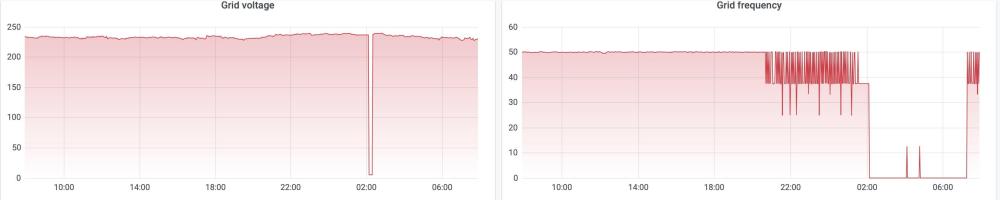
Thanks @Bobster. Makes perfect sense. What bugs me though and potentially points to problem no 2, is why now. This installation has been working without any hassles for nearly two years. Saying that, is there perhaps on possibility no 1, a case where the equipment from the municipality have become unstable, at the box on the street? Interesting thing I also noticed on both Solar Assistant, and the Inverter display, is that the Frequency goes to 0Hz, which explains the graphs, which I posted this morning. Last question (silly one perhaps). Could it be that the CT coil in the DB board, going to the inverter, becoming faulty? Or does the CT only measure W, and V?
-
Hi thanks, based in Pretoria East. How does one fix it though?
-
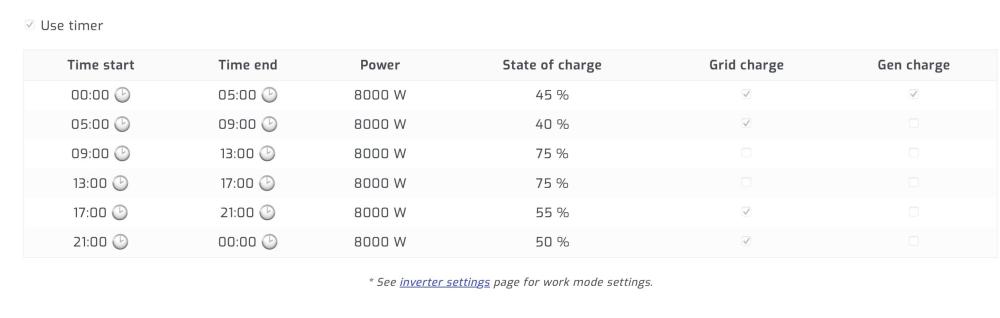
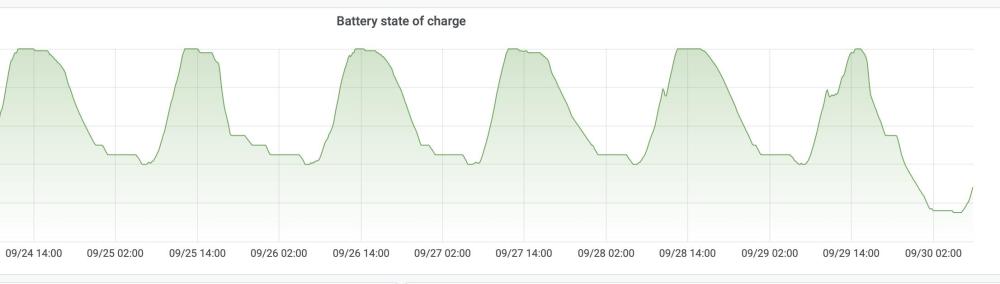
Need advice please, as I experienced an odd error during early hours of this morning. Our power went off (incoming mains remained, no issue) at 2, due to LOW VOLTAGE Error,as the SOC was at 17%. All as it should be. Issue is that AC didn't charge as per my parameters, where it should be kept at 45% by AC. What I found very interesting is the AC frequency being very erratic, starting just before 10pm, last night. I bypassed the inverter, so we can at least have power, and DC is charging very well like always. Could this be a faulty CT coil? How do I reset this, to get back to normal, and undo the bypass, and thus using municipal? Graphs is from Solar Assistant.

-
Question: I have two MPTT’s (4x450W, 5x450W). So I set it up accordingly. The total % I however expected was around 74%, but according to picture only 38%. Should I have a total pv_max_power as well, or does the logic add pv1_max_power and pv2_max_power?

-
Thanks @Cpt_GhostPants and @Ronnie1102. got it working. For temperature, add your sensor (e.g. environment_temp: sensor.patio_temperature), and then clear your browser cache.
-
I managed to get the current temperature (under the sun icon; great functionality). Even the animated load/solar icon works well. Don't think it is related though , but nether less my Solar Left today has now dissapeared. In have it mapped (remaining_solar: sensor.energy_production_today_remaining). and the sensor does carry data. Any advice please, I am on the latest version.

-
@Muttley Yes please do share your code.
-
Thanks that is the solution. Although the energy sensors totals up to a week, with reset on Monday, your suggestion of Daily Utility Meter, and forced reset is the key. I have adapted my sensors, will see how it turns out tomorrow. On another note I see that the 2024-11-22 Beta of Solar assistant claims configuration of when totals are reset. I can't see anything on either HA or MQTTExplorer though. For now your solution is great, thanks ! https://solar-assistant.io/help/updates/changelog

-
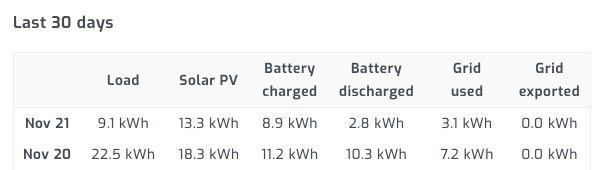
Hi @spotity I did use the helpers, as per screenshot in my post. What I don't have is the periodically reseting; will try that. I also added a sensor to convert the Wh to kWh. The numbers I get however from these sensors and helpers are completely out of whack, and doesn't tie up with what I was expecting as per Solar Assistant. See below comparison, I was expecting to see for today (21 Nov) 9.1kWh, I got 144.95kWh. This is all retrieved from sensor.sunsync_load_power in the Helper. 1. The Helper (without period reset, which I'll try - thanks!) 2. The sensor converted to kWh 3. In Solar Assist


-
@spotity Did you manage to get the mappings? I do know that the mappings for Solar Assistant (SA) can be found on Github at https://github.com/slipx06/sunsynk-power-flow-card/blob/master/docs/examples/sunsynk.rst. What I'm battling with is that the totals sent via MQTT from SA is weekly, as it resets on a Monday. How do you get daily totals, as an example below. It rolls up into 7 days (Monday to Sunday), hence it is not a daily total. I tried Utility meters on example measured in W, not kW. The results are completely incorrect. What I really need to see, back in the Sunsync card is the same as the totals from SA as per last screenshot. Any ideas? day_load_energy_84: sensor.sunsynk_day_load_energy


-
I had the same issue with the Grid Status before, when I was still using NR. Spoke to SA, and they proposed just using the Grid Voltage (you can use Frequency as well), when it drops below a certain value. I use 50V. It works perfectly, see my sensor.yaml code below. Now just for the other two, will wait and see with you from SA. FYI: I'm using SA, because I already bought it prior to using HA. Very good software, but obviously more expensive, plus the RPi availability issue. Cheaper and less mapping solution would be the ESP32 solution from @slipx grid_connected_status: friendly_name: "Grid Connection Status" value_template: > {% if int(states('sensor.grid_voltage')) < 50 %} {{ "off" }} {% else %} {{ "on" }} {% endif %}
-
Did you manage to get the remainder of the Solar Assistant mappings?
-
I’m also interested in an add-on. Agreed with Johan don’t see anything on the Geyserwise website.


