skipperster
Members
-
Joined
-
Last visited
-
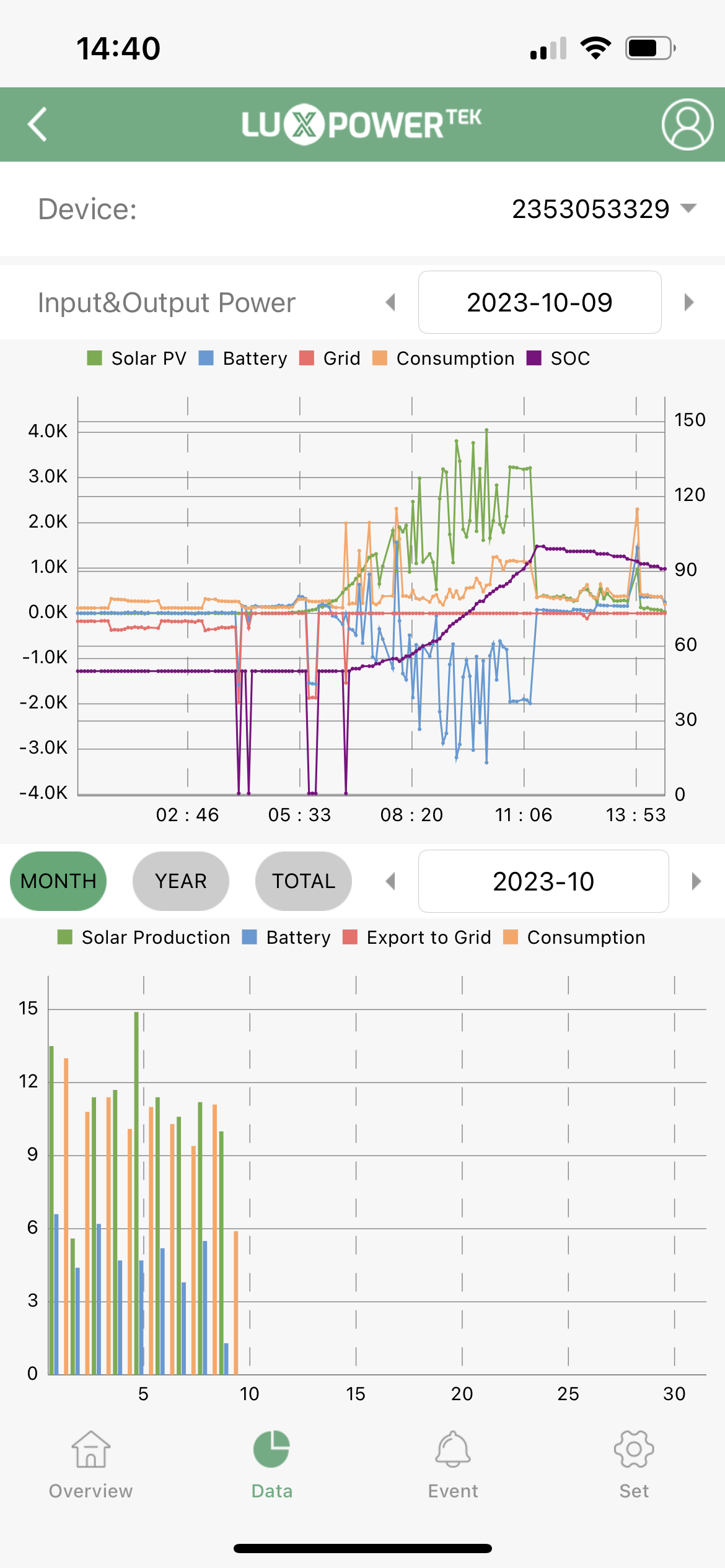
I have found that my CFE batteries, post latest firmware update pushed by the CFE team (yesterday), seem to now have the SOC dramatically increase (or decrease) crazily quickly. I am very concerned about these batteries, and I am not even sure if they will last a short loadshedding session anymore. I also got the new SmartEnergyPLAT app installed and working, and although it works, its basically just reflects these pretty crazy ups and downs. I will monitor over the next few days.
-
Thanks Jumper, so I guess i need to try and find a proper good LuxpowerTek installer... I wonder where I can find a good one!
-
Hi Jumper, Thanks yes thats an interesting take. Below are my inverter settings - do you (or anyone) perhaps have any suggestions as to what I should change to address this issue? The alternative is to bring an technician to troubleshoot the whole system etc - which I guess is an option but I dont know a good technician for this.


-
Thanks Jumper. And what do you think about the spikes down to 0% SOC in the early AM?
-
Thanks for your response! What about the SOC spike drops to 0% between 2am and 6am - that to me looks very strange? Any ideas?
-
Hi guys, I have a luxpowrtek 5kva inverter and 2 x 5kwh CFE batteries. Look though how it drains even when proper sun and no usage on the battery. any ideas or recommendations who can assist please?

-
Hi all, Please take a look at my app’s summary of a day of my system. It’s really sunny today, and what I don’t understand is why it looks like the batteries almost like “leak” SOC even when not drawing from them?

-
Where would I check that aetting
-
No error code…
-
Ok so now I have a new issue with the system… I just woke up, and there is loadshedding. the inverter says the batteries have 63%, but they are not discharging at all. My settings are for discharge cutoff at 20%. Anyone with similar issues or ideas?
-
 jumper reacted to a post in a topic:
Luxpower SNA5000WPV inverter with CFE batteries - BMS/CAN Cabling
jumper reacted to a post in a topic:
Luxpower SNA5000WPV inverter with CFE batteries - BMS/CAN Cabling
-
So I continued to have issues with this. I ended up then doing a firmware update to the inverter, which then seems when I switched back to the CFE battery code 6, seems to now work better. Will monitor for the next while and see, but seems like the firmware update might have been the magic required.
-
So when I scroll through the settings, it skips #7 and #8, which I assume is a good thing as means being set automatically. On 10, it is set on SOC. It is currently on 60%, so I guess will monitor over the morning and see if it does the 'skip' to 100% now that I changed it to battery code 6...
-
Thanks Jumper - afraid I'm quite new to all this, so not even sure what your question above means nor how to check!
-
Thank you - so when I change to brand code 6, as guided by LuxPowerTek documentation, then take a look at what happens. Note - no error message, but says feeding in at 999Ah - whereas when I put it onto the Pylontech brand code 2, I think goes to like 200Ah.

-
Thanks Jumper - per heinzg's post above, the indication was that the documentation was not right - and to rather set to Pylontech than CFE battery code?