


Hardusb
Members
-
Joined
-
Last visited
Everything posted by Hardusb
-
Thanks, will try tonight. These relay ATS Switches is only for light duty things such as between a tv / pc and generator / inverter, not for in a whole house configuration, but I can use this circuit in conjunction with a normal ATS Also in a DB for Indication purposes only. I dont understand what you mean by "contacts break before they make".
-
Sorry, it's a thermal circuit breaker. 10A Updated drawing Attached.

-
Its the relay Pin out wiring diagram, for if it will help.
-
The Big ATS Has 2 indicators to show if the power is present yes, the Relay ATS only has one led to show that power is present, but I need 2 more indicators to show which power is currently in use such as a light to show that eskom is in use and another that the Inverter is in use.
-
Its for a normal separate ATS Switch. I have one built on a Relay and other on a ATS Switch. I attach pics of the ATS Switch and the relay version Schematics.


-
Hi, anyone have any idea on how to accomplish this?
-
Hi, I am looking for a way to turn on an indicator light when my ATS Switch has switched over to Backup Power. I already have a Indicator Light on The Mains and Inverter input, but need a 3rd & 4th one to indicate that the switch is using the inverter or if its using the Mains power. Indicator 1: Mains Power Available Indicator 2: Inverter power Available Indicator 3: Mains Power is being used currently Indicator 4: Inverter Power is being used Thanks, Hardus
-
I found this: https://www.robotics.org.za/XH-M350 looks like exactly what I need.
-
Hi, I have 2 situations I need some help with: 1 I have an alarm system on an lifepo4 battery connected to it via a 1a charger as a backup, but due to the recent stage 6 loadshedding theres not enough time to fully charge the battery. I had a alarm charger connected to it which has a load and battery connections separate, but it only charges at 1A. I want to get a victron charger to charge the battery but I am scared the high voltage of the charger might damage the alarm system panel. How will I connect it up? Can the charger be directly conencted to the battery and that again to the alarm system? 2. I have an 2 way radio which usually runs on a 12v power supply unit, but with the loadshedding, it had a sla battery as a backup which charged with the radio, but after replacing it with a lifepo4 battery, it wont charge the battery. I need to connect a victron charger to the battery to charge it, but I am also scare the higher charging voltage will damage the radio. I was thinking on an dc to dc failover switch, so if the AC Power goes off, the switch will automatically switch to the lifepo4 battery? Also powering the equipement while charging the battery will significantly increase the charging time?
-
Im also looking to get one of these, they sell them at the chinas and some other stores. I see they have a serial port and saw a video on youtube of a guy saying you need an old laptop with a serial port to do their settings? Anyone have some experience on this?
-
I have seen that one, but with that method the battery will only charge via solar and not AC Power. Im looking for a way to accomplish what a hybrid inverter does on a small scale. Thus I need a way to have the battery charge via an AC Charger when theres AC and solar when the AC is down.
-
I was first planning to do that but they keep steeling our power cables then we off for 6h to a week at a time. Thus I want to get a solar backup to keep the gate online permanently. We in Florida North, Roodepoort. Always something up with the power here. I need to do a similar setup next door at a business, but just a bigger battery and inverter. The UPS keeps draining on every loadshedding and its costing them 6 new batteries every 6 months. They share their internet to an flat tenant behind the building and to the house next door, so the internet needs to be on 24/7. I saw these Hybrid inverters, but they a little expensive. I want to get a Automatic transfer switch to switch between the Grid and Solar power rather.
-
Im a bit new to Solar and batteries, need some advice on how to put this together; I have to keep replacing my gate motor every couple of months due to the loadshedding, so I am now going to do a small solar setup to keep the gate motor online permanently. The motor is a Centurion D5 Evo Motor. The gate gets used maximum 5 times a day, on average 1-2 times a day. I did some research on how to spec a basic solar System and first went looking at batteries and was looking at a 20AH Gel Battery which I think should be efficient, I will use a 60w Solar panel for charging this battery. Together with this I want to get a AC Battery Charger as-well to be able to charge the battery when there is AC power. Problem is I cant connect both at the same time to the battery? Is there some kind of DC Automatic transfer switch that can switch between AC and Solar? Correct me if I need some other devices in between: Solar panel connects to a Solar charge controller, Charge controller connects to the battery and the gate motor Battery input. In the house I have gotten a 30w solar panel and a 7ah battery for the alarm system and that seems to be holding well.
-
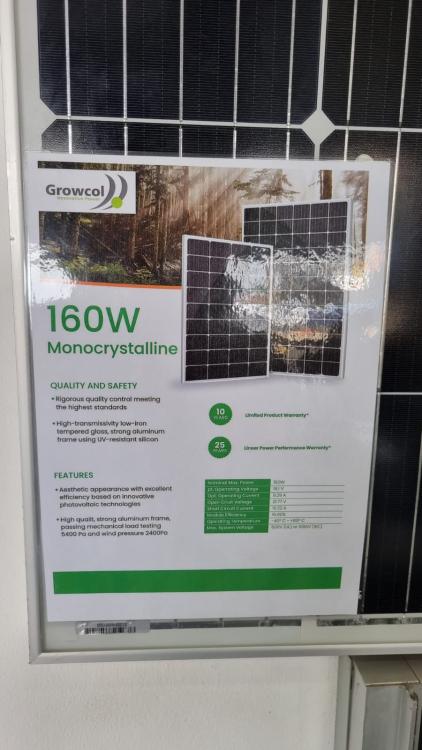
Thanks for the advice. I watched this one YouTube video where the guy puts a 300w buck boost converter between the solar panel and the pwm controller, says its a cheaper way to get the same effect as a MPPT Controller, The max I would draw from the panel would be about 6A, it supplies 10A. Will the 160W work or must I get a bigger one? Which Model controller do you suggest? Hows the Ecco ones the Chinas sell? Any good? I saw the attached one at a Solar shop for R1700.
-
HI, I understand the solar panels dont work with Cloudy conditions, for the time being its just going to be an Emergency power supply for my power station and or Laptop. To reduce the Amps in I can just use a Resistor on the Solar panel side to reduce the solar amps out? Regarding the gate motor batteries, I need 18/20v out, they only 12v, so I will then need 2 in series? I have 3 spares in good condition here. I dont understand what you mean by this: "as long as you draw from the power curve where the voltage is high". I also noticed theres these specs: Optimum Operating Voltage (Vmp): 18.21V. Optimum Operating Current (Imp): 8.79A. Open-Circuit Voltage (Voc): 22.39V. Short-Circuit Current (Isc): 9.529A. I assume I need to work with the "Optimum Operating Voltage". As I need a 20v output for my PD Charging, I will most probably need a Solar panel with an Higher than 20v Optimum Voltage? Or can I use a Buch Boost controller to boost the volts from the 160w panel to get my 20v? Theres plenty of spare amps, I will need a max of 6A between the 2 outputs? Im looking to get the following Buck converters: https://www.mantech.co.za/ProductInfo.aspx?Item=15M3540-A Its for a fixed 3A output with a variable voltage. I should be able to boost from 18.21V - 20v with this one? And https://www.mantech.co.za/ProductInfo.aspx?Item=14M2243 Down to 18v 3A to the other? Solar Panel Output 18.21v: (Not sure if I need a resistor also to limit the current to the converters) * Output 1: Buck Boost Converter --->20V 3A ---> USB PD Charger * Output 2: Buck Step Down Converter --->18V 3A ---> Power Station The USB PD Charger says it can take from 12-24v in, so Im just going to use the buck boost converter to limit the current to 3A, dont think the charger will take good with a full 10A input?
-
I don't think a solar charge controller will be neccecary, don't need a battery, need a semi portable setup. That charger you linked to is 40w max, I need a 65w one I can charge my PD powerbanks if needed, they do seem to have a 60w one: https://the4x4store.co.za/products/dual-qc4-0-type-c-and-qc3-0-usb-charger It says 65w but in the description it says thw following which is a bit contradicting: Output current QC3.0(5V/3A 9V/2A 12V/1.5A) Output voltage 5V USB type-C port output QC4.0(5-20V,max:60W) I'll chat them up to see if they can verify the specs for me. 60w looks like the best I'll be able to get. A full solar setup with a battery is going to be too expensive now, for now just need to be able to charge the gizzu / laptop / power banks
-
HI, thats why I will use a Buck converter to get the voltage and amps just right. The AC Adaptor that came with it is 18V 3A, the specs says you need a 18V 60W Solar panel. My aim is to go one step further and get a big enough Solar panel so that I can charge the USB PD also via the Solar. If I get a solar panel for USB C PD Charging it will be enough to charger the other input also via a Buck Converter, you can set the Voltage and amps with it.. I also think I made a mistake with the Sparkfun Module. You get much cheaper USBC trigger boards that will do the same as it. My alternate option for the USB PD is a Car charger: https://snatcher.co.za/wk-wp-c31-flash-series-65w-usb-usb-c-type-c-interface-fast-charging-car-charger-blue/ https://africadroneking.co.za/product/dji-65w-usb-car-charger-for-mavic-3/ https://baseus.co.za/product/baseus-5a-65w-qcpps-digital-display-usb-ca-quick-car-charger-cable/ https://www.firstshop.co.za/products/hp-65w-usb-c-auto-adapter-5tq76aa-133673 Most is out of stock.
-
Hi, Hope this is the right place, Im struggling to get answers on my project. First a bit of background on what im trying to accomplish. I recently bought a Gizzu 300w power station. It has a dc input of 18v 3A to charge (Solar & DC Same Port), takes about 6.5h, but I can reduce that to 3.5h if I add a PD quick charge to it. Charging Times: AC Adapter: 18V/3A (6.5hrs) DC Solar Panel: 60W (6.5hrs) PD Port: 45W (7.5hrs) PD Input/Output: 5V/3A, 9V/3A, 12V/3A, 15V/3A, 20V/2.25A AC Adapter + PD Port: 18V/3A + 45W (3.5hrs) My Laptop also charges via PD @ 45w and uses the 20v, so I assume this power station also uses 20v/2.25a? (I dont have a USBC power measuring tool, so not sure what the power station charges with via PD) The power station supports charging via a 60w solar panel (same input as the AC charger, comes with a charging brick). I dont just wand to get one 60w, but take it a step further, I want to get a big enough solar panel to support both the 18v 3a input as well as the PD charge input together. Theoretically I need to get the following:? 160w 21v 10a solar panel (pd power needs a 20v output and this gives 21v) to power the following 2 x "chargers"; 1. Step down buck converter to convert the 24v to: 18v 3a to charge my power station. 2. I got this board, not sure if I made a mistake; SparkFun Power Delivery Board - USB-C (Qwiic) (Only USBC Quick charging board available in this country, ordering from AliExpress takes months to get here); I see it needs a 20v input, so I want to use another step down converter to convert the 24v to 20v to power the Sparkfun board to charge my power station or laptop with, or can I just attach a USBc cable to the step down converter and use it directly to charge? Another option for PD Charge is a bit more bulky, but I can get a 200/300w car charger inverter to AC and power a AC charging brick? What other options is there to Charge a USBC PD Device, I want to be able to charge my Laptop / Power Bank / Power station with solar. I also need to know if it will be necessary to get a solar charge controller before all these electronics, or can I power the Buck converters directly from the raw solar panel feed?


