user27
Members
-
Joined
-
Last visited
Everything posted by user27
-
I'm still trying with the seller but it's like pulling teeth; have been trying to get answers for this issue for well over a month. If I crack it open and take pictures will you be able to tell from that what firmware is best?
-
Ah that's excellent info; but thankfully there was no card fitted. Appears it has cleared the error 71 on the new one (green screen)... However, connected them back up and the other one (yellowish screen) is now giving the error 71 instead. Additionally: I now know for the first time that the new inverter actually works; since when it booted up without the error 71 it started the default 60A battery charging. But the other one isn't doing anything now presumably because it sees 71 firmware incompatible. So do I flash the other inverter (yellowish screen) with the same firmware now? Or would it not be compatible with a slightly different motherboard? Also would it be bricked if it was flashed with firmware that's not correct for the board? Or just doesn't work and you can reflash something else? Your assistance is greatly appreciated as always!
-
I hope you're right! Looks the same as the images in the pdf so far. Do I have to add the serial and country specific settings after?
-
This UGREEN one says PL2303 so fingers crossed it comes tomorrow: https://amzn.eu/d/iGFZejA Jeff Bezos is a racist who lets people sort Amazon by the colour of the sellers skin in countries where it's legal to do so... But damned if I can find one anywhere else with delivery tomorrow.
-
Unless one of these two would do it?
-
Thankyou, I'm happy to try it but according to the pdf in that rar it has to be RS232 not via USB port? Can you recommend a cable for USB to RS232 or anything will work get the cheapest? Thanks again
-
Well it is greatly appreciated that you are taking the time to help me; I have been banging my head against a wall with this thing since before xmas. After the seller assured me that it would work. I believe the error 71 is incompatible firmware version in the manual and I have them connected for parallel operation so I assume it's incompatible between them. I still can't seem to figure out what the difference is between U1 and U2; the only thing that seems to be different is the U1/U2 top left corner?
-
This is the older one; or at least I assume it's older as it was installed first. U1 and U2 screens appear to be the same? How do you know what our all means is there a maintenance manual or something that I'm missing? Or you just have a lot of experience with them? Thanks again!
-
Found it on the side; no menu navigation required!
-
Those are two different inverters; I haven't done any firmware updates I don't know how to and I don't have any firmware files. The brighter green screen is a new addition since we need more power; I bought the same model to connect in parallel with the older one. How do I find out serial numbers? In the menu somewhere? Thanks again
-
Afternoon, I have been searching for this information for so many hours. Now, thanks to you, at least I know why we have ERROR 71 (firmware incompatible) here. But can they be updated to the same firmware? How can I tell? Thanks for reading, Alex
-
I'm guessing relay isn't going to be rated for the fault current it might see? Also can't your just set it in the software when connected via USB to output neutral grounding? I'm sure I have seen such a setting somewhere.
-
I'm struggling with this 10kw infini modbus setup I don't seem to be able to get either my batteries (Pylontech), which claim to be able to communicate with inverter via MODBUS, or the 3ph modbus CT meter to talk to eachother. No idea how to tell if batteries are communicating with inverter since there don't appear to be any link lights etc; however there is a little icon on my meter which is two arrows, one pointing left and one right, which is supposed to indicate modbus communication and it doesn't come on. I also don't have the EC-ON2 shown on inverter screen (as is shown in french PDF). I have set the meter to 19,200 rate, address 1, parity none, end bit 1 but that doesn't seem to have done it. I have tried swapping the blue/white wires at the meter end and no change. Can anybody point me in the right direction? That would be greatly appreciated! Thanks
-
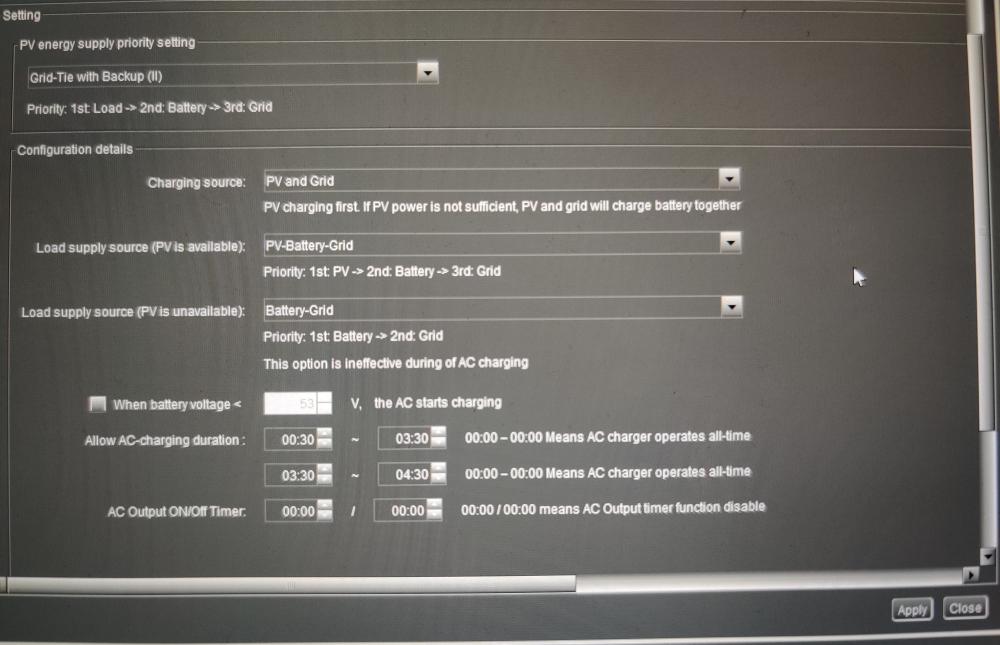
Evening John, Everybody, I hope you don't mind me messaging but I'm struggling with setup of Infini 10kw with Pylon batteries and it seems like you have already figured this stuff out. I have managed to connect via USB to the inverter using SolarPower software. I have a MODBUS card which appears to be the same as John's above. I have one of these 10kw inverters and another one coming on the slow boat from China; hoping to get one up and running and then add the slave when it arrives. I have 15 of the us5000 PylonTech batteries which seem to be talking to eachother properly and balancing etc; however I don't think they are communicating via the MODBUS card with the inverter... No idea how to tell? Are there drivers to install or something? How? Do I need it to talk to the Pylontech BMS or is it really just relaying the maximum and minimum charge voltages? The % charged on the inverter seems to be completely random maybe it would fix that? I have the battery to inverter cable from the first battery in the chain hooked up to the modbus card; no lights on either one so I don't know if it's a successful link? How would I know of it's connected? I have managed to change the AC charge Amos from default 60A to 200A as my battery bank is good for about 1500A continuous. It took a couple of trys to apply but I read somewhere that is common? I used "administrator" password which seemed to work eventually and it started charging at 200A before gradually dropping towards end of charge. I believe I need to set it to G98 standard for UK? However that's asking for factory password and I have no idea what that is? Anybody? I wish to set it to charge from 0030-0430 on my cheap rate tariff, then discharge from batteries during the day. Plus anything I get from solar is a bonus with offset load or if it exceeds load then recharge batteries. However, when I set it in "MyPower Management" to "Grid-Tie with Backup (ii)" and ac charging duration to 0030-0430 it still charges from grid outside those times; any idea what I'm doing wring there? I have a MODBUS meter which I intend to plug into the second port on the smart card so it can balance output against load; however I don't even know if the BMS is talking to the inverter yet so I haven't connect the meter up. It's all pretty overwhelming tbh. Any help would be appreciated. Thanks, Alex