


Ibraheem Hayek
Members
-
Joined
-
Last visited
-
About firmware? I think if flashing correct firmware maybe working
-
I tried many Firmwares all not showing SCC This data communication from Main to SCC The SCC send 2 packets Then the main board return 1 packets


-
I need firmware for this inverter I not know the firmware version the mcu MC9S08 is damage


-
i read other dvice like it by WatchPower U1=09.52 U2=03.34
-
Ibraheem Hayek changed their profile photo
-
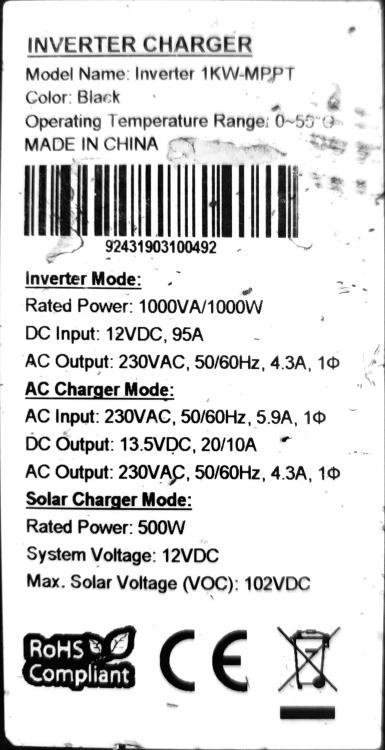
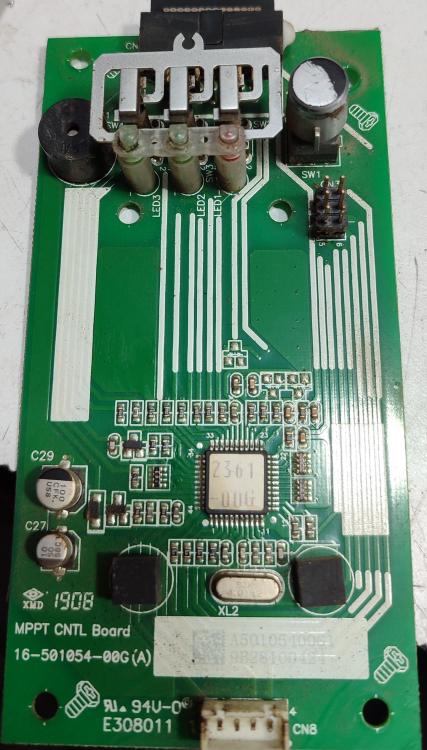
U1 Version= 09.52 U2 Version=???? Damage I need U2 firmware This U2 This U1 This label

-
I try this isn't working what the problem? I try this isn't working what the problem?

-
if you have 1550 i think will working
-
i test it the 1561 the device work 24V not 12v and 02.65 working but after 2min stop working show U1 Ver flashing
-
The Main (U1) Firmware 02.65 Axpert MKS 1-3 kVA 12V all PF0.8 except two 1 kVA models. Freescale processor. April 2023. This working I need this
-
MC9S08AC60 my IC and U1=15.50
-
Hello i need like thes firmware V15.50 (1.2KW - 12V)


