sorts
Members
-
Joined
-
Last visited
-
Thank you CobusK, I was aware of that, but that's not a problem, as my logger communicates via Modbus RTU. I was not using the dongle, but I will try to find a replacement to have it operational in case I need it.
-
 CobusK reacted to a post in a topic:
Deye inverter screen and logger not working (Installer MIA - advice needed pls)
CobusK reacted to a post in a topic:
Deye inverter screen and logger not working (Installer MIA - advice needed pls)
-
Thank you so much, guys. I have removed that connection, and the screen and rs485 communications are working again. Happy new year from Valencia, Spain.
-
 sorts reacted to a post in a topic:
Deye inverter screen and logger not working (Installer MIA - advice needed pls)
sorts reacted to a post in a topic:
Deye inverter screen and logger not working (Installer MIA - advice needed pls)
-
sorts reacted to a post in a topic:
Deye inverter screen and logger not working (Installer MIA - advice needed pls)
-
Thank you for the reply, that’s exactly what I suspected. My inverter is 3 years old and is out of warranty. I will try to contact Deye to see if they can offer me a solution.
-
sorts reacted to a post in a topic:
Deye inverter screen and logger not working (Installer MIA - advice needed pls)
-
Hi there, I am experiencing the same problem with a Deye SUN 5K, blank screen (sometimes, after a reboot, the screen turns on for a few seconds and then gradually dims until it turns off completely). At the same time, there is no RS485 communication with my local logger (Raspberry Pi). I do not use the Wi-Fi dongle, but I have also confirmed that it is not working. The inverter itself is operating normally, supplying the loads and exporting excess energy to the grid. However, the battery only charges for a few minutes, which I believe is due to a failure in the inverter-to-BMS communication. All of this makes me suspect a power supply issue. Has anyone found a solution to this problem?
-
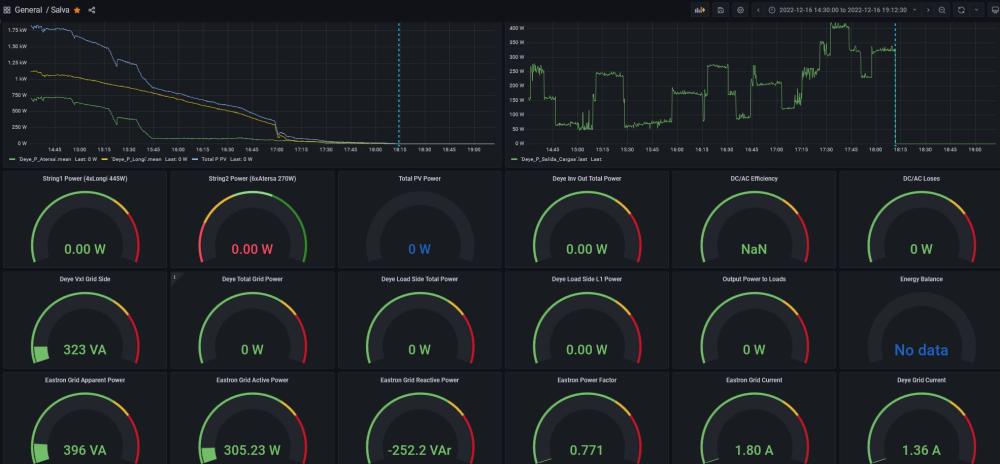
Hola Scubadude, Think you are right, I have installed CT coil and the inverter has measured the External Grid Total Power (172) until the sunset. At the time PV power has droped to 0, the inverter goes to stand-by mode, "nothing to do". It no longer carries out math computations like powers. I have an Eastron metter at the grid input side but I expected the inverter continue measuring grid and load powers at night. Thanks a lot for your comments.
-
Hi Scubadude, No batteries yet, so the system is running as on-grid inverter exporting power excedents to the grid (I do, not a problem at the moment). CT coil is not connected, I could install-it but think my problem is to figur out why the internal measurements (Grid and Load power measurements) are lost when PV Power goes 0W. It is normal because the inverter switches to OFF or could it be related to a config problem? and, are the sensors located as I think? Thanks a lot for your reply.
-
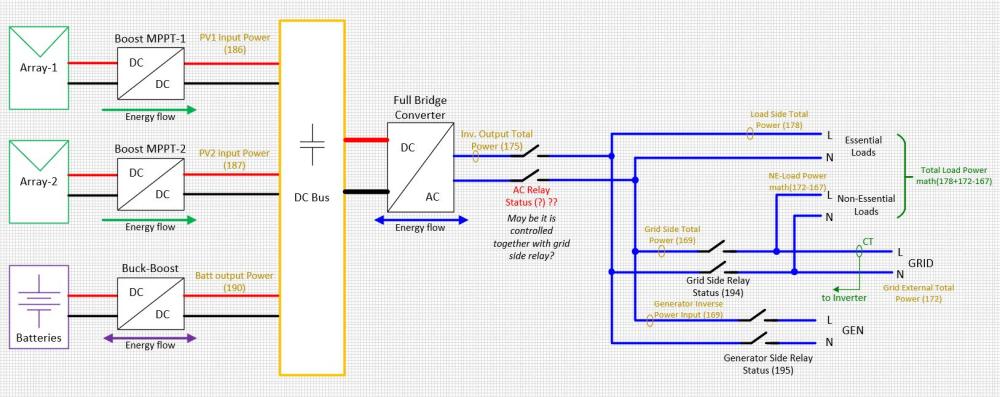
Hi there everybody, I'm running a Deye sun 5kW hybrid inverter for a month. No batteries yet, but some loads are conected to the Load Output (essential loads). I'm trying to figure out where the sensors are located over the hardware because some measures obtained via modbus are confusing to me. I have drawn the following block diagram including the sensors where I think they should be placed. However, measures tell me I must be wrong (e.g., Inverter output total power and Load side total power always match, even when part of the pv power is been sent to the grid and the rest to the essential loads output). Furthermore, all power measurements drop to 0W when no PV power is available. The inverter goes OFF (running status goes "stand-by"), I supose this may be because I have no batteries installed yet. Loads remain grid connected, but no power measurements are obtained. The only measures available are Grid voltage and current, so I can compute the grid apparent power but not active (or real) power. Hope you will help me some how.