


Rello
Members
-
Joined
-
Last visited
-
-
Good day to you all! So, I have 2 x Luxpower 5KW inverters, linked to 2 CFE 5.12KW 48V Lithium batteries. A few months ago, the following issue started: The batteries would discharge as per normal use, once the batteries reach 69% they would then rapidly discharge down to 0%, the grid would then kick in and automatically recharge the batteries to 100%. It's always in the early morning and then early evening when there is no sun. These are the times the battery drops to 70% with normal no sun usage and then they crash to 0%. So always uses GRID to recharge the batteries at these times. Anyone with a similar issue or suggestion what is going on? Many thanks!!
-
Yes - appears that all history has been lost for me. Others may also confirm???
-
Its already available - I had also bypassed the switch - put it back to normal. The eWelink app saw the device again and offered the update to 3.6.3. I applied it and all is good again!
-
I believe new firmware release is available now. Verison 3.6.3 - I have not tested it yet.
-
Any idea how to fix the issue?
-
Thanks for the reply! I have also logged a call - Hope something can be done. I have called an electrician to come and bypass so I can at least turn my geyser on. Please update this thread if you get any help or a solution. Thanks!!
-
Hi all. I have used it successfully for a long time. Today I got a message that there was a new firmware version for it. I installed the new version, and now the switch does not work correctly. Anyone have similar issues?
-
Has anyone been using one of these Smart Switches (EWELINK WIFI Smart Circuit Breaker Type Timer - 63A with Power KWh Monitoring - Ewelink Smart App - Geyser Timer)? I have used it successfully for a long time. Today I got a message that there was a new firmware version for it. I installed the new version, and now the switch does not work correctly. Anyone have similar issues? Thanks!!
-
 Rello reacted to a post in a topic:
Will reducing inverter output voltage during load-shedding, make my battery power last longer?
Rello reacted to a post in a topic:
Will reducing inverter output voltage during load-shedding, make my battery power last longer?
-
Rello reacted to a post in a topic:
Will reducing inverter output voltage during load-shedding, make my battery power last longer?
-
Rello reacted to a post in a topic:
Will reducing inverter output voltage during load-shedding, make my battery power last longer?
-
Rello reacted to a post in a topic:
Will reducing inverter output voltage during load-shedding, make my battery power last longer?
-
Rello reacted to a post in a topic:
Will reducing inverter output voltage during load-shedding, make my battery power last longer?
-
Rello reacted to a post in a topic:
Will reducing inverter output voltage during load-shedding, make my battery power last longer?
-
Rello reacted to a post in a topic:
Will reducing inverter output voltage during load-shedding, make my battery power last longer?
-
Rello reacted to a post in a topic:
Will reducing inverter output voltage during load-shedding, make my battery power last longer?
-
Rello reacted to a post in a topic:
Will reducing inverter output voltage during load-shedding, make my battery power last longer?
-
Good morning all.... In the graphs above, you will notice that between 22h00 and 00h00 last night we had load shedding. When the grid is on, we get, what looks like an average of 210/215 volts. When the grid goes off, and we are running on battery, I get a constant 230v from the inverter. (I see there is a setting for this on the inverter). As soon as load shedding starts, I can actually hear the room fans speed up. When the grid returns, I hear them slow down a bit. My question is: If I change my inverter setting to produce 215v instead of 230v, would my batteries last longer? (Deye 8Kv inverter. 3 x Hubble AM2)

-
Hi again The post I was referring to that spoke about channel changing was:
-
Hi there I did see another post some time back that spoke about changing the channel on my router. It was on Channel 6 and I moved it to Channel 11. I used a WiFi analyzer app on my phone that shows me all the channels and which are "crowded", possibly by neighbours routers. It's also useful to determine the WiFi strength by my logger - (it was quite strong enough) I also moved my router a bit - Raised it about 20cm - (put it on a box!) - Since then its been fine! 🙂 BTW- I have also recently bought a Solar Assistant - Device and software - Real-time solar monitoring from a Raspberry Pi | SolarAssistant Software (solar-assistant.io) - It's a SA product and pretty cool!!! Now - If you do try change the channel, check all your other devices, phones etc, still can connect. Some channels I tried my phone did not like! Good Luck.
-
Thank you VERY much for the reply!
-
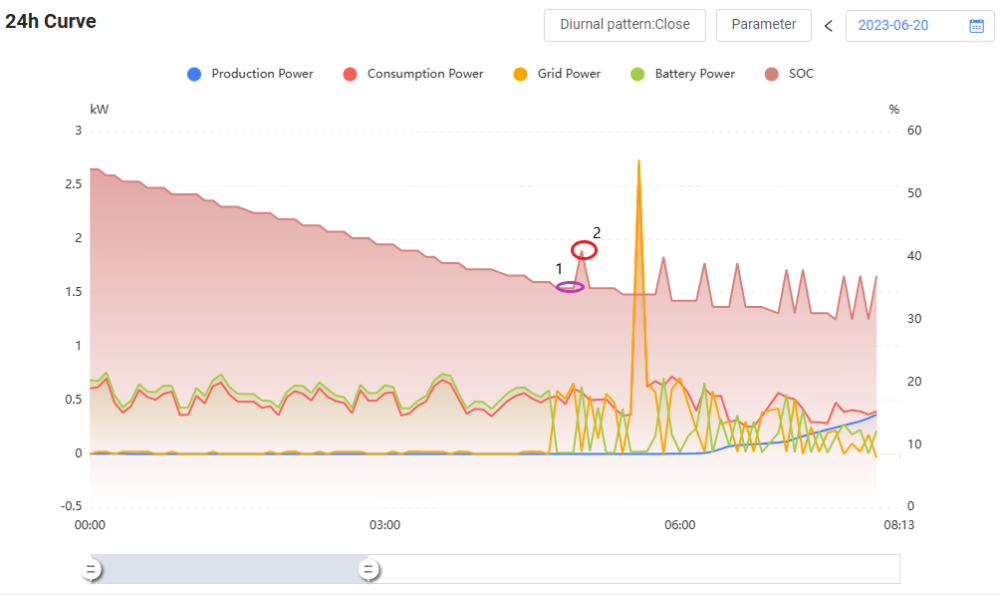
Hi everyone! Not sure I can describe my issue but will give it a bash!. 8kw Deye Hybrid Inverter 3x 5.5 KWH Hubble batteries. Inverter LOW = 25% Inverter SHUTDOWN = 20% Inverter RESTART = 50% TIME OF USE: 01:00 🕑 05:00 🕑 8000 W 35 % 05:00 🕑 08:00 🕑 8000 W 35 % 08:00 🕑 12:00 🕑 8000 W 95 % 12:00 🕑 16:00 🕑 8000 W 95 % 16:00 🕑 21:00 🕑 8000 W 35 % 21:00 🕑 01:00 🕑 8000 W 35 % Question is about the graph below: Point 1 : 04:55:00 SOC 35% Point 2: 05:00:00 (5 minutes later) SOC 41% This up and down of the SOC% started at 04h40. (Not always the same time - yesterday started at 02h00), and carries on until the sun is up and the PV value starts increasing. So, this means that while the up and down and up and down is happening, Grid goes to Zero and we use battery until it falls below 35%, then few minutes later, when SOC < 35% we use grid for a few minutes. How can SOC go from 35% to 41% in 5 minutes and it still dark? Hope this makes sense to someone. Regards
-
Good day all For the last two weeks or so, my Deye inverter seems to go off-line for a few hours, and I can't see any statistics on Solarman for that offline period. I don't think it's my WiFi or internet as all other devices connecting to my router are fine. There is no interruption in performance of the inverter, just the connection to the Deye data-center. I have asked on my WhatsApps group if any one else experiences this, but it seems just me. I have re-booted my router. Prior to this, the connection was up 24-hours and I could look at all stats. Anyone have any idea or clues to this? These random issues are the worst 🙂 Thank you!!! An export of data shows the missing gap this morning: Updated Time 2023/05/21 02:45 2023/05/21 02:50 2023/05/21 02:55 2023/05/21 03:00 2023/05/21 03:05 2023/05/21 08:20 2023/05/21 08:25 2023/05/21 08:30 2023/05/21 08:35 2023/05/21 08:40
-
-
Good day all, I have my Deye inverter running since November last year and very happy with it. I'm quite used to using the TIME OF USE screen to get optimum use during Load-shedding/Cloudy days. I will be going away for a week or so and will have house sitters looking after everything. I can't expect them to fiddle around with these settings, so what I'd like to know is if I Un-tick TIME OF USE, will the system work purely like a UPS, providing power when load-shedding occurs and recharge via Grid or PV when available? Thanks everyone! 🙂

