


FransJ
Members
-
Joined
-
Last visited
-
-
I just received a message from Revov, stating they have replaced the BMS, and I can now collect my batteries again
-
-
I have taken the batteries in to be tested; their support team also never saw the error before. They have stated that, unfortunately, it is going to take at least 20 days for them to get to my batteries and test them
-
I received a reply from Revov via email. They wanted me to call them and then let them connect with AnyDesk to see what I am seeing in PbmsTools. When I had everything ready on Wednesday morning and called them, the guy just told me to take them in so they could test them. I will be taking them in today. I have tried only running one battery at a time, but this also did not work. The one battery would immediately alarm, and the other would charge/discharge for a bit before raising the alarm.
-
All the BMS are on the same version: P16S100A-31167-1.10B The issue is that the battery stops charging and discharging when the alarm occurs. I have tried running the batteries without communication between them, and sometimes they work for a few min or immediately raise the alarm
-
It seems B1 and B3 settings are the same, and B2 is a bit different. Top (B1) Middle (B2) Bottom (B3) - Newest and working Yes, I do have coms set up and running with my inverter (Sunsynk Rackmount 6KW)



-
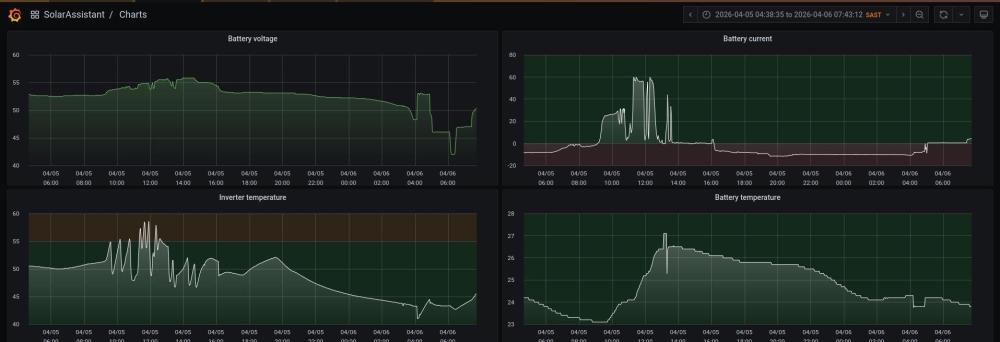
Below is the voltage and current graph. The alarm happens on both charge and discharge of the batteries, and only on the oldest two. The jump in voltage after 4 am is when the newest battery ran down to 0%, and I switched one of the other batteries off and on. It ran for a couple of minutes before raising an alarm again.
-
Hi, Two of my DIY "Portal" system's batteries started giving alarms on Sunday. The battery screen shows no active alarms, but connecting the battery to PBMS tools shows me a "Total Voltage Fault". Is there anything I can do, or is my only option to go to Revov directly? They seem to give an alarm while charging and discharging, and I have not changed any battery settings. I originally built the system in December 2024 and added a third battery in November 2025. Bat 1 Bat 2


-
-
From the official Sunsynk Youtube channel
-
To export your settings and totals, go to the Configuration tab. Then, under System, click "view detail." On this screen, you should see the back option.
-
-
-
-
What model do you have? Do you still have them set to 65C? I have 2 Dewhot Constant temp geysers, which I set to 50C during winter and 45C during summer. I have mixer taps throughout the house and flat and have no issues with hot water
-
I don't feel it is worth it, was considdering it, but found out the credit will only be used to offset your electricity bill. https://mybroadband.co.za/news/energy/527805-cape-town-vs-pretoria-vs-durban-best-electricity-feed-in-tariffs.html https://mybroadband.co.za/news/energy/537225-new-electricity-meters-for-pretoria.html




