championc
Members
-
Joined
-
Last visited
Everything posted by championc
-
Found that Deye's have a Stop Battery Discharge setting which is set to 47.5v by Default
-
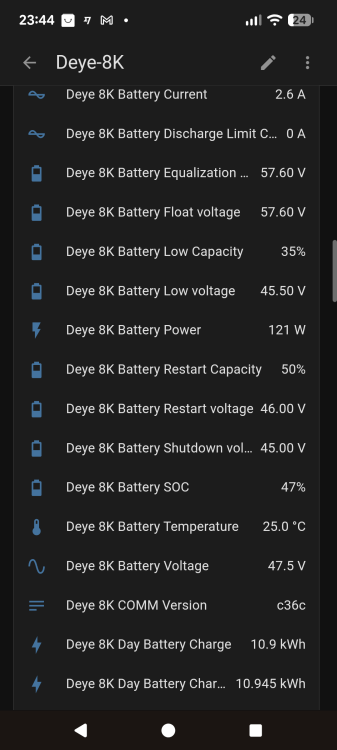
I have a strange problem where my Deye will not discharge any lower than 47.5v. I can see that my JK-BMS is discharging 87w, so it is available to discharge more. I run the SOC on Voltage. The Battery Low Voltage setting is 45.5v, Shutdown is 45v, Restart is 46v. The min cell voltage allowed setting on the JK is 2.6v, so it is nowhere near undervoltage levels Any ideas as to what is stopping it from dropping lower than 47.5v

-
I know this is not really the place for this question but I'll ask anyway I am using Slipx06's script ESPHome-1P-Sunsynk-Deye.yaml but when I browse to my ESP32, I can see the options to change the Work Mode and the Max Sell Power, but within Home Assistant, neither option has appeared within the Controls section of my ESPHome device, meaning I cannot change either with Automations. Anyone any ideas ? EDIT: I think a restart of HA fixed it :)
-
Problem solved I needed this for the esp32-wroom-32. Thanks @Sc00bs esp32: board: esp32dev framework: type: esp-idf
-
Thanks for the quick reply I have Logger set to DEBUG. I have an ESP32-WROOM-32 and a MAX485 board (with R7 removed). When selecting the Device, I selected "ESP32". Where do I tell it that I have a MAX485 board ? I also tried the code in "frankthetank"'s first post in this thread and got the same blank screen
-
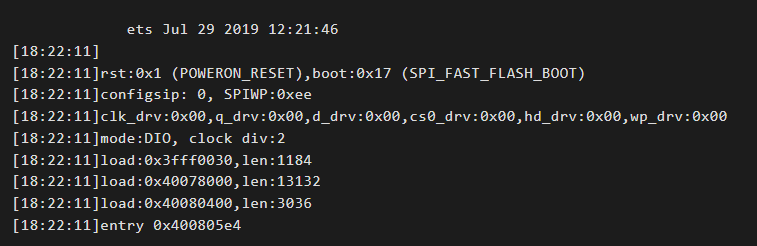
I am trying to get this working, but i am seeing nothing on the logs at all When i reset the esp32, i see the following, and nothing more I don't even see anything about even trying to connet to my wifi SSID I tried the ESPHome-1P-Sunsynk-Deye.yaml from slipx06 github page, and i now tried the code from Muttley in this thread too - but the same result with both
-
Assuming this reply was for me - many thanks I actually got a USB to RS485 board working (ttyUSB0) but I tried to pass it through mbusd which ran fine for a while, but then stopped sending it's data, so I must have an issue with it's config in my docker-compose.yaml file. Any example of one for mbusd would be greatly appreciated
-
mbusd question I have a sunsynk-multi docker container connecting to my mbusd docker container via TCP over port 502, and it is sending the data perfectly to HomeAssistant But I wanted to try the Node-Red flows and changed the Modbus-Client node settings to Type - TCP Host 192.168.1.xx Port 502 TCP type Default But this didn't seem to work, and actually seemed to interfere with the data to Home Assistant What are the correct port details, or what SHOULD work ? I searched this thread since the node-red flows originated here, but I didn't see the specifics mentioned anywhere
-
Hi all, I found a solution, and I thought that it would be good to share it with everyone, in case that someone else would like to do the same. I suggest that you ground the Negative side of the CT clamp. So connect pin 6 to the CT and also to the Earth on the right side of the InverterHi all I'm trying to get my Node-Red to talk to the inverter, but it just says "initialise". DMESG confirmed my device got allocated ttyUSB0. What should the baud rate be ? I have set 9600 I have seen comments elsewhere about the Deye RS485 RJ45 connector using pins 4 & 5 ??? Alternatively, if I went the TCP route, over port 8899, do I not need to authenticate in some way using the logger serial number and the inverter serial number ? Thanks in advanceI can export power I have the Zero Export Power set to 000. If only there was a CT Calibration menu to set an offset value. The Sofar ME3000 had it, and it was so useful. You'd almost expect a hidden engineering menu, with access to a CT Calibration figureHi all, My Deye 8K is continuously importing about 20w - 30w during the hours of non-generation. This can add up and lead to buying units at the more expensive tariff I would much prefer to have a continuous export of the same amount. I previously had a Sofar ME3000 which had a CT Colibration option where you could set an offset of the CT value. Is there any hidden engineering meny that would have such an item ? thanks in advance