Stefan
Members
-
Joined
-
Last visited
-
-
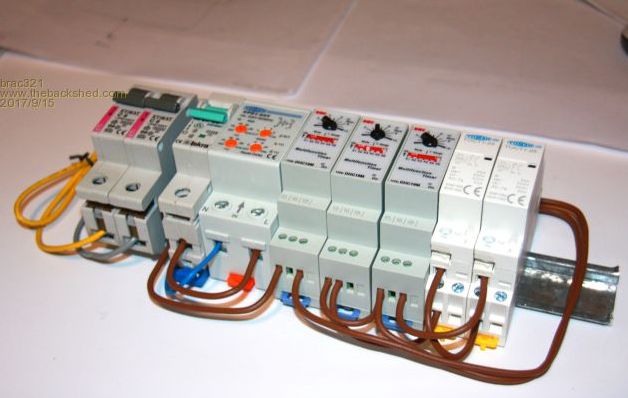
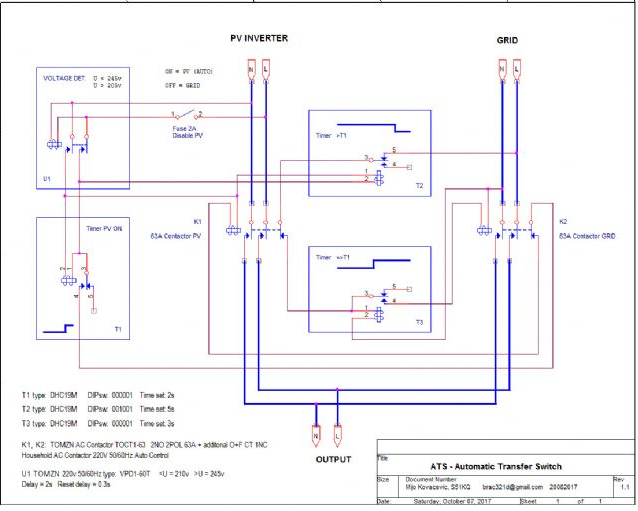
Hi @Gerrie Thanks for the schematic. I think you will also like this. This guy with his own idea on how to design an ATS (Automatic Transfer Switch) - for safe fully automatic switching between two completely non synchronized power sources (PV and Grid), with priority input, wired on to Inverter that uses soft start, also watching on to too low and too high input voltages, plus taking care for safe transition in any direction and from any state ... https://www.thebackshed.com/forum/ViewTopic.php?TID=9879 It was designed to automatically switch all his home appliances between non synchronized PV (Off Grid inverter) and city Grid, with PV priority, that can be disabled by 2A breaker. He use/share common N (neutral) in his system, thus only L (live) is switched thru ATS. the second design uses both neutral and live. He also uses TOMZ contactors.
-
Hi Gerrie, Is it possible for you to provide a simple schematic of the lay out of such a DB board. Very interested in this concept.
-
Stefan changed their profile photo
-
Thanks for this .... and I fortunately do have a Pi-3
-
Interesting ... I actually do have a spare Pi lying around ..... 🤦♂️
-
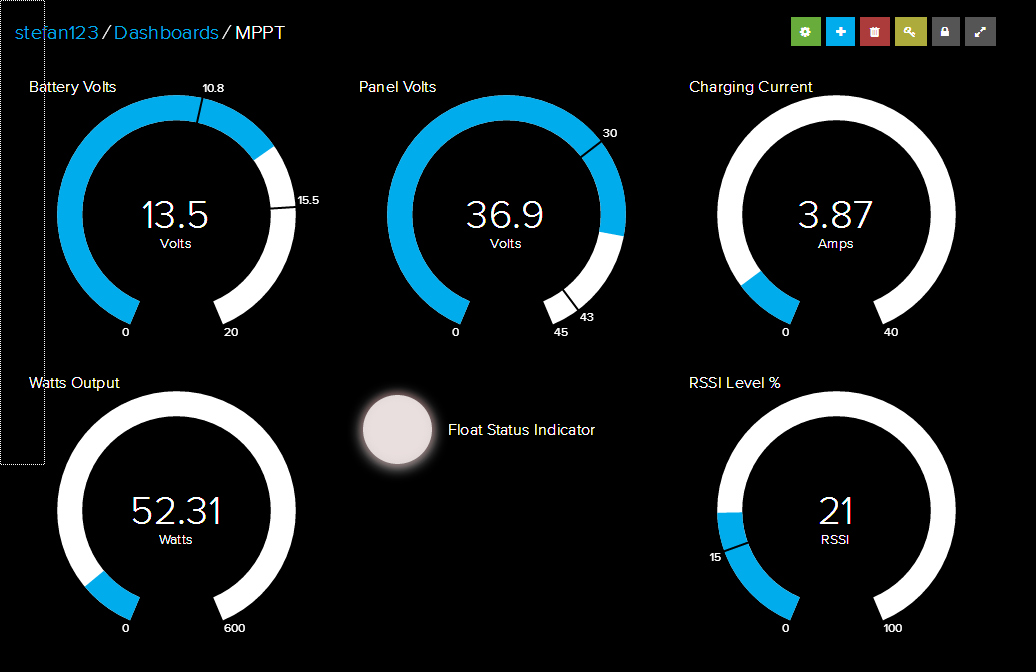
Hi TTT, Thanks for the feedback. The plan is to eventually move over to all Victron components including a VenusGX. I do have access to the Micro care MTTP via its RS232 port. I got an ESP8266 connected to it, sending the values to Adafruit.io. (Will add a screen dump for you). Going to do the same with the 712 BMV. For now I want to start off with 6x 330 watt Solar Panels, a set off 4x Omni power batteries with the Multiplus-II 48/3000VA. I want to be able to draw an additional 1200 watt on top off my daily 450 watt twice a week. The question is, will the 40A MPPT be big enough to supply both charging the batteries and provide power to the loads? Adafruit Dashboard sceen dump( It is overcast today, hence the low Panel volts:

-
Hi everybody, I am so impressed with this discussion since day one. I currently have a small 600W off grid system which is made up off 2x 330Watt Canadian Solar panels, a 40 Amp Micro Care MPPT controller, and 2x 12V 120Ah OPR Deep Cycle Rechargeable AGM / GEL Hybrid VRLA Solar Batteries and a 600-Watt inverter. I also got a Victron 712 Smart BMV wired into the system to watch my SOC. Currently, the system supplies my home office with power during the day. And then sometimes, when we experience load shedding or a power outage, I divert the Inverter power to the TV, decoder and one or two lights. I am thinking of upgrading to a Multiplus-II with system specs as described in this thread. My question is, can I use my existing 40A Micro care with the MTP-II? Thanks in advance
-
Hi @Cef I need to understand the following? What "command" or "string" is PHORAMTRAY.exe send to the inverter to recognize the COM port connection, and what is the format of the communication. Is it in HEX or is it in ASCII. If I understand correctly, it is sending every so often, QPIGS<cr> Regards
-
@Javi Martinez As far as I know, the TX/RX pins on Nano is connected directly to the Atmega328 chip, and it goes back to the CP340 USB chip for communication through USB. My goal was to specifically connect the Nano to an RS232 port, com port 1, and not a USB port.
-
Hi @Cef Ok ... I have done some further testing. I have now connected the TX, and RX pins from the Arduino to an RS232 max chip directly to COM1 of my PC. I use RealTerm to communicate to the Arduino Nano @ 2400 baud. I then sent QPIGS<cr> to the Nano from RT, and the Nano respond with the following: Serial.print("(220.0 002200 50.0 010 220.0 005940 50.0 027.0 100 345.8 344.9 012.2 013.3 082 024.2 00900 00940 00950 111.0 112.5 100.4 045.0 0100000000\r"); I do get the above response string back to RealTerm. So, it seems that the communication portion does work. However, when I ran, phoramtray.exe, does the program not recognize the Nano on COM1. Any help will be appreciated. I would really like to test your software, by simulating an inverter with an Arduino Nano. Regards
-
Hi @Cef Is it possible to connect an Arduino, to simulate response on QPIGS<cr> command from Phoram? I have tried to connect to an Arduino, but Phoram does not seem to recognize the Arduino. The Arduino drivers are working when I use the IDE. How does one assign the drivers to your software? Regards
-
Hi @seant, Thanks for the tip ... I am also looking at getting an EV tube system fitted. Why the caution?