


Flarkit
Members
-
Joined
-
Last visited
-
A full restart sorted the issue out
-
duplicates deleted
-
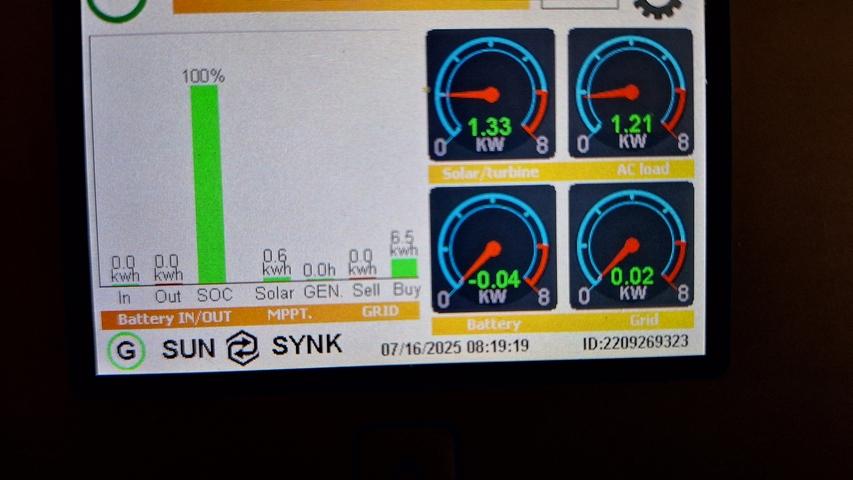
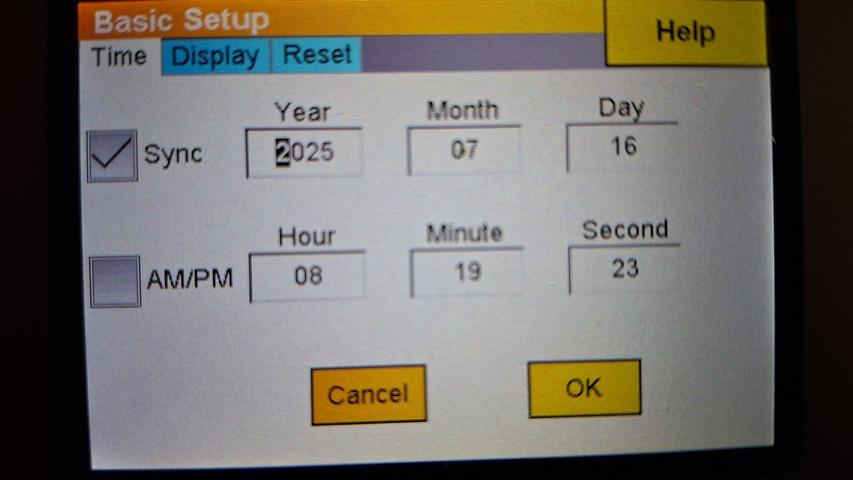
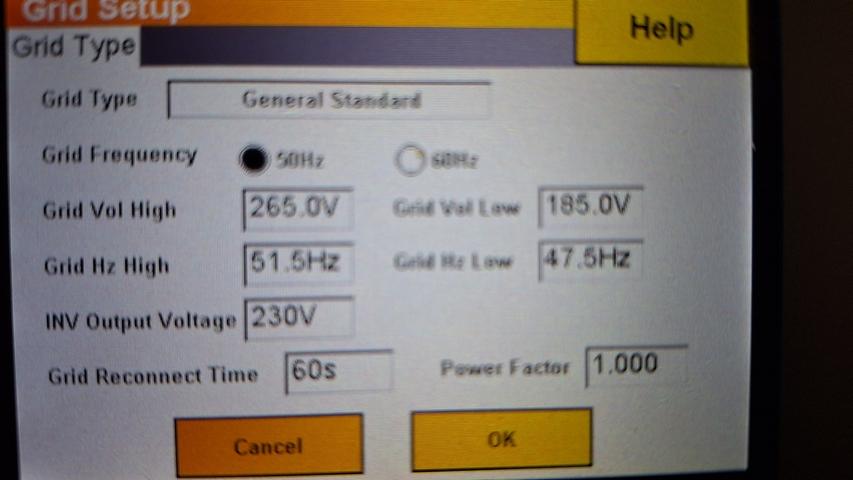
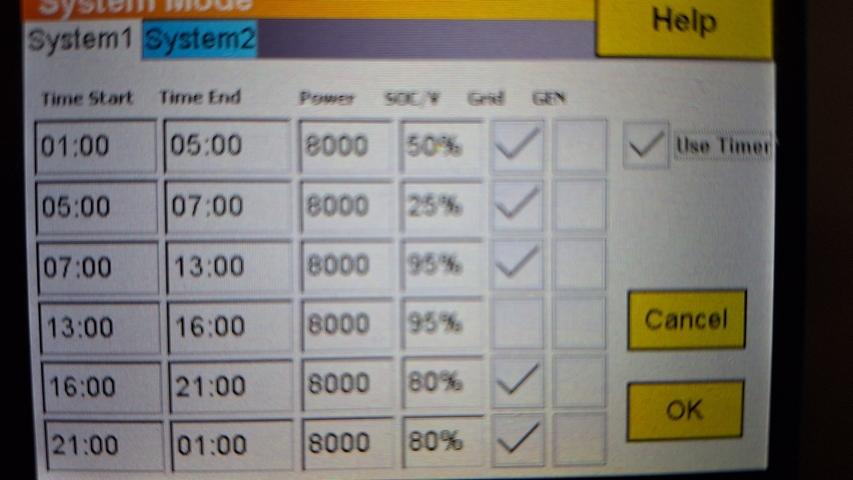
Hi, 10 days ago our prepaid electricity ran out and our inverter shut off when the batteries had run down to the 13% minimum level. The inverter alarm activated, so I shut the unit off (green button) for 1 minute while reloading electricity units and switched the inverter back on. After that I've noticed that my inverter is not using the batteries to supply power to the house. The batteries are at 100% at night, but the electricity grid is being used to supply power instead. The solar panels + grid are used during the day. How do I ensure that the batteries are used at night, rather than the grid?



 TimCam reacted to a post in a topic:
Just a simple Sunsynk 8kW, 10kW Freedom Won, 12 460 JA installation
TimCam reacted to a post in a topic:
Just a simple Sunsynk 8kW, 10kW Freedom Won, 12 460 JA installation
 Steve87 reacted to a post in a topic:
Just a simple Sunsynk 8kW, 10kW Freedom Won, 12 460 JA installation
Kalahari Cruiser reacted to a post in a topic:
Just a simple Sunsynk 8kW, 10kW Freedom Won, 12 460 JA installation
The OP doesn't mind hosting an informative discussion, at all 😆
Flarkit reacted to a post in a topic:
Just a simple Sunsynk 8kW, 10kW Freedom Won, 12 460 JA installation
Flarkit reacted to a post in a topic:
Just a simple Sunsynk 8kW, 10kW Freedom Won, 12 460 JA installation
Flarkit reacted to a post in a topic:
Just a simple Sunsynk 8kW, 10kW Freedom Won, 12 460 JA installation
Flarkit reacted to a post in a topic:
Just a simple Sunsynk 8kW, 10kW Freedom Won, 12 460 JA installation
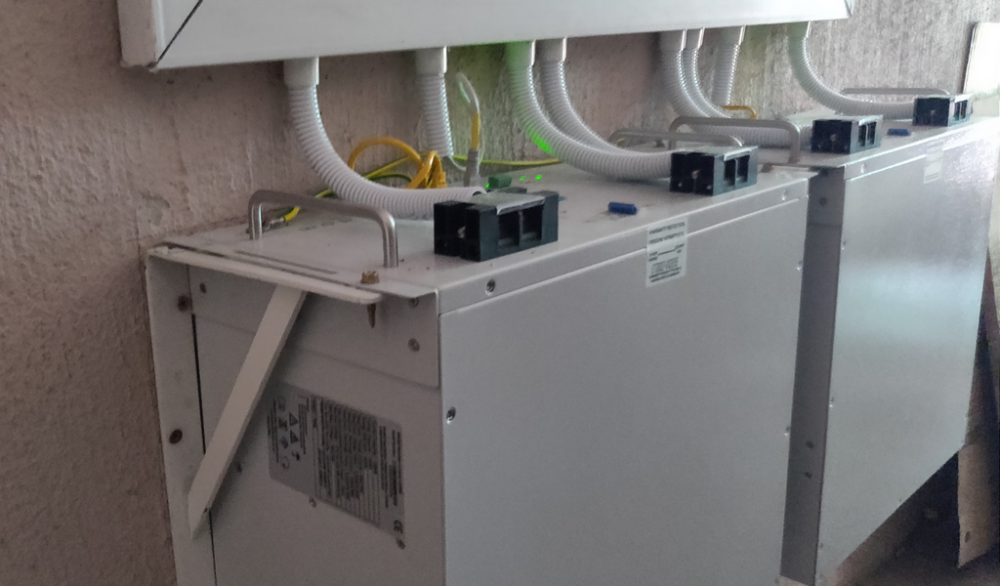
Meaning replace the current ones with wider brackets? I was surprised to see 3 screws in each bracket, but perhaps this is per specJust your regular L-brackets, for the batteries: 2 per battery:
Steve87 reacted to a post in a topic:
Just a simple Sunsynk 8kW, 10kW Freedom Won, 12 460 JA installation
Kalahari Cruiser reacted to a post in a topic:
Just a simple Sunsynk 8kW, 10kW Freedom Won, 12 460 JA installation
The OP doesn't mind hosting an informative discussion, at all 😆
Flarkit reacted to a post in a topic:
Just a simple Sunsynk 8kW, 10kW Freedom Won, 12 460 JA installation
Flarkit reacted to a post in a topic:
Just a simple Sunsynk 8kW, 10kW Freedom Won, 12 460 JA installation
Flarkit reacted to a post in a topic:
Just a simple Sunsynk 8kW, 10kW Freedom Won, 12 460 JA installation
Flarkit reacted to a post in a topic:
Just a simple Sunsynk 8kW, 10kW Freedom Won, 12 460 JA installation
Meaning replace the current ones with wider brackets? I was surprised to see 3 screws in each bracket, but perhaps this is per specJust your regular L-brackets, for the batteries: 2 per battery:
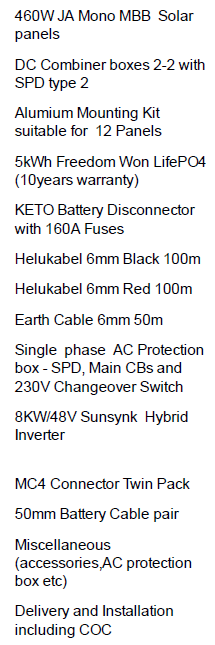
 Here's the invoiced list: @Steve87 I noted there's mention of 2 sets of 50mm Battery Cable pair...
 Flarkit reacted to a post in a topic:
Better Late Than Never - But First I Have A Question Regarding Inverter Location
Cudub have been great through the whole process. These queries are worth checking though, thank you!Thanks, BGR. Pardon my lack of terminology, but does this refer to earthing the panels? If so, I've queried it with both the installer and the CEO. Apparently this is either done via rods in commercial installs, or using the house's own electrical earthing used by the grid. Does this make sense @Steve87?
Flarkit reacted to a post in a topic:
Just a simple Sunsynk 8kW, 10kW Freedom Won, 12 460 JA installation
Powerforum Store reacted to a post in a topic:
Power forum store? A figment of my imagination? A scam?
Steve87 reacted to a post in a topic:
Just a simple Sunsynk 8kW, 10kW Freedom Won, 12 460 JA installation
Yellow Measure reacted to a post in a topic:
Power forum store? A figment of my imagination? A scam?
I can only add my experience, I was very lucky to find an excellent installer who quoted me and installed my setup within 2 weeks of my request for a quote. This week they're not replying to calls or Whatsapp messages and I hardly blame them, when seeing how many of my colleagues are trying to jump onto the solar wagon now. Hang in there, it's worth using a well-regarding company with a proven record, rather than rushing out and using a fly-by-night operation
WJP reacted to a post in a topic:
Just a simple Sunsynk 8kW, 10kW Freedom Won, 12 460 JA installation
The Powerforum store is a good start, and you'll receive excellent advice as well.I had an 800W inverter with 2x 150Ah lead acids for a similar purpose: 2 laptops, wifi router + ONT, alarm system. It ran very well for a year, then the batteries would only last for an hour intermittently. Stage 6 gave me nightmares. Took me a year to reach the last straw and cough up for an 8kW inverter, 12x 460W panels and 10kWh lithiums. I have the battery backup still sitting there quietly, hopefully able to stand in for the basics if ever the lithiums run down and there's no sun nor grid, nor access to a generatorAvoiding replying to that thread, with the hair-pulling going on. The sheer peace of mind alone, from having almost no issues with load shedding, makes it worth the cost to get a decent solar setup. While the doomsday-prophets are spitting and shouting, I'm running my household and not stressing about potential appliance failures anymore.Thanks. The guys from Cudub did a great job and sorted me out in a short time. By day 2 I'd already missed a midday load-shedding slot completely. Really wish I'd woken up and had this done ages ago
Flarkit reacted to a post in a topic:
Better Late Than Never - But First I Have A Question Regarding Inverter Location
Cudub have been great through the whole process. These queries are worth checking though, thank you!Thanks, BGR. Pardon my lack of terminology, but does this refer to earthing the panels? If so, I've queried it with both the installer and the CEO. Apparently this is either done via rods in commercial installs, or using the house's own electrical earthing used by the grid. Does this make sense @Steve87?
Flarkit reacted to a post in a topic:
Just a simple Sunsynk 8kW, 10kW Freedom Won, 12 460 JA installation
Powerforum Store reacted to a post in a topic:
Power forum store? A figment of my imagination? A scam?
Steve87 reacted to a post in a topic:
Just a simple Sunsynk 8kW, 10kW Freedom Won, 12 460 JA installation
Yellow Measure reacted to a post in a topic:
Power forum store? A figment of my imagination? A scam?
I can only add my experience, I was very lucky to find an excellent installer who quoted me and installed my setup within 2 weeks of my request for a quote. This week they're not replying to calls or Whatsapp messages and I hardly blame them, when seeing how many of my colleagues are trying to jump onto the solar wagon now. Hang in there, it's worth using a well-regarding company with a proven record, rather than rushing out and using a fly-by-night operation
WJP reacted to a post in a topic:
Just a simple Sunsynk 8kW, 10kW Freedom Won, 12 460 JA installation
The Powerforum store is a good start, and you'll receive excellent advice as well.I had an 800W inverter with 2x 150Ah lead acids for a similar purpose: 2 laptops, wifi router + ONT, alarm system. It ran very well for a year, then the batteries would only last for an hour intermittently. Stage 6 gave me nightmares. Took me a year to reach the last straw and cough up for an 8kW inverter, 12x 460W panels and 10kWh lithiums. I have the battery backup still sitting there quietly, hopefully able to stand in for the basics if ever the lithiums run down and there's no sun nor grid, nor access to a generatorAvoiding replying to that thread, with the hair-pulling going on. The sheer peace of mind alone, from having almost no issues with load shedding, makes it worth the cost to get a decent solar setup. While the doomsday-prophets are spitting and shouting, I'm running my household and not stressing about potential appliance failures anymore.Thanks. The guys from Cudub did a great job and sorted me out in a short time. By day 2 I'd already missed a midday load-shedding slot completely. Really wish I'd woken up and had this done ages ago

