


Headwin
Members
-
Joined
-
Last visited
Everything posted by Headwin
-
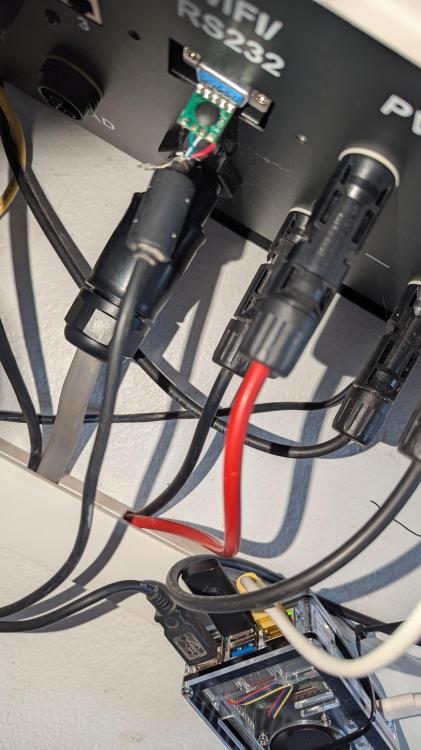
I have been having a similar issue with Solar assistant and connection with my Sunsynk Lifelynk inverter/battery system. after many days i have found... When the system switches over to change the solar batteries (cheap rate at night) the USB to RS232 cable which connects the Ras Pi to the Wifi RS232 in the lifelynk unit disconnects. and will not reestablish the connection. upon investigating my USB / RS232 (d9) cable i see the cable has NO Shielding/screening, So out comes the soldering iron and clippers, Found and unused USB cable (Old USB printer / Data cable) cut the end off and solder the RS232 (which has the CH341 controller chip embedded) onto it) to the USB Cable, Plugged in and tested. WOW..... set up a charge cycle on the inverter and it remains online (No disconnection) so far i would say this is resolved for me!!!
-
I have been having a similar issue with Solar assistant and connection with my Sunsynk Lifelynk inverter/battery system. after many days i have found... When the system switches over to change the solar batteries (cheap rate at night) the USB to rs232 cable which connects the Ras Pie to the Wifi RS232 in the lifelynk unit disconnects. and will not reestablish the connection. upon investigating my USB / RS232 (d9) cable i see the cable has NO Shielding/screening, So out comes the soldering iron and clippers, Found and unused USB cable (Old USB printer / Data cable) cut the end off and solder the RS232 (which has the CH341 controller chip embedded) onto it) to the USB Cable, Plugged in and tested. WOW..... set up a charge cycle on the inverter and it remains online (No disconnection) sofar i would say this is resolved for me!!!

