


Jaybabe
Members
-
Joined
-
Last visited
-
Thanks.
-
@willie_b Did the DC USB PSU from Solar Assistant above do the job, did you connect it directly to the battery to power your RPI ?
-
Anyone have any insight into these lithium batteries, can’t seem to find any reviews on them. What to replace my lead acid batteries with these in my camper trailer.
-
Hi, City Powers new prepaid tariff now includes a monthly service and capacity charge. I assume this only applies to grid tide prepaid uses. I have a prepaid meter but don’t use it as we are off grid so assume we won’t have to pay the capacity and service monthly fee. Does anyone know?
-
Hi All, I have x3 US3000 and have never updated the firmware in the last 2 years and dont have any issues so what are the benefits in updating the firmware ? will appreciate some guidance, thanks.
-
@Steven BurnettDid you get this to work. I have the same setup (just x3 pylotechs) and looking to invest in a generator for backup and failover for the cloudy and rainy days when no sun ?
-
Did this work @Steven Burnett?
-
Hi Folks, I cant seem to find these panels anywhere. I currently have x12 already running x6 each off its own MPPT string using a GoodWe 5048ES Hybrid inverter. I want to now upgrade each string to x9 panels each which is my max. Ive been told I cant mix and match but also been told I can providing Voc is the same and the Voc on my panels are 45.8V. See picture attached. Any suggestions on what panels I can try get or unless anyone knows who has stock of Canadian Solar Panels Model CS6U-335P ?

-
@Dave @Richard Mackay Im also interested to know too where would you view "Tripped" status on the SEMS Portal reports ? I connected my pool to setup but when toaster whent on everything tripped so I suspect pool was connected to backup feed and not the main/solar feed. Thanks

-
Hi Guys, Is there anyway to select priority on my GoodWe Hybrid 5048EM inverter to only use PV panels during the day and not the grid or my batteries. I want it to only use grid and or batteries when there is no more sun to harvest ?
-
-
Guys, another question and some guidance please. I need to report my electricity consumption to COJ manually myself as they are billing me for someone else's electricity and not mine. The meter number outside on my DV box is not the same meter number on my COJ statement. Currently Im using the eFergy power meter that's connected to the inside mains box which allows me to extract monthly, hourly reports which I send to COJ and only pay for what Ive consume and not what they billing me (Which is double my monthly consumption). The problem with eFergy is now it cant differentiate between my own harvested electricity from the PV including what I use from the battery bank vs the grid. Any recommendations how I can measure and separate my electricity consumption from the PV/Batteries vs the grid. I don't see anything on SEMS Portal or PV Master. Attached is eFergy report for this month. I switched over to the inverter/PV at 11H00 today. I don't know how to calculate what I owe COJ now as it all looks the same interms of consumption and Im certainly not paying them for energy I harvested ? August (1).csv
-
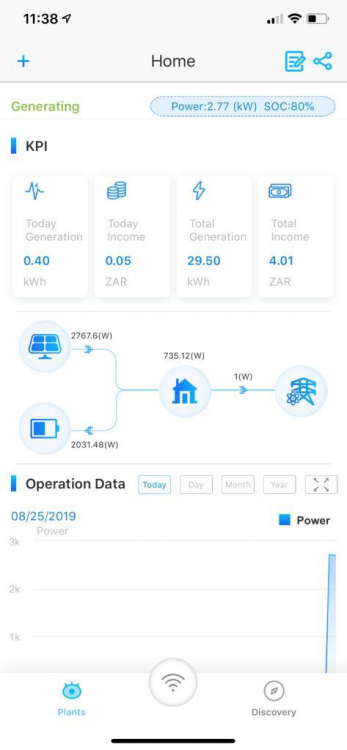
Its looking good.
-
Thanks Chaps. Missed the dip switches completely. I selected "1" on the master.

-
Hi, Ive added a 2nd Pylontech Lithium 3,5kWh battery to my GoodWe inverter but doest seem to be working. Does anyone know if I need to change anything in the PV Master app config ? Thanks,


