Anarchy2007
Members
-
Joined
-
Last visited
Everything posted by Anarchy2007
-
I can 100% confirm that this is in fact incorrect. - Microcare Inverters, just like any other inverter will "trip" if overloaded or batteries are specced incorrectly (which is 80% the case) - Their inverters and MPPTs are very robust and give very little issues. - Their comms / App is useless. - The other claim above that it is "old technology" is also bogus. It is a transformer based inverter which will not only outlast any High Frequency (Transistor / component) based inverter but also are designed this way to start heavy and inductive loads hence why Victron also build transformer based inverters. - Their after sales service is horrible, it is in fact so bad that we have stopped installing their products.
-
Unfortunately Jules Hendry's comment above is spot on. 90% of the people that work there are quite rude and this includes the response from one of their directors as well. I have installed quite a few Microcare systems. I can honestly say that it is a descent product, very little issues as far as hardware goes. UNFORTUNATELY their service is realy horrible. We have since stopped installing any Microcare products.
-
I know this is old, but an update to this issue. the Kodak / Pylontech Force L1 was connected to a Victron Cerbo GX and within 10 seconds of connecting the BMS CAN (Cerbo was not powered yet) the Force L1 LEDs turned red and the unit turned off. Returned it to the supplier, which took 2 months to be replaced under warranty. During this time the Cerbo was also replaced as the HDMi port didn't work. The new Cerbo GX was connected to a loan Pylontech US3000C and worked flawlessly. Replaced the US3000C with the replaced Force L1 BMS and within 10 seconds of pluging the BMS CAN cable red LEDs and unit turns off. Took Force L1 back again. The BMS PCB was burnt next to the RS232 port. Got another replacement Force L1 BMS. I have not plugged it in in fear of it blowing up again. I even traced all the pins back just in case, pins 4, 5 & 6 on BMS are correct, Cerbo has GND on pin 3. I'm at a loss at to why this is happening. I'm starting to think design flaw or massive issue on Force L1. Would explain why they were discontinued.

-
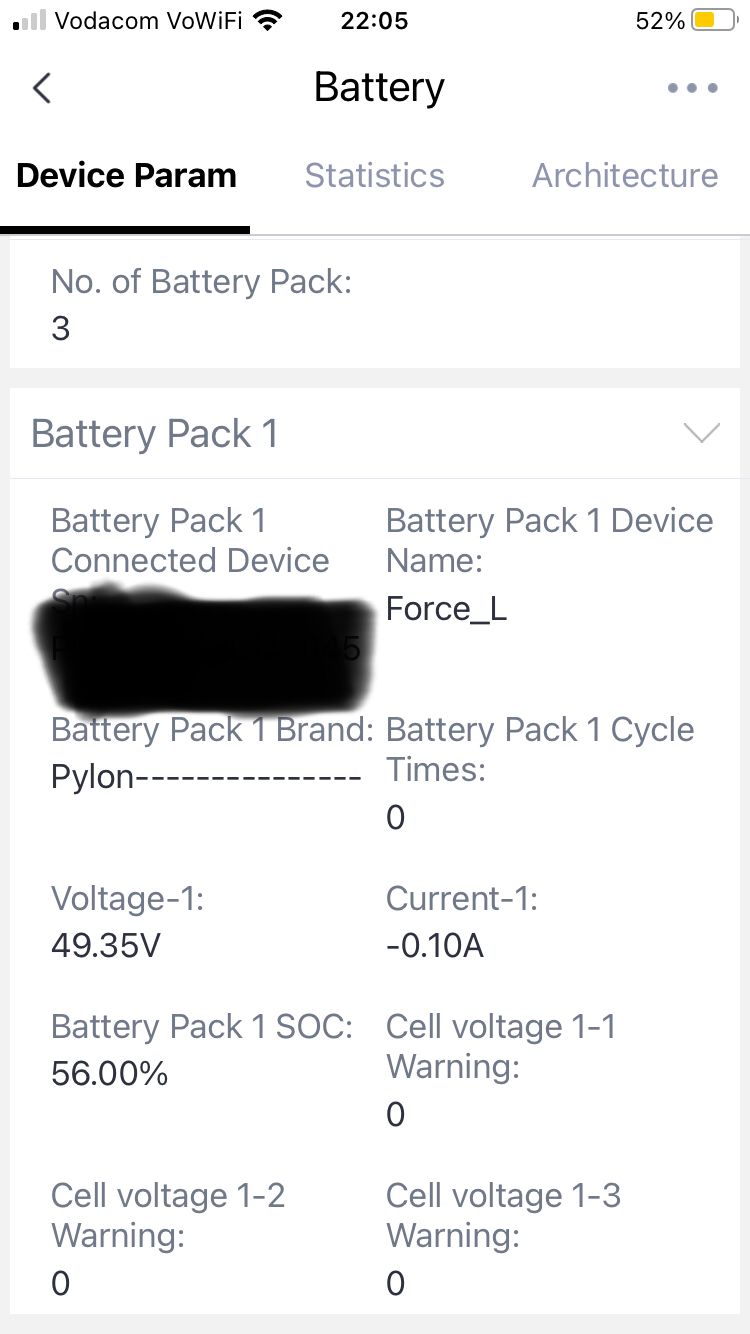
@Fuertewifi I tried all the different configurations as mentioned in the Pylontech manual. Also tried 3 different RS232 converters and nothing. I did find a post on the Victron support forums that confirmed my issue with Force L1. The issue was apparently due to long cables, apparently the cable should be under 1 metre or shielded, NOT standard UTP. Apparently heavy RF environments had also been found to cause an issue. In the end I simply configured the onboard WiFi module and added it to the Solarman Smart APP. I get all the values I need from there. It is however limited but is better than nothing. At least I can get Charging current, current drawn, Battery cell warnings and SOC for each battery. As a side note, I also had the phantom shutdown issue where the Force L1 BMS would simply restart (at low power usage) just as some Victron owners had mentioned. A FW update from Pylontech resolved this issue.

-
Hi there, Does any one have any experience with the Kodak (pylontech) Force L1 lithium batteires' RS232 or RS485 comms? The RJ45 port (located on the bms) is labelled RS232 / RS485. I used "Batteryview" and have tried RS232 2 wire (oddly no GND) as per the datasheet, tried GND on serial pin 5 from RJ45, tried GND from negative battery pole. Tried Cisco RS232 console cable pinouts the same goes for RS485 and RS485 to RS232 converter. But no connection at all. It comes with WiFi. I connected to the web portal of the battery system but it's basic WiFi setup and server addresses. At best I managed to connect it to my solis account but that's it as I assume the data lgger is actually a solis WiFi stick and will log Solis inverter data. I'm starting to think that debug needs to enabled in some way to get comms. This is my first time working with the Force L1 batteries and it seems like infomation regarding them is a little vague. Can someone with knowledge of thes batteries maybe guide me in the right direction?
-
@GooseDI'm sorry to hear about your issues. And can only contribute to your agony. We have installed 4 sets of Omni power batteries and every one of these had failed well before the 1 year guarantee period. All with the same issues as described in your post. A battery monitor was connected to the last set of 4x OPR240s. I do not have the graphs with me at this moment, but can tell you that the highest temp recorded was 24 degrees, the lowest discharge rate was around 70% SoC. The highest charge rate was around 35A - 40A. Cycle wise, none of these batteries had more than 50 cycles at an average discharge of around 10% per cycle (90% soc). Two sets were credited under warranty, the 2nd last which coincidentally was connected to the battery monitor, was rejected. Within a month (during a single cycle) the battery monitor showed a total disacharge of eg. 30A and once charge completed (charge rate of less than 1A) the battery monitor would indicate only 91% SoC. Checking this it was noted that the recharge rate was almost always less than the discharge rate. This set off red flags. These batteries were returned to Sintech and the warranty claim was rejected. Their reason, possible overcharging. With a data sheet that claims 50A max charge rate and up to 60 degrees Celsius temp rate. That is kind of impossible. The reality is that these batteries are really bad quality and the specs claimed in the data sheet is nowhere near the real values. I have had clients that used realy cheap rubbish batteries that lasted much longer than these under the same conditions.
-
Hi Martin, if they have not been sold yet please let me know. I’m also interested. thanks
-
I realize this is an old post, but just to clarify. Included with each of these products: Battery sensor - 1x Cat5 RJ45 Flylead, 1x cable for battery midpoint, 1x cable for battery temp, 1x cable for power Rs232 to 485 cobverter - 1x 6 Core RJ11 cable Battery monito - 1x Cat5 RJ45 Flylead The battery monitor calculates state of charge vs current drawn using Peukert's law. This I would rate it's best feature giving a quick visual indication of SOC and time remaining at current usage.